What happened to iTunes Store search in Monterey 12.2.1?

What is the fix for searching the iTunes Store using Monterey 12.2.1? The procedure suggested in 2019 for Catalina does not work. The left-hand column search function searches only my library, not the store. There is no way to search the iTunes Store.

MacBook Pro 15″, macOS 12.2

Posted on Mar 18, 2022 7:31 AM

Reply
Question marked as Top-ranking reply

Posted on Mar 18, 2022 8:29 AM

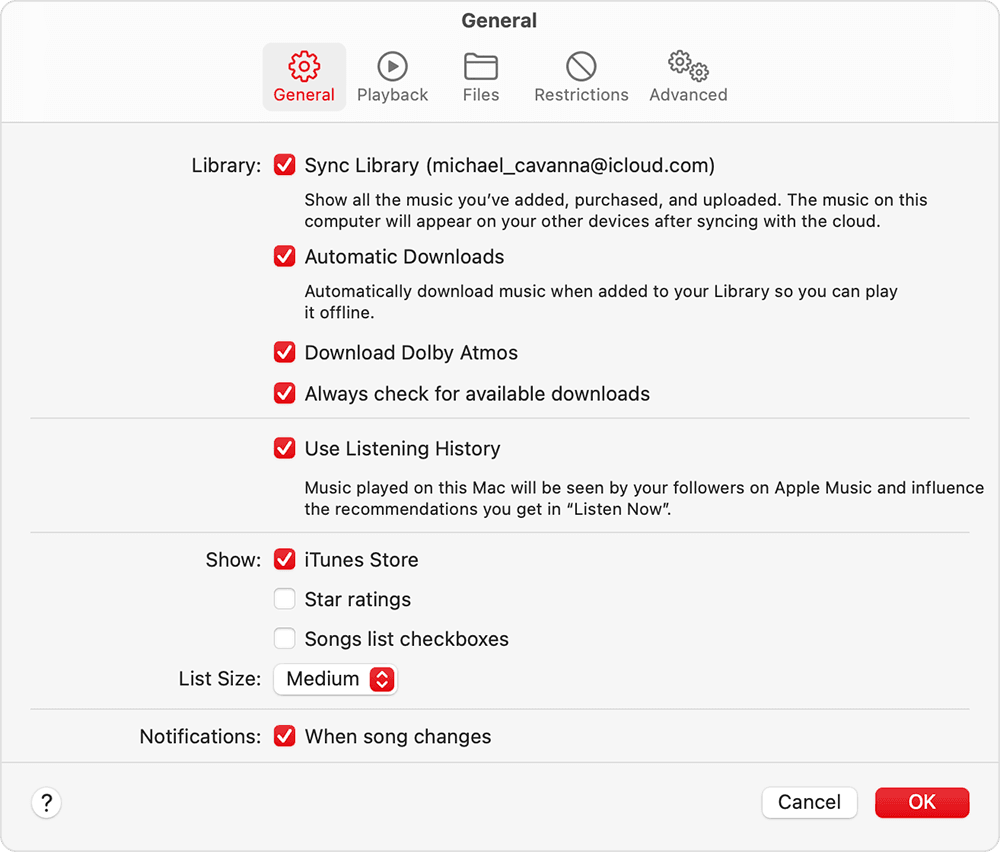
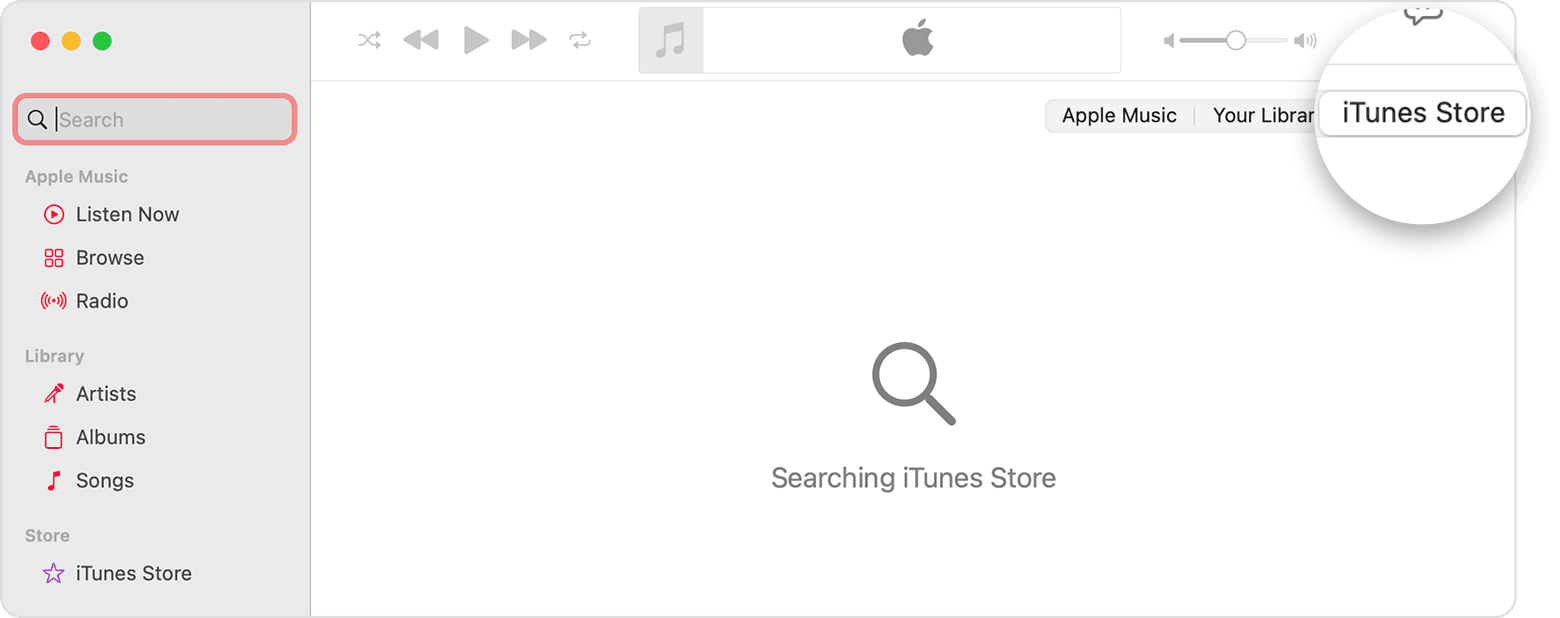
Clicking in the search box at the top of the left sidebar and then clicking iTunes Store at the top right of the main window in the Music app in macOS 12.2.1 still works for me. If iTunes Store is not one of the options, see step 3 in the "Buy music from the iTunes Store in the Apple Music app on your Mac" section of Buy music from the iTunes Store - Apple Support


16 replies
Question marked as Top-ranking reply

Mar 18, 2022 8:29 AM in response to Hawkfeathyr

Clicking in the search box at the top of the left sidebar and then clicking iTunes Store at the top right of the main window in the Music app in macOS 12.2.1 still works for me. If iTunes Store is not one of the options, see step 3 in the "Buy music from the iTunes Store in the Apple Music app on your Mac" section of Buy music from the iTunes Store - Apple Support


Apr 3, 2022 2:33 PM in response to Hawkfeathyr

Buy music from the iTunes Store in the Apple Music app on your Mac

  1. Open the Apple Music app.
  2. In the menu bar, choose Music > Preferences.
  3. Go to the General tab, select iTunes Store, then click Ok.

  4. Click the search field, then enter the song or album that you want to buy.
  5. Click the iTunes Store button in the upper-right corner.

  6. Click the price next to the song or album to buy it.
  7. Sign in with your Apple ID and password to complete the purchase. Need help?

After you buy music, you can find it in your music library. 

To download music to listen to offline, click the Download button  next to a song or album.


Mar 18, 2022 9:42 AM in response to Hawkfeathyr

That's the main iTunes Store screen -- same one that I see on my Mac. However, if I click in the search box (while classical guitar is already entered in the search box), that screen changes to the search results and at the top right of the search results there is an option for "Your Library" or "Apple Music" or "iTunes Store." If I click iTunes Store there (top right of the window, it displays iTunes Store search results.

May 25, 2022 11:21 AM in response to RoperTwoFeet

I was able to figure it out. I was not signed in to my Apple Account. I thought, as before, I could SEARCH the iTunes Store without being logged in but I guess you cannot. Obviously, to purchase you must be logged in but now to search I guess you must also be logged in. These constant changes drive me insane sometimes. Thanks for the help folks! Much appreciated.

Apr 28, 2022 2:20 PM in response to FoxFifth

"then clicking iTunes Store at the top right of the main window " no longer seems to exist - Monterrey 12.3.1 on a brand new Mac Studio. WTH? Even when it did show up on previous iTunes Applications it was archaic and not intuitive. Apple has ruined a good application. This needs to be fixed. In the meantime, how do I search the store??? Doesn't Apple want me to buy new music?

This thread has been closed by the system or the community team. You may vote for any posts you find helpful, or search the Community for additional answers.

What happened to iTunes Store search in Monterey 12.2.1?

Welcome to Apple Support Community
A forum where Apple customers help each other with their products. Get started with your Apple Account.