What is the change in WatchOS 8.5?

I just updated to the new version of Watch OS 8.5 for my Version 6 watch and found that the "upswipe" to get to short cuts has been eliminated - is that true & is there a workaround to get that function back?


Apple Watch Series 6

Posted on Mar 19, 2022 3:24 PM

Reply
Question marked as Top-ranking reply

Posted on Mar 20, 2022 11:28 AM

Hi Jlhaigh,


Are you referring to using and accessing Control Center? If so, the function has remained the same "From the watch face, swipe up".


"Open or close Control Center


  • Open Control Center: From the watch face, swipe up. From other screens, touch and hold the bottom of the screen, then swipe up.
  • Note: You can’t open Control Center from the Home Screen on your Apple Watch. Instead, press the Digital Crown to go to the watch face or open an app, then open Control Center.
  • Close Control Center: Swipe down from the top of the screen, or press the Digital Crown.
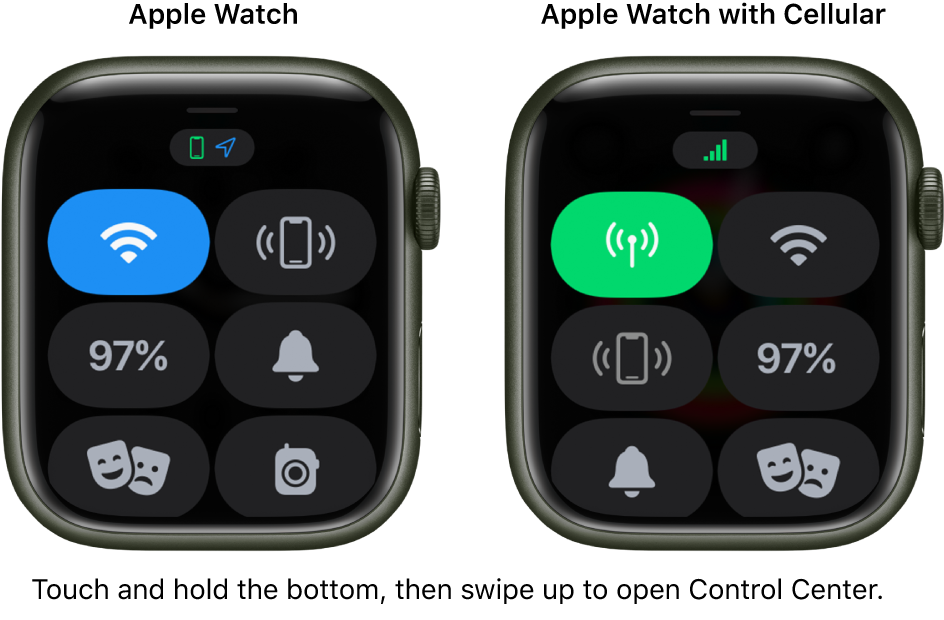
  • Two images: Apple Watch without cellular on the left, showing Control Center. The Wi-Fi button is at the top left, Ping iPhone button at the top right, Battery Percentage button at the center left, Silent Mode button at the center right, Theater mode at the bottom left, and Walkie-Talkie button at the bottom right. The right image shows Apple Watch with cellular. Its Control Center shows the Cellular button at the top left, Wi-Fi button at the top right, Ping iPhone button at the center left, Battery Percentage button at the center right, Silent Mode button at the bottom left, and Theater mode button at the bottom right."


You can find this information and helpful details here: Use Control Center on Apple Watch


If you're having issues accessing the Control Center, test a normal restart of your Apple Watch and paired iPhone.


Restart your Apple Watch


Restart your iPhone


Best!


3 replies
Question marked as Top-ranking reply

Mar 20, 2022 11:28 AM in response to Jlhaigh

Hi Jlhaigh,


Are you referring to using and accessing Control Center? If so, the function has remained the same "From the watch face, swipe up".


"Open or close Control Center


  • Open Control Center: From the watch face, swipe up. From other screens, touch and hold the bottom of the screen, then swipe up.
  • Note: You can’t open Control Center from the Home Screen on your Apple Watch. Instead, press the Digital Crown to go to the watch face or open an app, then open Control Center.
  • Close Control Center: Swipe down from the top of the screen, or press the Digital Crown.
  • Two images: Apple Watch without cellular on the left, showing Control Center. The Wi-Fi button is at the top left, Ping iPhone button at the top right, Battery Percentage button at the center left, Silent Mode button at the center right, Theater mode at the bottom left, and Walkie-Talkie button at the bottom right. The right image shows Apple Watch with cellular. Its Control Center shows the Cellular button at the top left, Wi-Fi button at the top right, Ping iPhone button at the center left, Battery Percentage button at the center right, Silent Mode button at the bottom left, and Theater mode button at the bottom right."


You can find this information and helpful details here: Use Control Center on Apple Watch


If you're having issues accessing the Control Center, test a normal restart of your Apple Watch and paired iPhone.


Restart your Apple Watch


Restart your iPhone


Best!


This thread has been closed by the system or the community team. You may vote for any posts you find helpful, or search the Community for additional answers.

What is the change in WatchOS 8.5?

Welcome to Apple Support Community
A forum where Apple customers help each other with their products. Get started with your Apple Account.