why does my apple watch say i’m not connected to my iphone but on my bluetooth on my phone it says it’s connected
yes
Apple Watch Series 3, watchOS 8
yes
Apple Watch Series 3, watchOS 8
Hello toomuchlily,
Your Apple Watch may have lost its connection to the iPhone. If your watch isn't showing the connection to the iPhone follow the steps below:
Try to connect your Apple Watch and iPhone again
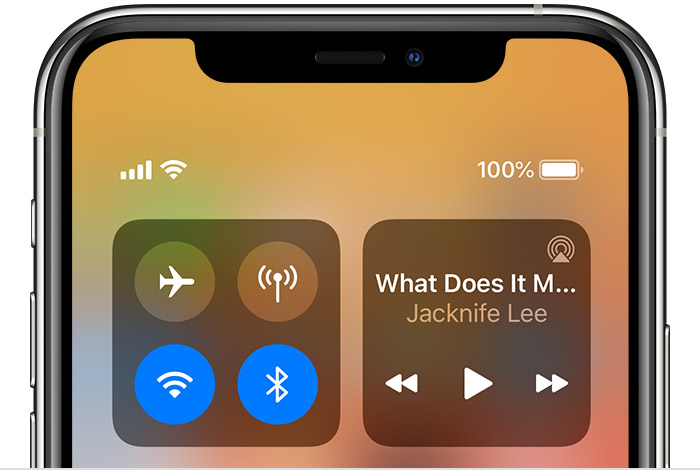
1. Keep your Apple Watch and paired iPhone close together to make sure that they're in range.2. On your iPhone, make sure that Airplane Mode is off and that Wi-Fi and Bluetooth are on. To check, open Control Center.
3. If you see the Airplane Mode icon on your watch face, Airplane Mode is on. Open Control Center, then turn off Airplane Mode. 4. Restart your Apple Watch and iPhone.If your issue persists, follow the additional steps from If your Apple Watch isn't connected or paired with your iPhone.
Best Regards.
Hello toomuchlily,
Your Apple Watch may have lost its connection to the iPhone. If your watch isn't showing the connection to the iPhone follow the steps below:
Try to connect your Apple Watch and iPhone again
1. Keep your Apple Watch and paired iPhone close together to make sure that they're in range.2. On your iPhone, make sure that Airplane Mode is off and that Wi-Fi and Bluetooth are on. To check, open Control Center.
3. If you see the Airplane Mode icon on your watch face, Airplane Mode is on. Open Control Center, then turn off Airplane Mode. 4. Restart your Apple Watch and iPhone.If your issue persists, follow the additional steps from If your Apple Watch isn't connected or paired with your iPhone.
Best Regards.
why does my apple watch say i’m not connected to my iphone but on my bluetooth on my phone it says it’s connected