"your computer was restarted because of a problem"

The MacBook pro OS crushed and I took the computer to an authorized service center (Sadly that happened five days after the warranty ended" . They did the formatting, installed the OS Monterey twice but it did work. I kept getting this message "your computer was restarted because of a problem". The technician insisted it is because of a faulty program or back-up. I noticed that the tough bar is not working anymore. Now the MacBook with another authorized service center. They tried to reinstall OS Monterey, it did work as well. They still have no clue what causing the problem. Any advice?

MacBook Pro (2020 and later)

Posted on Mar 19, 2022 11:15 PM

Reply
Question marked as Top-ranking reply

Posted on Mar 24, 2022 4:38 PM

Thanks for providing the second EtreCheck report (as it is so much easier to read) and the Kernel Panic log. Since you have no third party software installed the problem is most likely a hardware issue with the Logic Board. I'm not sure how the clean install of macOS was performed, but if a "Restore" of the firmware was not done, then you could try that if you have access to another Mac running macOS 10.15+ as the firmware restore process will also reset the security enclave and all the "helper" files on the hidden partition(s) on the SSD.

Revive or restore a Mac with Apple silicon using Apple Configurator - Apple Support


My guess is the Logic Board will need to be replaced anyway. Here is one other post where someone reported a similar Kernel Panic with "Halt/Restart Timed Out" and Apple ended up replacing the Logic Board under warranty:

https://origin-discussions2-us-dr-prz.apple.com/en/thread/252884715


Also, if the failure was first noticed just five days after the warranty expired and if you also have a record of an Apple appointment (or a record with Apple for when you first contacted them for an appointment), then you can try having the AASP getting a repair exception for you so the repair is covered by the warranty. An AASP tech can contact Apple on your behalf to explain the situation and many times the tech can get a repair exception for you to have the repair covered. If an AASP tech is unable or unwilling to intercede on your behalf, then I suggest you contact Apple yourself to attempt to get the repair covered by the warranty. I'm not certain if contacting Apple technical support (using the "Get Support" link at the top right of this page) to ask for the repair exception will work, so you may need to contact Apple corporate instead. In years past (10+ years ago) Apple would easily grant a repair exception for you, but the Apple of recent years is much less likely to do so. It never hurts to ask.


Similar questions

17 replies
Question marked as Top-ranking reply

Mar 24, 2022 4:38 PM in response to rashadqaid

Thanks for providing the second EtreCheck report (as it is so much easier to read) and the Kernel Panic log. Since you have no third party software installed the problem is most likely a hardware issue with the Logic Board. I'm not sure how the clean install of macOS was performed, but if a "Restore" of the firmware was not done, then you could try that if you have access to another Mac running macOS 10.15+ as the firmware restore process will also reset the security enclave and all the "helper" files on the hidden partition(s) on the SSD.

Revive or restore a Mac with Apple silicon using Apple Configurator - Apple Support


My guess is the Logic Board will need to be replaced anyway. Here is one other post where someone reported a similar Kernel Panic with "Halt/Restart Timed Out" and Apple ended up replacing the Logic Board under warranty:

https://origin-discussions2-us-dr-prz.apple.com/en/thread/252884715


Also, if the failure was first noticed just five days after the warranty expired and if you also have a record of an Apple appointment (or a record with Apple for when you first contacted them for an appointment), then you can try having the AASP getting a repair exception for you so the repair is covered by the warranty. An AASP tech can contact Apple on your behalf to explain the situation and many times the tech can get a repair exception for you to have the repair covered. If an AASP tech is unable or unwilling to intercede on your behalf, then I suggest you contact Apple yourself to attempt to get the repair covered by the warranty. I'm not certain if contacting Apple technical support (using the "Get Support" link at the top right of this page) to ask for the repair exception will work, so you may need to contact Apple corporate instead. In years past (10+ years ago) Apple would easily grant a repair exception for you, but the Apple of recent years is much less likely to do so. It never hurts to ask.


Mar 21, 2022 8:38 AM in response to rashadqaid

You want to check to see if any Kernel Panic logs exist which may provide some clues. Kernel Panic logs are located in "/Library/Logs/DiagnosticReports" and the file names begin with "kernel" and ends in ".panic". If these logs exist, then post several of them here using the "Additional Text" icon which looks like a piece of paper so we can see if there is a pattern.


To look for possible software issues you can run EtreCheck and post the report here using the "Additional Text" icon which looks like a piece of paper. If you give EtreCheck "Full Disk Access", then the report will include more information that may provide a clue.


Make sure to disconnect all external devices in case one of them is causing a problem.

Mar 25, 2022 6:00 PM in response to HWTech

Thanks for that 3rd party software wisdom: thence we unsuccessfully try raw macOS. Apple Care is taking us further, with hardware investigation directed at 3rd party disk enclosures. Excepting Apple Airports and ISP modem-hub ethernet stuff, all external devices, enclosures and extra displays are removed.


Instantly the toxic problem report popups are gone. Removing displays is an etiquette thing, according to Apple Care. Their suspicion is directed at our new OWC and old Rocket-Store disk enclosures. The recurring problem report kernel panic 210 bug is a known enclosure issue, effecting macOS, apparently. Hence, the Apple Service Center (Simply Computing Canada) OWC Enclosure has physical on-off buttons, glowing and very visible on top.


When Apple Care completes its device cut-back testing and Capture Data, we will keep unused enclosures "OFF".

Save electricity!

Mar 19, 2022 11:35 PM in response to rashadqaid

rashadqaid Said:

"'your computer was restarted because of a problem': The MacBook pro OS crushed and I took the computer to an authorized service center: They tried to reinstall OS Monterey, it did work as well. They still have no clue what causing the problem. Any advice?"

-------


Troubleshooting "Your computer was restarted because of a problem":

Two Thoughts:

A. Boot in to Safe Mode:

Try booting in to Safe Mode [Hold Down the Shift Key upon boot]. In Safe Mode, only necessary items load (i.e. the caches), and new preferences are set aside.


B. Try a New Administrator User:

What happens when you create a new administrator user? Do you stop getting this error? If so, then it is something configured in you current user. Delete this administrator you've just created, when desired.


C. Reset your SMC and your NVRAM:

Sometimes changes (i.e. Installations) are made to the system and then settings (i.e. Keyboard) become corrupted, technically. So, reset both on your Mac. So, reset the SMC and reset the NVRAM or PRAM. It might take three tries. to fix this. So, be certain you have the time to do so.

Refer to these Two Links:


D. Troubleshooting Power:

Mar 25, 2022 6:28 AM in response to Osiyo

Osiyo wrote:

Stackshot panics x7: {"timestamp":"2022-03-24 18:40:25.00 -0700","bug_type":"210"

os_version":"macOS 12.2.1., 11, 10, 9, 8, etc - 210 is common to daily panics and also comes up as BitDefender bad security warning on more Intels than I can remember. M1 any day, 365x4. Theory, the Beast looks after itself better.

Well that is most likely your problem. Anti-virus apps, along with cleaning apps, and third party security apps interfere with the normal operation of macOS. These types of apps are not needed on macOS and usually cause more problems than they solve plus they impact system performance. Uninstall BitDefender by following the developer's instructions. The security built into macOS is already very good so you just need to practice safe computing habits to go along with the built-in macOS security. Here is an excellent guide written by a respected forum contributor:

Effective defenses against malware and ot… - Apple Community


Mac scores clean bill of good health at Genius Bar where they click ignore and say, "We can just ignore that." As I noted earlier, culture will comply with certain imperatives. Thanks for helping us to confirm an imperative perspective.

Most Apple techs never even look at or consider Kernel Panic logs since they don't understand how to interpret the reports because Apple doesn't train them to understand the reports. Usually Apple will force a clean install of macOS for testing purposes (without installing third party apps, and without restoring/migrating from a backup) to confirm if there is a hardware or software issue. This is almost always near the top of the list for Apple techs.


Mar 25, 2022 3:57 AM in response to rashadqaid

rashadquaid reply is interesting and often appropriate, but useless here, because in addition we have followed the Restart problem across Erase for resell architecture.

Problem:- Every time that computer display sleeps for over 20 minutes, then when macOS is woken it displays a warning:

Your computer was restarted because of a problem.

Click Report to see more detailed information and send a report to Apple.


Google "monterey" "your computer was restarted because of a problem”.

2,780 results in 0.44 seconds. This has been a “minor and ignored” issue for years, but is now epidemic. Very common issue. Macs are presently very unstable, some devices each generating dozens of daily warnings.


Screenshot A - not available.
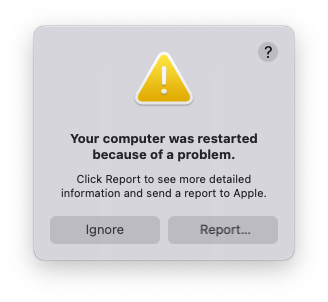
Screenshot B - Clicking Report opens a 2nd or 3rd popup (similar to the initial popup that defies screenshot capture):
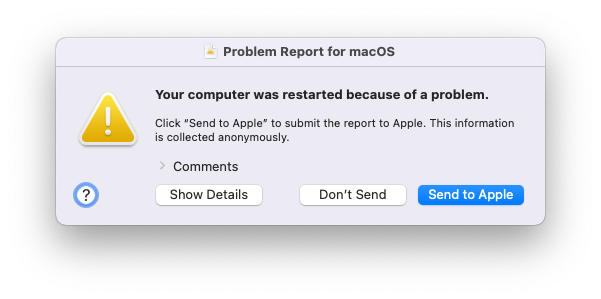
Screenshot C - Sometimes, the same warning appears in an initial popup, Screenshot A, similar to Screenshot C, except all-white buttons when the A popup first appears. But that initial wider popup cannot be captured because it closes in response to key press and/or mouse click capture attempts. Candid iPhone captures would be welcome here (?).


Reports are sent to Apple but the warnings keep appearing and the reports can take an increasing period of time to create and send. My guess, this is a geopolitical spyware attack. Fresh erase-to-resell provides popups after a day of macOS-only use. The more app-and-script gear we add to our systems, the more unstable our operating environment becomes, and the sooner these annoying popups appear. Impossible to say if geopolitical attack is friend or foe, though usually is both. As we will honestly advise in that role, we are watching. MacOS instability is essential. Display wake today must enable totally vulnerable public devices. Apple Users' resistance or cave-in is a consideration, as this problem report spectacle worsens. Discussion here warms our hearts and calms our concerns!


Waiting for a useful Apple Care solution.

Mar 25, 2022 6:19 PM in response to HWTech

HWTech wrote:
Stackshot panics x7: {"timestamp":"2022-03-24 18:40:25.00 -0700","bug_type":"210"
os_version":"macOS 12.2.1., 11, 10, 9, 8, etc - 210 is common to daily panics and also comes up as BitDefender bad security warning...
Well that is most likely your problem. Anti-virus apps...

Bit Defender ecosystem, if you can afford it, includes Interpol, FBI, CIA and inconsequential sundry, like Apple. Be careful what you wish for.

Mar 25, 2022 5:57 AM in response to HWTech

Stackshot panics x7: {"timestamp":"2022-03-24 18:40:25.00 -0700","bug_type":"210"


os_version":"macOS 12.2.1., 11, 10, 9, 8, etc - 210 is common to daily panics and also comes up as BitDefender bad security warning on more Intels than I can remember. M1 any day, 365x4. Theory, the Beast looks after itself better.


Mac scores clean bill of good health at Genius Bar where they click ignore and say, "We can just ignore that." As I noted earlier, culture will comply with certain imperatives. Thanks for helping us to confirm an imperative perspective.

This thread has been closed by the system or the community team. You may vote for any posts you find helpful, or search the Community for additional answers.

"your computer was restarted because of a problem"

Welcome to Apple Support Community
A forum where Apple customers help each other with their products. Get started with your Apple Account.

