iMessage notifications

Hi iPhone community please I’m having issues with my iMessage notifications, I have done all the settings, I even did a reset but it’s still the same thing, I still don’t have notifications, please I will be glad if you can help me out

iPhone 12 Pro Max, iOS 14

Posted on Mar 28, 2022 12:44 PM

Reply
Question marked as Top-ranking reply

Posted on Apr 1, 2022 12:24 PM

I have been having a similar problem, no notification tones for iMessages when phones are locked, for a few weeks for my iPhone 12 Pro Max and my wife's iPhone 8 Max, both running IOS 15.4.1. We get tones for SMS, but not iMessage. Message Notifications were always enabled. I tried several fixes found online to no avail. Since the problem was just with iMessage and not SMS, I decided to remove our cell numbers from iMessage and FaceTime and turned both off. We could then receive SMS from other iPhones (and Android phones) with a Notification tone. I then re-enabled our cell numbers/iMessage/FaceTime for our respective phones and now iMessage Notifications are working normally. I am not a programmer, but this appears to suggest a problem with iMessage/iCloud and not the iPhone or IOS, perhaps triggered by IOS updates. I hope this works for you.

3 replies
Question marked as Top-ranking reply

Apr 1, 2022 12:24 PM in response to Jessica3910

I have been having a similar problem, no notification tones for iMessages when phones are locked, for a few weeks for my iPhone 12 Pro Max and my wife's iPhone 8 Max, both running IOS 15.4.1. We get tones for SMS, but not iMessage. Message Notifications were always enabled. I tried several fixes found online to no avail. Since the problem was just with iMessage and not SMS, I decided to remove our cell numbers from iMessage and FaceTime and turned both off. We could then receive SMS from other iPhones (and Android phones) with a Notification tone. I then re-enabled our cell numbers/iMessage/FaceTime for our respective phones and now iMessage Notifications are working normally. I am not a programmer, but this appears to suggest a problem with iMessage/iCloud and not the iPhone or IOS, perhaps triggered by IOS updates. I hope this works for you.

Mar 28, 2022 1:21 PM in response to Jessica3910

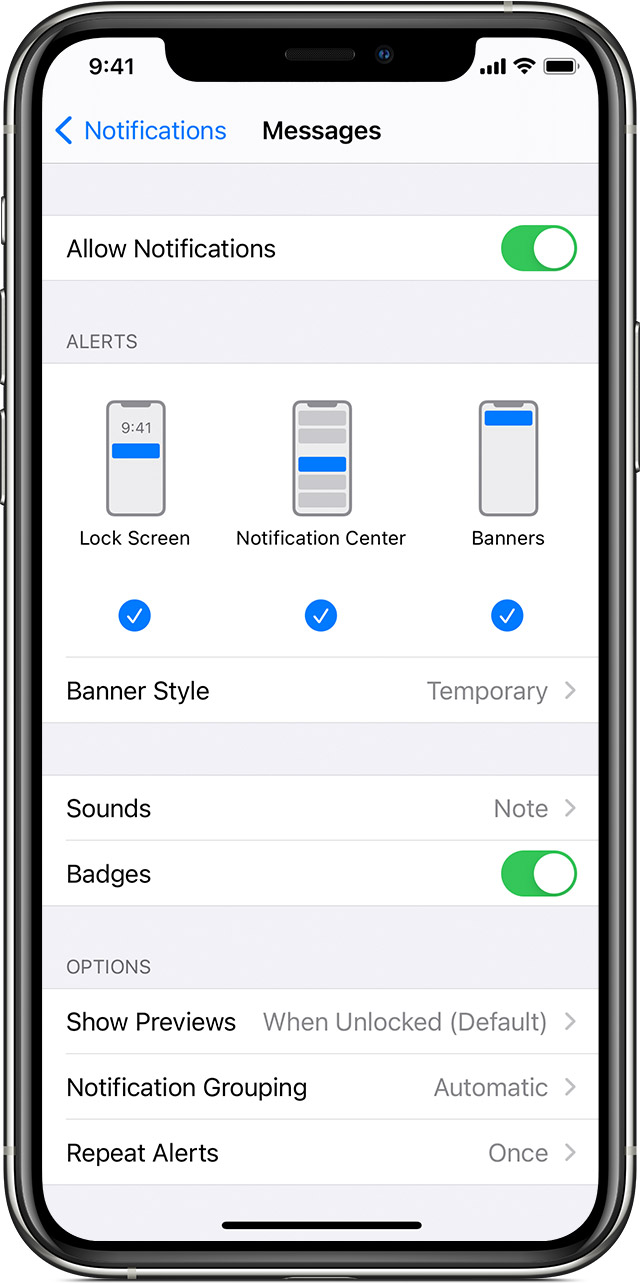
Change alert styles

To add or change an alert style for a notification:

  1. Go to Settings > Notifications.
  2. Select an app under Notification Style. 
  3. Choose a type of alert and banner style. 

You can also turn sounds and badges on or off.

Change group notification settings

You can use group notifications or keep them separate.

  1. Go to Settings > Notifications.
  2. Select an app and tap Notification Grouping.
  3. Select one of these options:
    • Automatic: Notifications from each app will appear in groups based on app alerts.
    • By App: All notifications from each app will be grouped into single expandable alerts.
    • Off: Notifications appear in the order they’re received, without grouping.

From here you can also choose how to show notification previews for specific apps. For example, you can have notification previews show up all the time or never, even when your device is locked.


This thread has been closed by the system or the community team. You may vote for any posts you find helpful, or search the Community for additional answers.

iMessage notifications

Welcome to Apple Support Community
A forum where Apple customers help each other with their products. Get started with your Apple Account.