Trash deleting immediately in Monterey

I have seen a few posts on this but after updating to Monterey, my trash keeps getting locked. The only option I have is to deleted files immediately. The fix in all those posts is to delete the ~/.Trash directory and log back in letting OSX create a new one.


This works for me for about 10 minutes. Then something keeps happening to lock the trash again so that it won't let me use it. Am I missing a setting somewhere to keep this from happening?

Posted on Apr 1, 2022 12:07 PM

Reply
Question marked as Top-ranking reply

Posted on Apr 1, 2022 1:47 PM

1 - Suggest restarting in Safe Mode. This will perform a Disk Repair, clear cache files and only load Apple Software, extensions and fonts. The boot up will be slow and can take some time - Normal.


2 - Does the issue present in this mode ?


3 - If not - there could be something in the main User Account playing up. To further isolate this - Set up users, guests, and groups on Mac. Then log out of the Main User account and log into the dummy account and test again if the issue persists.


4 - If the issue is present in the dummy account - then, this appears to be a System Wide issue on the computer.


5 - Suggest downloading the Application Etrecheck directly from a well Respected ASC Contributor. And Safe to use.


The application is free or paid from added features. 


Run the application with Full Disc Access ( Security & Privacy - Full Disc Access ).
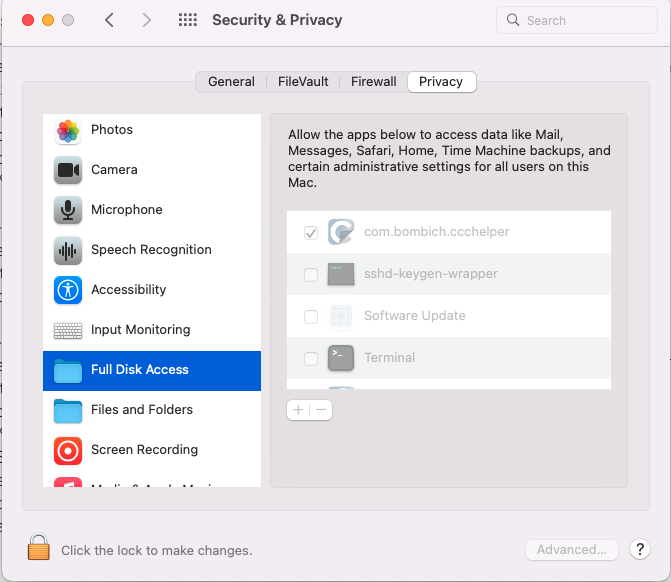

It will take a Snap Shot -  both the hardware and software.


 The Report will Not Reveal Any Personal Information. 


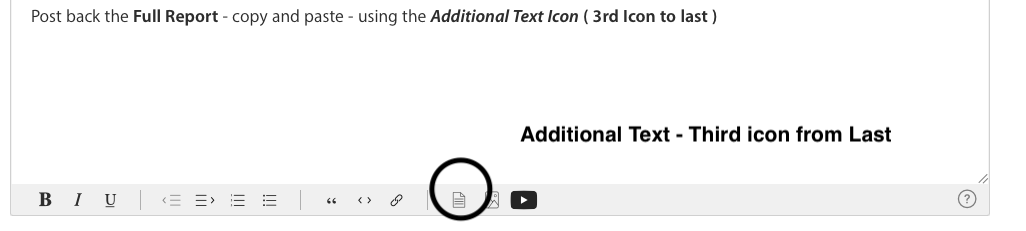
Post back the Full Report - copy and paste - using the Additional Text Icon ( 3rd Icon to last )

We can have a look at the report for possible issues and may have possible suggestions to resolve the issues.


Any Third Party Applications that will interfere with the normal operation of the OS, alter, modify, remove or delete or attempt to do so is an invitation for disaster and may require a Reinstallation of the OS in-order to replace any modified, altered, removed or corrupted elements of the OS this software has inflected on this computer 


Any of the below should be removed as per Developers Instructions 


This includes AntiVirus, Disk Cleaners, Disk Optimizes, UnInstaller etc.


This will include CleanMyMac , This will include BitDefender


This will included Norton Antivirus , Sophos Av Software


Intego AntiVirus, McAfee, MacKeeper, Avast AntiVirus


Ad Guard, Webroot


The The Built in Security  is all that is required.

Similar questions

5 replies
Question marked as Top-ranking reply

Apr 1, 2022 1:47 PM in response to DoubleTap

1 - Suggest restarting in Safe Mode. This will perform a Disk Repair, clear cache files and only load Apple Software, extensions and fonts. The boot up will be slow and can take some time - Normal.


2 - Does the issue present in this mode ?


3 - If not - there could be something in the main User Account playing up. To further isolate this - Set up users, guests, and groups on Mac. Then log out of the Main User account and log into the dummy account and test again if the issue persists.


4 - If the issue is present in the dummy account - then, this appears to be a System Wide issue on the computer.


5 - Suggest downloading the Application Etrecheck directly from a well Respected ASC Contributor. And Safe to use.


The application is free or paid from added features. 


Run the application with Full Disc Access ( Security & Privacy - Full Disc Access ).


It will take a Snap Shot -  both the hardware and software.


 The Report will Not Reveal Any Personal Information. 


Post back the Full Report - copy and paste - using the Additional Text Icon ( 3rd Icon to last )


We can have a look at the report for possible issues and may have possible suggestions to resolve the issues.


Any Third Party Applications that will interfere with the normal operation of the OS, alter, modify, remove or delete or attempt to do so is an invitation for disaster and may require a Reinstallation of the OS in-order to replace any modified, altered, removed or corrupted elements of the OS this software has inflected on this computer 


Any of the below should be removed as per Developers Instructions 


This includes AntiVirus, Disk Cleaners, Disk Optimizes, UnInstaller etc.


This will include CleanMyMac , This will include BitDefender


This will included Norton Antivirus , Sophos Av Software


Intego AntiVirus, McAfee, MacKeeper, Avast AntiVirus


Ad Guard, Webroot


The The Built in Security  is all that is required.

Apr 1, 2022 2:43 PM in response to Owl-53

Thanks for the response. If you see above, I think this is specific to OneDrive.


1-3. Problem persists. #4 - would involve me syncing my OneDrive folder or a dummy OneDrive to a new account on the Mac. That's kind of a last resort for me due to disk space concerns. I'll do it if I need to. But after some research, I found that Microsoft enabled "Files On-Demand" in February and when they did that moved your directory out of the user home and into ~/Library/CloudStorage/. I am starting to feel this is a bug that developed when they moved to that folder and it somehow no longer has access to delete to the trash, or this is a feature and Microsoft took it away. I am thinking the second, because Microsoft has their own "Recycle Bin" in OneDrive, so I have found that and even if I delete and the Mac says it is permanent, I can go to the recycling bin in OneDrive and recover.


I do not have any of the apps you mentioned installed (or any Securty apps) and agree that the build in security is all that is required.


As for Etrecheck, I went ahead and ran it anyway. The results are below. I took a look through it and everything in there is installed by me and has been installed for a while. If you are wondering about the Kernel extension, it's due to Drobo and the M1 mac.


Apr 1, 2022 12:48 PM in response to Luis Sequeira1

Sorry, I don't know what Etrecheck is. But before installing something else on my machine, I discovered something that I missed before and I think it's an app permissions issue. I use OneDrive for my corporate stuff and sync my OneDrive locally. The location for the OneDrive sync folder was recently moved (by Apple or Microsoft, not sure which) from under my user home directory to ~/Library/CloudStorage/. Somehow, it doesn't look like I can access the .Trash folder anymore when deleting from one drive. If I go to say ~/Documents or ~/Downloads and delete from there, they go right into the Trash.


So my guess is a permissions issue with the OneDrive app. In Finder, if I try to delete a file in the OneDrive folder, it tells me it will be deleted immediately. But if I go into Terminal and the directory in the OneDrive folder, I can move the file to the .Trash folder without issue. So I am not sure it will not work in Finder, but terminal, I can do it (without sudo I would add).

This thread has been closed by the system or the community team. You may vote for any posts you find helpful, or search the Community for additional answers.

Trash deleting immediately in Monterey

Welcome to Apple Support Community
A forum where Apple customers help each other with their products. Get started with your Apple Account.
