macbook air m1 battery drain.


Why is it every time I shut down my Apple MacBook M1 with the capacity of battery at 75% or 80% the next day switch it back on the level is on 60% to 65%?


My battery health is 100%. My mac is bought less than a month! Running macOS monterey 12.3.1 the latest!


Posted on Apr 7, 2022 4:51 AM

Reply
7 replies

Apr 8, 2022 7:49 AM in response to GioMS

Hi GioMS,


Thanks for contacting Apple Support Communities!


We understand that your MacBook battery loses power while it's shut down.


Check out this resource which will help you to isolate this behavior further: Get help with your Mac notebook battery


Diagnose battery issues
Learn how to check your hardware, identify apps or features contributing to high energy use, and resolve charging issues.
Run diagnostics
A great place to start when troubleshooting battery issues is the built-in diagnostics that are available on your Mac notebook. Learn how to use Apple Diagnostics on your Mac.
If you don't find any issues with Apple Diagnostics, read on for more information about troubleshooting your battery.
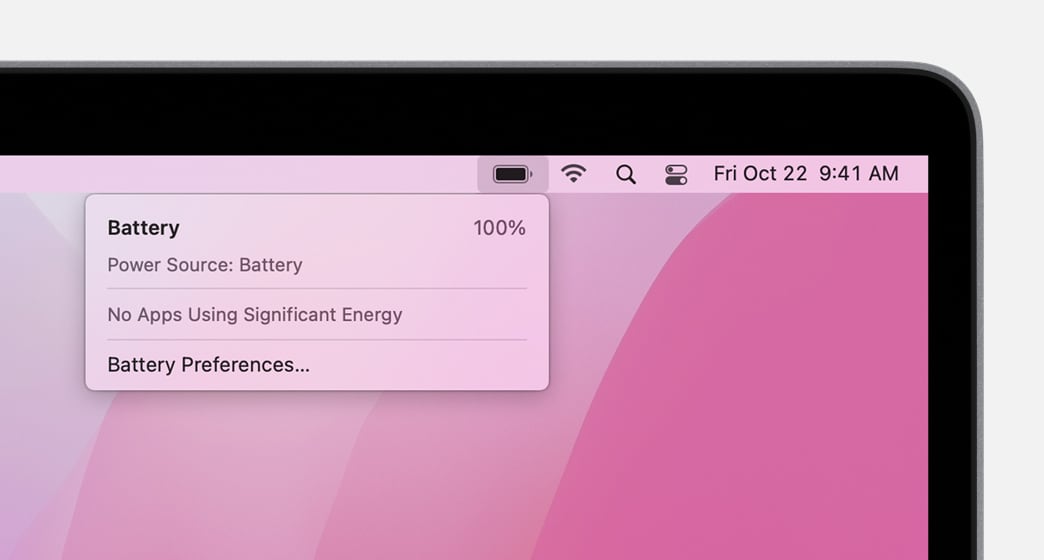
Check the battery status menu
The battery status menu shows you how much charge your battery has and whether it's currently charging. This menu is at the right side of the menu bar.
macOS menu bar with battery menu open
The battery status menu also tells you if your display or any apps are using significant energy. Also consider closing any apps that are listed to save battery power.
If you use Optimized Battery Charging in macOS Big Sur or later, you'll see additional information when your Mac is connected to power, such as whether charging is paused or when your battery will be fully charged. If charging is paused and you need to have your Mac fully charged sooner, click Charge To Full Now.


We hope this helps.


Cheers!

Apr 9, 2022 8:19 AM in response to GioMS

 GioMS,


Thanks for the update!


To see what processes are currently running, use this guide View information about Mac processes in Activity Monitor. This is just an FYI because there isn't a history on your Mac battery like you might see on an iOS device.


We'd suggest following MichaelB2019's advice and Contact Apple Support. They'd be able to dig into this with you and narrow down what might be happening.


Have a great weekend!


This thread has been closed by the system or the community team. You may vote for any posts you find helpful, or search the Community for additional answers.

macbook air m1 battery drain.

Welcome to Apple Support Community
A forum where Apple customers help each other with their products. Get started with your Apple Account.