The toggle to turn on/off FaceTime and iMessages is missing

I was signed out of iMessage and FaceTime yesterday morning and I already tried every suggestion The toggle to turn on/off FaceTime and iMessages is missing and I don’t know what to do and he’s I’m connected to a stable Wi-Fi, I restarted my iPad at least 10 times, and this has nothing to do with screen time every time I try signing in it says an error has occurred during the activation

iPad Pro, iPadOS 15

Posted on Apr 9, 2022 9:21 AM

Reply
Question marked as Top-ranking reply

Posted on Apr 10, 2022 9:29 AM

Hi meínliàh,


It sounds like you may have restrictions enabled for iMessage and FaceTime if you are indeed missing a toggle button. So you're sure, check out the section "Allow built-in apps and features" in the article here: Use parental controls on your child's iPhone, iPad, and iPod touch

Details from that section are also below.


"You can restrict the use of built-in apps or features. If you turn off an app or feature, the app or feature won't be deleted, it's just temporarily hidden from your Home Screen. For example, if you turn off Mail, the Mail app won't appear on your Home Screen until you turn it back on.
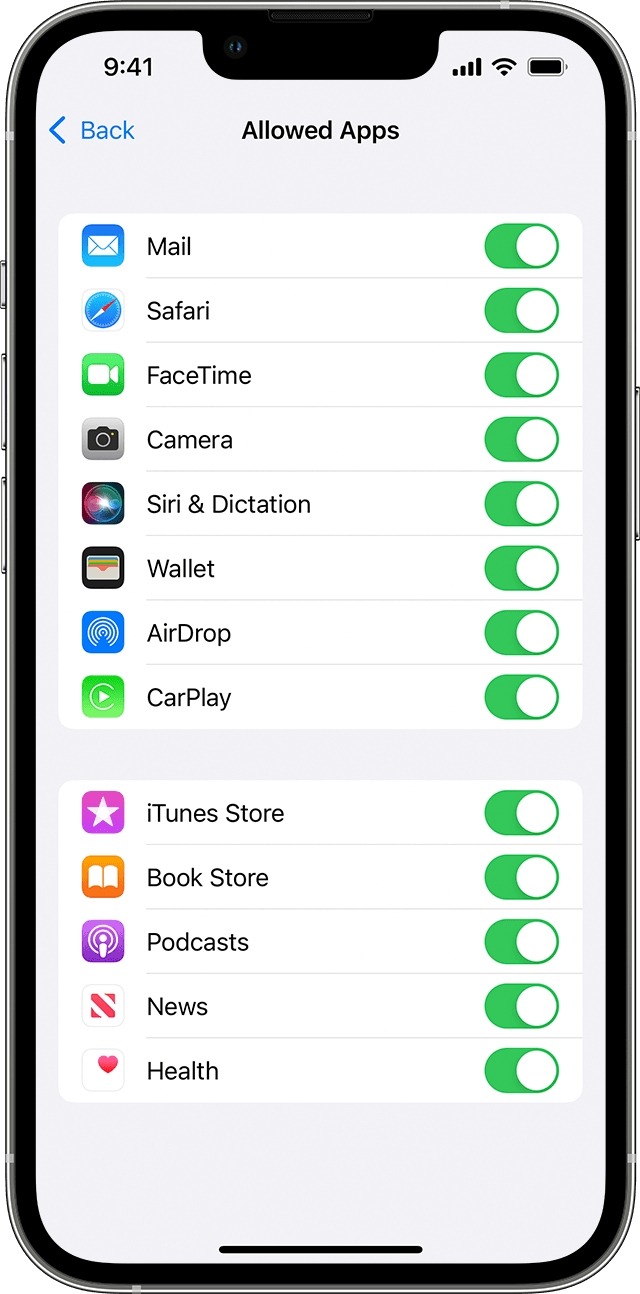

An iPhone showing the Allowed Apps screen. Selected apps have their toggle turned on.


To change your Allowed Apps:

  1. Go to Settings and tap Screen Time.
  2. Tap Content & Privacy Restrictions.
  3. Enter your Screen Time passcode. 
  4. Tap Allowed Apps. 
  5. Select the apps that you want to allow."


If you see both apps are allowed, in the same article scroll to the section "Allow changes to privacy settings" to make sure the microphone, and other privacy settings aren't blocked.


Should you continue to have issues, check and be sure all steps in the article here are completed: If you can’t turn on or sign in to iMessage or FaceTime

This includes waiting 24 hours to attempt to activate iMessage and FaceTime. As the article states, should the issue continue reach out to Apple Support directly to further assist.


Contact Apple Support

Cheers!


1 reply
Question marked as Top-ranking reply

Apr 10, 2022 9:29 AM in response to meínliàh

Hi meínliàh,


It sounds like you may have restrictions enabled for iMessage and FaceTime if you are indeed missing a toggle button. So you're sure, check out the section "Allow built-in apps and features" in the article here: Use parental controls on your child's iPhone, iPad, and iPod touch

Details from that section are also below.


"You can restrict the use of built-in apps or features. If you turn off an app or feature, the app or feature won't be deleted, it's just temporarily hidden from your Home Screen. For example, if you turn off Mail, the Mail app won't appear on your Home Screen until you turn it back on.


An iPhone showing the Allowed Apps screen. Selected apps have their toggle turned on.


To change your Allowed Apps:

  1. Go to Settings and tap Screen Time.
  2. Tap Content & Privacy Restrictions.
  3. Enter your Screen Time passcode. 
  4. Tap Allowed Apps. 
  5. Select the apps that you want to allow."


If you see both apps are allowed, in the same article scroll to the section "Allow changes to privacy settings" to make sure the microphone, and other privacy settings aren't blocked.


Should you continue to have issues, check and be sure all steps in the article here are completed: If you can’t turn on or sign in to iMessage or FaceTime

This includes waiting 24 hours to attempt to activate iMessage and FaceTime. As the article states, should the issue continue reach out to Apple Support directly to further assist.


Contact Apple Support

Cheers!


This thread has been closed by the system or the community team. You may vote for any posts you find helpful, or search the Community for additional answers.

The toggle to turn on/off FaceTime and iMessages is missing

Welcome to Apple Support Community
A forum where Apple customers help each other with their products. Get started with your Apple Account.