Unable to upload photos album

I have photos in my unable to upload album. Is there anyway to get them to upload? I’ve tried several things from google and nothing has worked.

iPhone 12 Pro Max, iOS 15

Posted on Apr 19, 2022 5:40 AM

Reply
Question marked as Top-ranking reply

Posted on Apr 19, 2022 6:26 AM

"unable to upload" usually means, that Photos cannot upload the item to iCloud Photos, either because the format is incompatible with iCloud, or the file is damaged in some way and Photos cannot process it. Have you tried to fix it as described in this Support document? Check the status of your library in Photos for macOS - Apple Support


"If you see "Unable to Upload"

Photos counts as “Unable to Upload” any items that it can't upload to iCloud Photos. These steps might fix the issue, but any edits or keywords that you applied to the affected items will be lost.
  1. From the menu bar in Photos, choose File > New Smart Album.
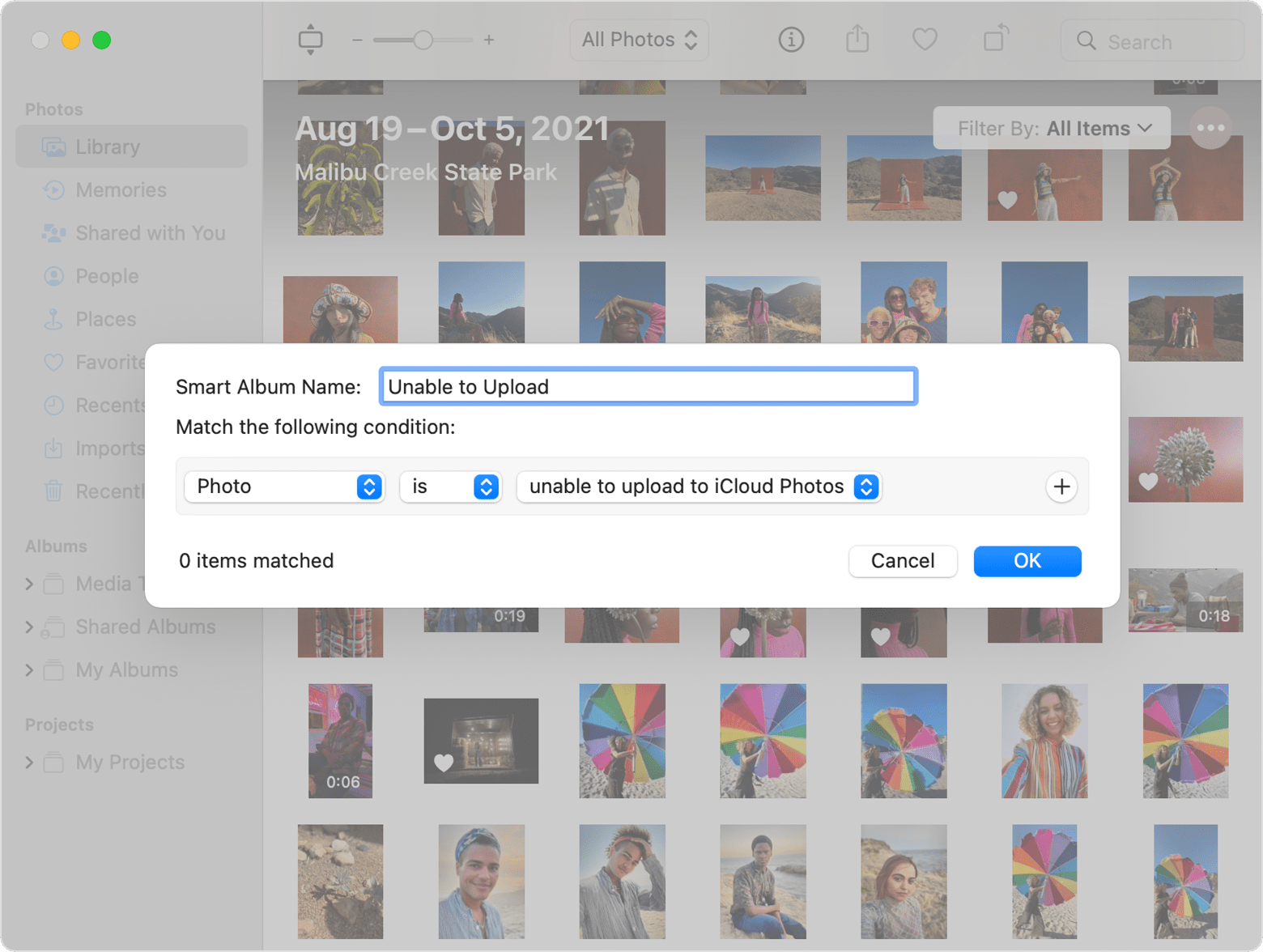
  2. Name the Smart Album “Unable to upload” and set the three conditions to “Photo” and “is” and “unable to upload to iCloud Photos.” Click OK.

  3. Select the “Unable to upload” album in the sidebar.
  4. Press Command-A to select all items in the album, then choose File > Export > Export Unmodified Original For [number] Photos.
  5. In the dialogs that follow, click Export, then choose a save location and click Export Originals.
  6. After the items export, make sure they are all still selected in the album, then choose Image > Delete [number] Photos.
  7. Click Delete, then click OK.
  8. Now import the photos back into your library: Choose File > Import, then choose the images you exported in step 5."


1 reply
Question marked as Top-ranking reply

Apr 19, 2022 6:26 AM in response to Travelingma50

"unable to upload" usually means, that Photos cannot upload the item to iCloud Photos, either because the format is incompatible with iCloud, or the file is damaged in some way and Photos cannot process it. Have you tried to fix it as described in this Support document? Check the status of your library in Photos for macOS - Apple Support


"If you see "Unable to Upload"

Photos counts as “Unable to Upload” any items that it can't upload to iCloud Photos. These steps might fix the issue, but any edits or keywords that you applied to the affected items will be lost.

  1. From the menu bar in Photos, choose File > New Smart Album.
  2. Name the Smart Album “Unable to upload” and set the three conditions to “Photo” and “is” and “unable to upload to iCloud Photos.” Click OK.

  3. Select the “Unable to upload” album in the sidebar.
  4. Press Command-A to select all items in the album, then choose File > Export > Export Unmodified Original For [number] Photos.
  5. In the dialogs that follow, click Export, then choose a save location and click Export Originals.
  6. After the items export, make sure they are all still selected in the album, then choose Image > Delete [number] Photos.
  7. Click Delete, then click OK.
  8. Now import the photos back into your library: Choose File > Import, then choose the images you exported in step 5."


This thread has been closed by the system or the community team. You may vote for any posts you find helpful, or search the Community for additional answers.

Unable to upload photos album

Welcome to Apple Support Community
A forum where Apple customers help each other with their products. Get started with your Apple Account.
