I want to erase an eMac but I no longer have the installation CD

I am trying to erase an eMac for my grandfather, but it's been so long that he no longer has the original install disc. Is there another way to wipe and restore a PowerPC eMac running OSX 10.4.11 without installation media? Is there a less than scrutable site that I can download a copy of Lion or Leopard to create a USB installation media?


[Re-Titled by Moderator]

eMac

Posted on Apr 23, 2022 2:59 PM

Reply
Question marked as Top-ranking reply

Posted on Apr 24, 2022 8:44 AM

Sometimes you can get proper old retail install disks from Apple User Groups. Many such groups have a member or two who tend to archive old software. Start here:


https://appleusergroupresources.com/find-a-group/


Lion only runs on Intel-powered Macs. eMacs are PowerPC.


Your processor speed determines what OS you can install. If the eMac has a 700 or 800 MHz processor, its max OS is 10.4 "Tiger." If it has a 1.0Ghz or faster processor, its max OS is 10.5 "Leopard."


Many retail install disk are on DVDs but many early eMacs do not have DVD drives, only CD drives. Make sure to order the proper media.


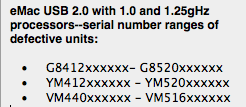
Does the computer function OK now? I ask because most 1.25ghz eMacs have defective logic boards and they won't start from the HDD or an optical disk. If that is the case, buying expensive disk sets will be a waste of money. The known-bad units fall in these serial number ranges:


The serial number is inside the opticals drive door:
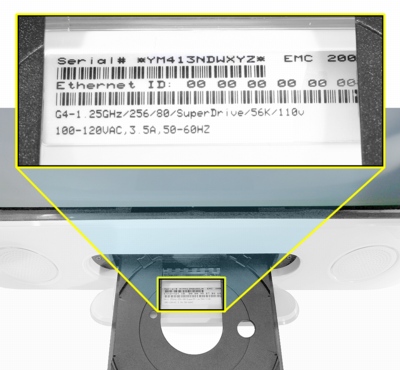


If the serial number starts with "R" or "RM," the unit is an Apple refurb and those number ranges won't help.


This chart shows how to determine which of the four model families of eMacs your Grandfather has:
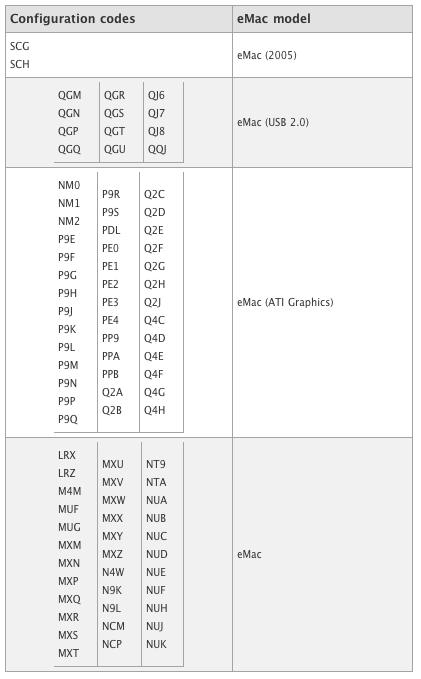


Config codes are the last three characters of the serial number.


2 replies
Question marked as Top-ranking reply

Apr 24, 2022 8:44 AM in response to Agent_Hidalgo

Sometimes you can get proper old retail install disks from Apple User Groups. Many such groups have a member or two who tend to archive old software. Start here:


https://appleusergroupresources.com/find-a-group/


Lion only runs on Intel-powered Macs. eMacs are PowerPC.


Your processor speed determines what OS you can install. If the eMac has a 700 or 800 MHz processor, its max OS is 10.4 "Tiger." If it has a 1.0Ghz or faster processor, its max OS is 10.5 "Leopard."


Many retail install disk are on DVDs but many early eMacs do not have DVD drives, only CD drives. Make sure to order the proper media.


Does the computer function OK now? I ask because most 1.25ghz eMacs have defective logic boards and they won't start from the HDD or an optical disk. If that is the case, buying expensive disk sets will be a waste of money. The known-bad units fall in these serial number ranges:


The serial number is inside the opticals drive door:


If the serial number starts with "R" or "RM," the unit is an Apple refurb and those number ranges won't help.


This chart shows how to determine which of the four model families of eMacs your Grandfather has:


Config codes are the last three characters of the serial number.



Apr 24, 2022 7:05 AM in response to Agent_Hidalgo

Hi,


Since you wish to restore the eMac as well, installation media would be needed. It is not a good idea to download anything from unknown sites, so you would have to look for an appropriate retail Mac OS X 10.4 Tiger for PowerPC DVD, or Mac OS X 10.5 Leopard (depending on the exact eMac model). The maximum operating system versions can be found in the detailed specifications at https://everymac.com/systems/apple/emac/index-emac.html. Do not buy a model-specific disc for another Mac.


If necessary, a free alternative could possibly be a Linux distribution for PowerPC.

This thread has been closed by the system or the community team. You may vote for any posts you find helpful, or search the Community for additional answers.

I want to erase an eMac but I no longer have the installation CD

Welcome to Apple Support Community
A forum where Apple customers help each other with their products. Get started with your Apple Account.
