Child lock apple watch 2

Is there child lock to apple watch? Water lock option is not ok because it's not automatically. Usually my son navigate everywhere in my watch when I pick him up and holding him. Or when I dress up him. Wrist detection also not good. Because once I unlock it stays unlock forever. So it does not lock automatically again. I need a function like on iphone. Lock after x seconds.

iPhone 12 mini, iOS 15

Posted on May 2, 2022 12:01 AM

Reply
Question marked as Top-ranking reply

Posted on May 2, 2022 6:07 PM

Hello gyuris,


Thank you for reaching out in Apple Support Communities. There's an option available to lock your Apple Watch manually. The option to lock an Apple Watch after a few seconds is unavailable. Here are the steps to lock it manually:


Lock manually
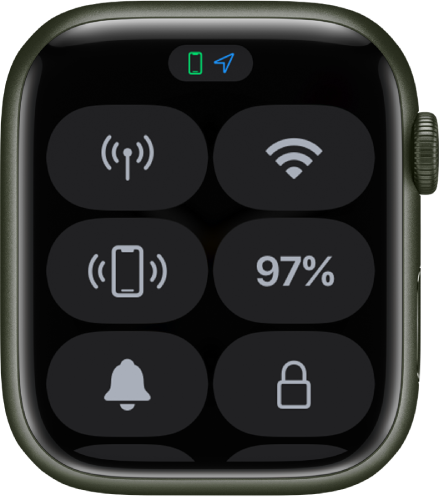
Control Center with the Lock icon in the bottom-right corner.
Touch and hold the bottom of the screen, then swipe up to open Control Center.
Tap the Lock button.
Note: To manually lock your Apple Watch, you must turn off wrist detection. (Open the Settings app  on your Apple Watch, tap Passcode, then turn off Wrist Detection.)
You must enter your passcode the next time you try to use your Apple Watch.
You can also lock your screen to avoid accidental taps during a workout. While using the Workout app on your Apple Watch, just swipe right, then tap Lock. When you start a swimming workout, your Apple Watch automatically locks the screen with Water Lock.


That information is outlined in this helpful article: Lock or unlock Apple Watch - Apple Support


Best regards.


2 replies
Question marked as Top-ranking reply

May 2, 2022 6:07 PM in response to gyuris

Hello gyuris,


Thank you for reaching out in Apple Support Communities. There's an option available to lock your Apple Watch manually. The option to lock an Apple Watch after a few seconds is unavailable. Here are the steps to lock it manually:


Lock manually
Control Center with the Lock icon in the bottom-right corner.
Touch and hold the bottom of the screen, then swipe up to open Control Center.
Tap the Lock button.
Note: To manually lock your Apple Watch, you must turn off wrist detection. (Open the Settings app  on your Apple Watch, tap Passcode, then turn off Wrist Detection.)
You must enter your passcode the next time you try to use your Apple Watch.
You can also lock your screen to avoid accidental taps during a workout. While using the Workout app on your Apple Watch, just swipe right, then tap Lock. When you start a swimming workout, your Apple Watch automatically locks the screen with Water Lock.


That information is outlined in this helpful article: Lock or unlock Apple Watch - Apple Support


Best regards.


This thread has been closed by the system or the community team. You may vote for any posts you find helpful, or search the Community for additional answers.

Child lock apple watch 2

Welcome to Apple Support Community
A forum where Apple customers help each other with their products. Get started with your Apple Account.