Apple Pencil/keyboard problem

My iPad mini assumes incorrectly that I want to use the pencil’s keyboard ever since I added the Apple Pencil. The pencil keyboard very small and a PITA to use. I’d rather keep using my regular onscreen keyboard. How can I make the onscreen keyboard show up if the iPad wants me to use the pencil keyboard?

iPad mini 6 Wi-Fi

Posted on May 5, 2022 10:34 AM

Reply
Question marked as Top-ranking reply

Posted on May 6, 2022 11:15 AM

Hello karenfromhubbard,


If you are seeing the floating keyboard, you can put it back to full size using the steps below:

1. Place two fingers on the floating keyboard.
2. Spread your fingers apart to enlarge the keyboard back to its full size, then let go.

You can also find those steps in this resource: If your iPad keyboard is small or split in half - Apple Support


Additionally, you can use the step from the end of this resource to disable the Scribble feature, if needed: Enter text with Scribble on iPad - Apple Support


Hopefully those resources address your inquiry.


Take care.

6 replies
Question marked as Top-ranking reply

May 6, 2022 11:15 AM in response to karenfromhubbard

Hello karenfromhubbard,


If you are seeing the floating keyboard, you can put it back to full size using the steps below:

1. Place two fingers on the floating keyboard.
2. Spread your fingers apart to enlarge the keyboard back to its full size, then let go.

You can also find those steps in this resource: If your iPad keyboard is small or split in half - Apple Support


Additionally, you can use the step from the end of this resource to disable the Scribble feature, if needed: Enter text with Scribble on iPad - Apple Support


Hopefully those resources address your inquiry.


Take care.

May 7, 2022 8:41 AM in response to Miche11e_P

That little keyboard will not expand for love not money no matter what I did. And I did try rebooting, completely shut down, etc., however, nothing worked. What has finally worked was installing the Grammarly keyboard free version, and that was only because someone recommend it to me as a tool because I am such a grammar nazi-thats what she teasingly actually calls me. Common punctuation and spelling errors drive me nuts. Maybe it's a keyboard problem or setting, although I've tinkered with all the keyboard settings.

So, for now my problem is fixed. I wonder if the problem might be somehow related to the protective case I use for my iPad, since it keeps the pencil constantly in the charging position and my problem only started after adding the pencil. Hmmmm..... It's a Miesherk case with a neck strap.

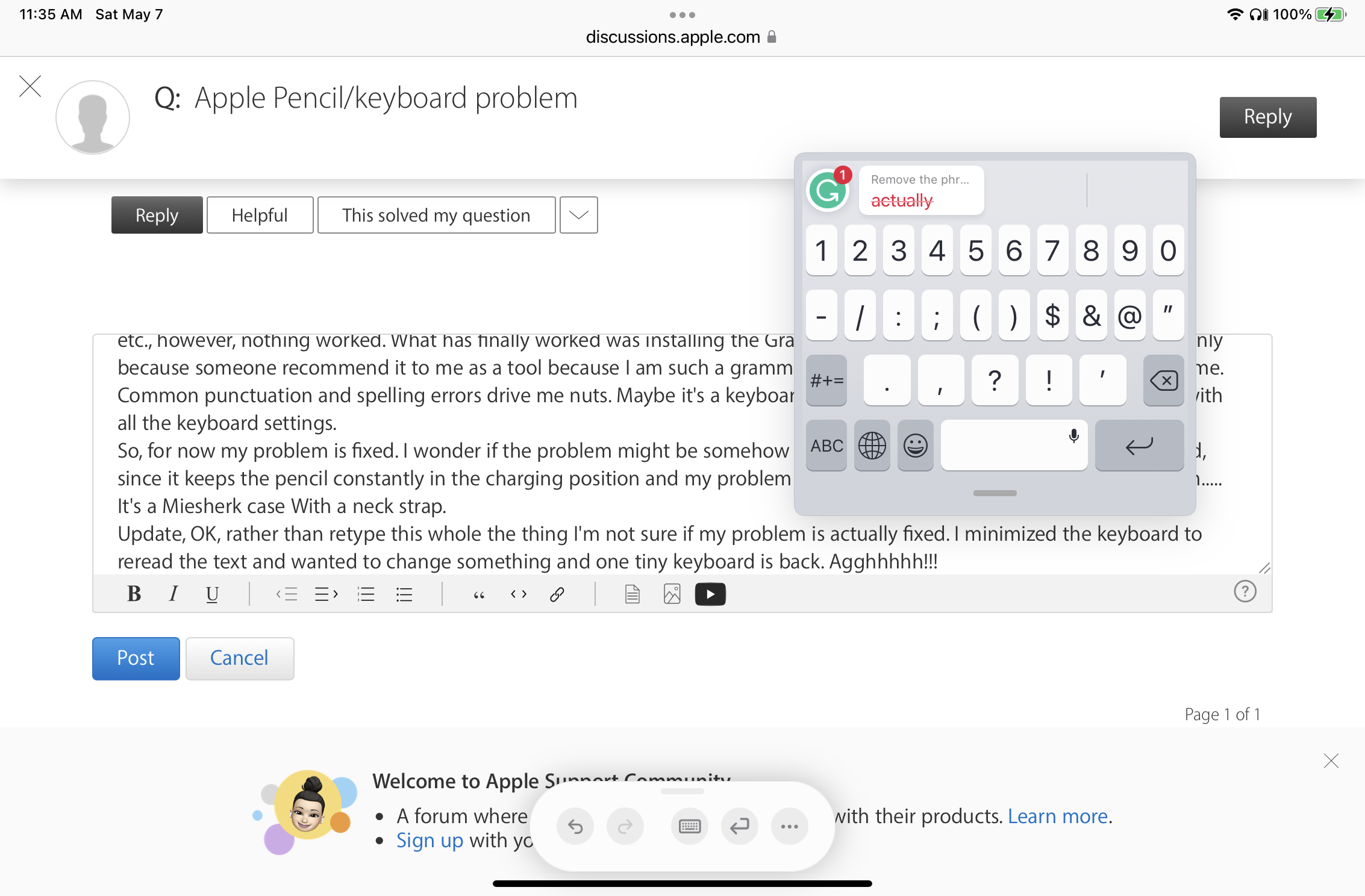
Update, OK, rather than retype this whole the thing I'm not sure if my problem is actually fixed. I minimized the keyboard to reread the text and wanted to change something and now the tiny keyboard is back. Agghhhhh!!! I will try to add a screenshot
May 7, 2022 12:27 PM in response to LotusPilot

You misunderstand. Please re-read the previous post. The screenshot shows just how small a keyboard with which I am forced to work. I want a REGULAR KEYBOARD, not this mini one. I could not even get a normal-size keyboard until after I installed the Grammarly keyboard. Installing the Grammarly keyboard semi-fixed the problem. What Apple keyboard settings do you recommend that might rectify my problem if I stop using or uninstall Grammarly?

This thread has been closed by the system or the community team. You may vote for any posts you find helpful, or search the Community for additional answers.

Apple Pencil/keyboard problem

Welcome to Apple Support Community
A forum where Apple customers help each other with their products. Get started with your Apple Account.

