Why do all the same songs play on shuffle?
The same group of songs constantly play when I select shuffle regardless if it’s albums or songs.
The same group of songs constantly play when I select shuffle regardless if it’s albums or songs.
Thanks for the reply!
If you haven't already, make sure the repeat option is not enabled when attempting to shuffle these songs. Follow the steps below to check:
Open the Apple Music app.
Play an album or playlist.
Tap the song that's playing at the bottom of the screen.
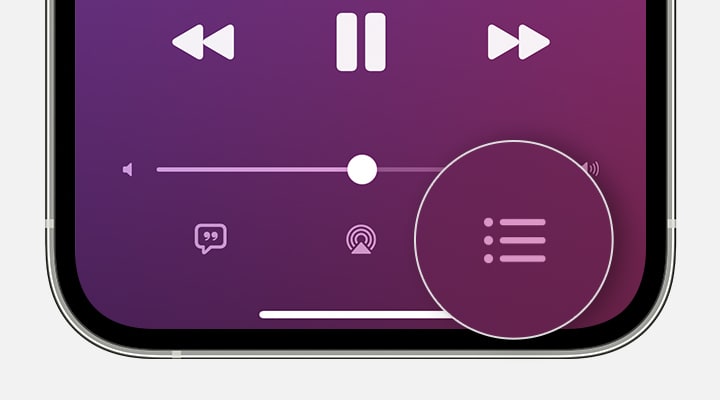
In the screen that appears, tap the Playing Next buttonin the lower-right corner.
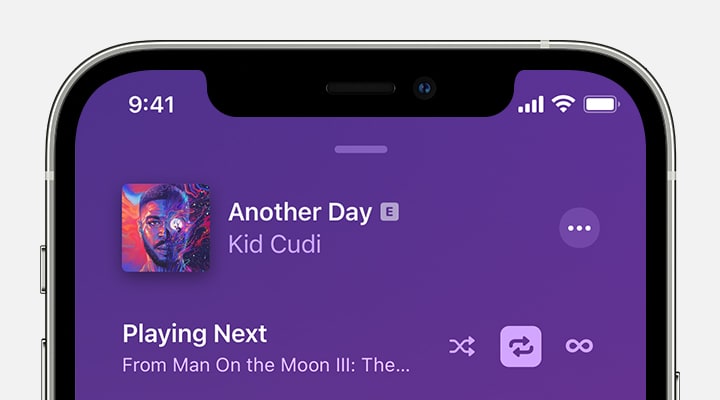
At the top of the Playing Next screen, tap the Repeat buttonuntil it changes to Repeat All. When the Repeat button is highlighted, Repeat All is turned on.
For help with checking repeat on a single song, continue with the link here:
How to repeat music on your iPhone
All the best.
It’s from my library. It just seems like the algorithm isn’t very random and the same songs get played over and over.
Hi Tjc1981,
Thanks for contacting Apple Support Communities!
We understand that when you attempt to shuffle songs on your iPhone, the same songs play.
Are you attempting to shuffle your library or an album?
When you shuffle music, we don't have the option to choose which songs to shuffle unless you've added them to a playlist, for example. You can learn more here: How to shuffle music on your iPhone - Apple Support
Feel free to share any feature requests you have with Apple directly here: Product Feedback
Take care!
Why do all the same songs play on shuffle?