How to play mp3 file in endless loop on iPhone?
How to play mp3 file in endless loop on iPhone?
How to play mp3 file in endless loop on iPhone?
Hello Stonytech,
This article shows you how to repeat a song on your iPhone: How to repeat music on your iPhone
How to repeat a song
1. Open the Apple Music app.
2. Play a song.
3. Tap the song that's playing at the bottom of the screen.
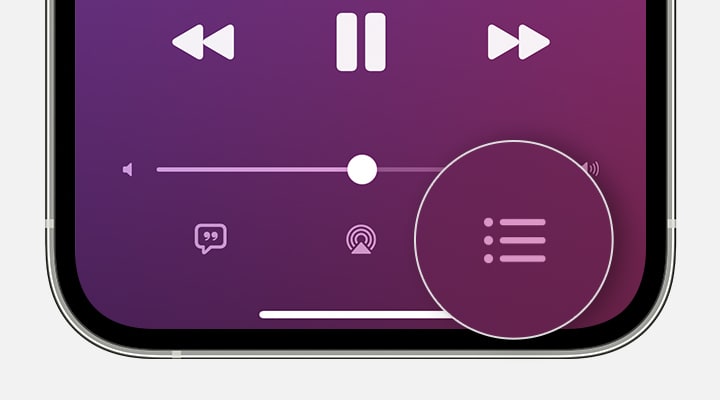
4. In the screen that appears, tap the Playing Next buttonin the lower-right corner.
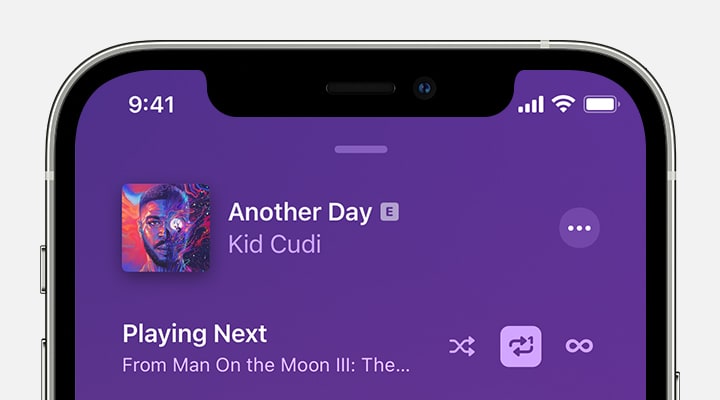
5. At the top of the Playing Next screen, tap the Repeat button until it changes to Repeat One. When the Repeat button is highlighted with a number 1, Repeat One is turned on.
Best Regards.
Hello Stonytech,
This article shows you how to repeat a song on your iPhone: How to repeat music on your iPhone
How to repeat a song
1. Open the Apple Music app.
2. Play a song.
3. Tap the song that's playing at the bottom of the screen.
4. In the screen that appears, tap the Playing Next button
5. At the top of the Playing Next screen, tap the Repeat button until it changes to Repeat One. When the Repeat button is highlighted with a number 1, Repeat One is turned on.
Best Regards.
How to play mp3 file in endless loop on iPhone?