My Ipad Air (4th Gen) touch screen isnt working. I've restored it but when I get the the part of swiping up to restore completely it doesnt recognize my touch. I've even tried with my apple pencil and nothing. I have no idea what else to do.

My Ipad Air (4th Gen) touch screen isnt working. I've restored it but when I get the the part of swiping up to restore completely it doesnt recognize my touch. I've even tried with my apple pencil and nothing. I have no idea what else to do. I've tried restarting it a bunch of times too any nothing. At first it would pick up a little of my apple pencil to try to put in a passcode but ultimately just locked me out.

iPad Air, iPadOS 15

Posted on May 22, 2022 9:37 AM

Reply
Question marked as Top-ranking reply

Posted on May 22, 2022 9:54 AM

Connect your iPad to its Power Adapter and allow the iPad to charge. While still connected to external power, try a forced-restart:


  • On an iPad with a Home button: Press and hold the top button and the Home button at the same time. When the Apple logo appears, release both buttons.
  • On other iPad models: Press and quickly release the volume up button, press and quickly release the volume down button, then press and hold the top button. When the Apple logo appears, release the button.
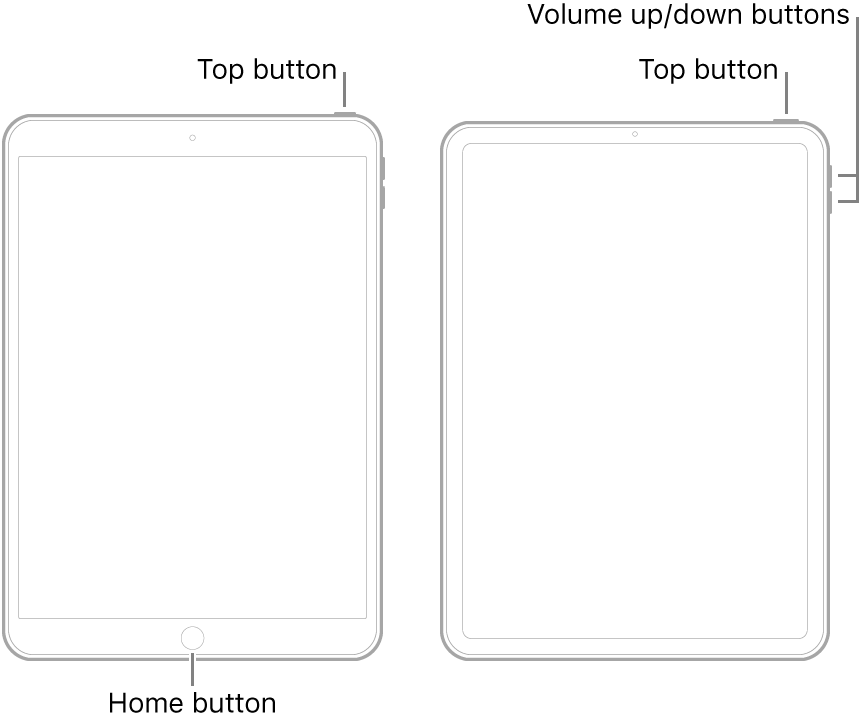


Note:  If iPad still doesn’t turn on, or if it gets stuck during start up, see the Apple Support article If your iPhone, iPad, or iPod touch won’t turn on or is frozen. Or if your iPad isn’t working correctly after you restart it, see the iPad Support website.


If you continue to experience difficulties, you will need to seek assistance directly from from Apple Support. You can contact the Support Team using the Get Support link at top-right of this page. Alternatively, you can initiate and manage your support cases using the excellent Apple Support App. If not already installed on your iPad, the App can be downloaded from the App Store:

https://apps.apple.com/gb/app/apple-support/id1130498044


You might also visit the Genius Bar at your local Apple Store or Apple Authorised Service Provider (AASP) - where the technicians will be able to test and assess your iPad:

Genius Bar Reservation and Apple Support Options - Apple

1 reply
Question marked as Top-ranking reply

May 22, 2022 9:54 AM in response to glori241

Connect your iPad to its Power Adapter and allow the iPad to charge. While still connected to external power, try a forced-restart:


  • On an iPad with a Home button: Press and hold the top button and the Home button at the same time. When the Apple logo appears, release both buttons.
  • On other iPad models: Press and quickly release the volume up button, press and quickly release the volume down button, then press and hold the top button. When the Apple logo appears, release the button.


Note:  If iPad still doesn’t turn on, or if it gets stuck during start up, see the Apple Support article If your iPhone, iPad, or iPod touch won’t turn on or is frozen. Or if your iPad isn’t working correctly after you restart it, see the iPad Support website.


If you continue to experience difficulties, you will need to seek assistance directly from from Apple Support. You can contact the Support Team using the Get Support link at top-right of this page. Alternatively, you can initiate and manage your support cases using the excellent Apple Support App. If not already installed on your iPad, the App can be downloaded from the App Store:

https://apps.apple.com/gb/app/apple-support/id1130498044


You might also visit the Genius Bar at your local Apple Store or Apple Authorised Service Provider (AASP) - where the technicians will be able to test and assess your iPad:

Genius Bar Reservation and Apple Support Options - Apple

This thread has been closed by the system or the community team. You may vote for any posts you find helpful, or search the Community for additional answers.

My Ipad Air (4th Gen) touch screen isnt working. I've restored it but when I get the the part of swiping up to restore completely it doesnt recognize my touch. I've even tried with my apple pencil and nothing. I have no idea what else to do.

Welcome to Apple Support Community
A forum where Apple customers help each other with their products. Get started with your Apple Account.