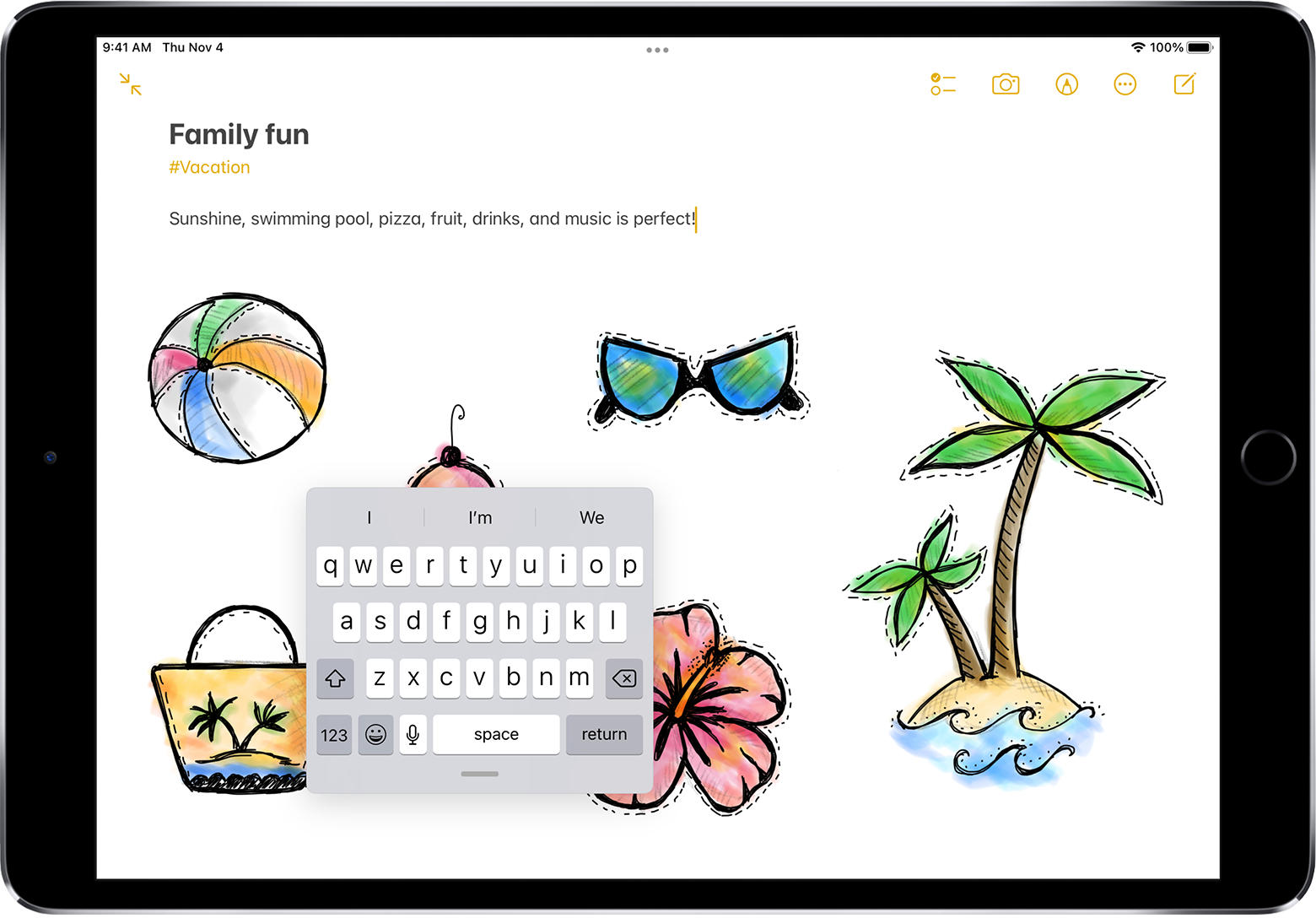
Keyboard placement on iPad.
Is there a way to move the keyboard to the corner on my iPad (9th Gen) for anytime I need to use it?
iPad, iPadOS 15
Is there a way to move the keyboard to the corner on my iPad (9th Gen) for anytime I need to use it?
iPad, iPadOS 15
Hi Mynameis94,
Depending on your iPad model, there's a number of ways you can position the keyboard. The one most close to what you seem to be looking for is the floating keyboard.
How to make your iPad keyboard smaller
Open an app that uses the iPadOS keyboard — like Notes or Messages.
Use two fingers to pinch the keyboard inward to make it smaller.
Touch and hold the gray lineto move the keyboard on your screen.
To use QuickPath to type with one hand, just swipe your finger from letter to letter to spell the words that you want to use.
You can also use a split keyboard as outlined below.
Use a split keyboard
You can type with a split keyboard that’s at the bottom of the screen, or undocked and in the middle of the screen.
To turn Split Keyboard on or off, touch and holdor
, tap Keyboard Settings, then select Split Keyboard; or go to Settings
> General > Keyboard, then turn Split Keyboard on or off.
When Split Keyboard is turned on in Settings, touch and hold, then do any of the following:
Use a split keyboard: Slide your finger to Split, then release. Or spread the keyboard apart from the middle using two fingers.
Move the keyboard to the middle of the screen: Slide your finger to Undock, then release.
Return to a full keyboard: Slide your finger to Dock and Merge, then release.
Return a full keyboard to the bottom of the screen: Slide your finger to Dock, then release.
Note: The Split Keyboard option is available on supported models.
Cheers!
Hi Mynameis94,
Depending on your iPad model, there's a number of ways you can position the keyboard. The one most close to what you seem to be looking for is the floating keyboard.
How to make your iPad keyboard smaller
Open an app that uses the iPadOS keyboard — like Notes or Messages.
Use two fingers to pinch the keyboard inward to make it smaller.
Touch and hold the gray line
To use QuickPath to type with one hand, just swipe your finger from letter to letter to spell the words that you want to use.
You can also use a split keyboard as outlined below.
Use a split keyboard
You can type with a split keyboard that’s at the bottom of the screen, or undocked and in the middle of the screen.
To turn Split Keyboard on or off, touch and hold
When Split Keyboard is turned on in Settings, touch and hold
Use a split keyboard: Slide your finger to Split, then release. Or spread the keyboard apart from the middle using two fingers.
Move the keyboard to the middle of the screen: Slide your finger to Undock, then release.
Return to a full keyboard: Slide your finger to Dock and Merge, then release.
Return a full keyboard to the bottom of the screen: Slide your finger to Dock, then release.
Note: The Split Keyboard option is available on supported models.
Cheers!
Keyboard placement on iPad.