iphone 12 only showing apple logo
My iphone 12 is only showing the apple logo - i force restart but it goes black and then back to the apple logo
iPhone 12 Pro
My iphone 12 is only showing the apple logo - i force restart but it goes black and then back to the apple logo
iPhone 12 Pro
Hi alecia40,
If your iPhone won't start up all the way, we'd recommend trying the tips below.
If your iPhone turns on but gets stuck during start up
If you see the Apple logo or a red or blue screen during startup, try these steps:
Connect your iPhone to a computer. On a Mac with macOS Catalina, open the Finder. On a Mac with macOS Mojave or earlier, or on a PC, open iTunes. Find out which macOS your Mac is using.
Select your iPhone on your computer.
While your iPhone is connected, follow these steps:
On your iPhone 8 or later, including iPhone SE (2nd and 3rd generation): Press and quickly release the volume up button. Press and quickly release the volume down button. Then press and hold the side button.
On your iPhone 7 or iPhone 7 Plus: Press and hold the side button and volume down button at the same time.
On your iPhone 6s or earlier, including iPhone SE (1st generation): Press and hold both the Home button and the side button or the top button at the same time.
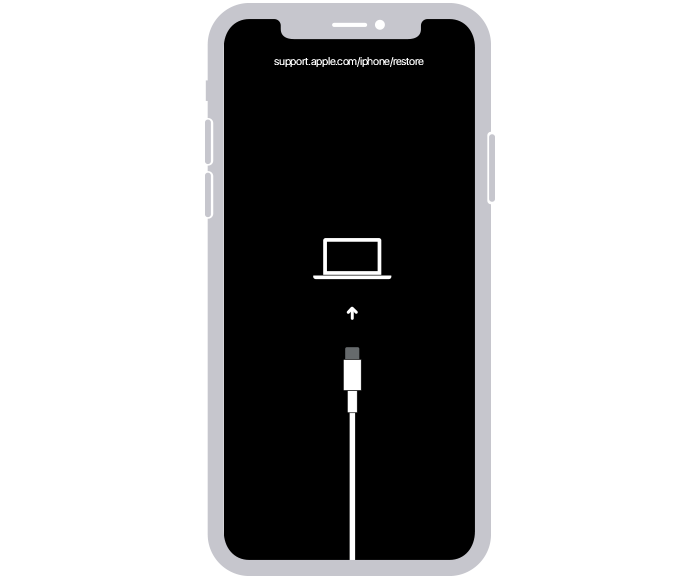
Keep holding the buttons until you see the recovery mode screen.
When you get the option to restore or update, choose Update.
Your computer will download the software for your device. If it takes more than 15 minutes, your device will exit recovery mode. Repeat steps 2-4.
Cheers!
Hi alecia40,
If your iPhone won't start up all the way, we'd recommend trying the tips below.
If your iPhone turns on but gets stuck during start up
If you see the Apple logo or a red or blue screen during startup, try these steps:
Connect your iPhone to a computer. On a Mac with macOS Catalina, open the Finder. On a Mac with macOS Mojave or earlier, or on a PC, open iTunes. Find out which macOS your Mac is using.
Select your iPhone on your computer.
While your iPhone is connected, follow these steps:
On your iPhone 8 or later, including iPhone SE (2nd and 3rd generation): Press and quickly release the volume up button. Press and quickly release the volume down button. Then press and hold the side button.
On your iPhone 7 or iPhone 7 Plus: Press and hold the side button and volume down button at the same time.
On your iPhone 6s or earlier, including iPhone SE (1st generation): Press and hold both the Home button and the side button or the top button at the same time.
Keep holding the buttons until you see the recovery mode screen.
When you get the option to restore or update, choose Update.
Your computer will download the software for your device. If it takes more than 15 minutes, your device will exit recovery mode. Repeat steps 2-4.
Cheers!
iphone 12 only showing apple logo