magic keyboard delete button
The delete button on my magic keyboard for my iPad Pro is no longer deleting messages. It works for everything else. Anyone have a recent similar issue of cure? Thank you.
iPad Pro 11-inch Wi-Fi
The delete button on my magic keyboard for my iPad Pro is no longer deleting messages. It works for everything else. Anyone have a recent similar issue of cure? Thank you.
iPad Pro 11-inch Wi-Fi
Hello Chuck,
We'd try closing the Messages app, then restarting the iPad and Magic Keyboard.
To close an app: https://support.apple.com/guide/ipad/quit-and-reopen-an-app-ipad79518d15/ipados
Quit and reopen an app on iPad
If an app isn’t responding, you can quit it and then reopen it to try and resolve the issue. (Typically, there’s no reason to quit an app; quitting it doesn’t save battery power, for example.)
1. To quit an app, open the App Switcher, then swipe up on the app.
Turn off the Magic Keyboard.
Then restart the iPad: https://support.apple.com/HT210631
How to restart an iPad without a Home button
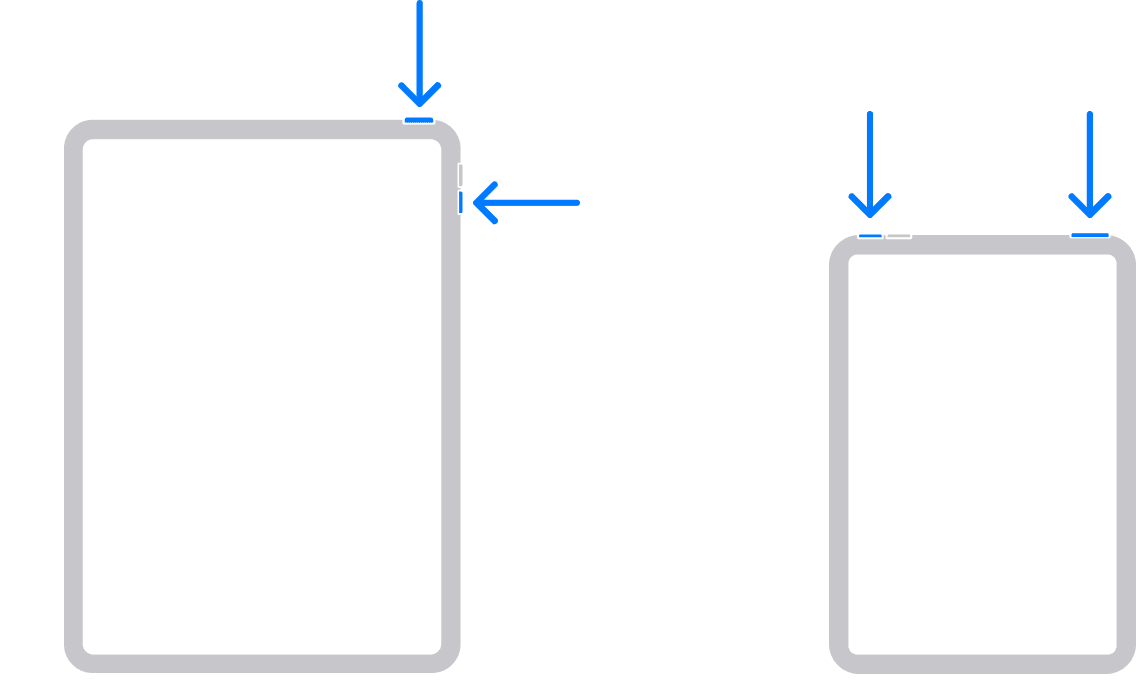
1. Press and hold either volume button and the top button until the power off slider appears.
2. Drag the slider, then wait 30 seconds for your device to turn off. If your device is frozen or unresponsive, force restart your device.
3. To turn your device back on, press and hold the top button until you see the Apple logo.
How to restart an iPad with a Home button
1. Press and hold the top button until the power off slider appears.
2. Drag the slider, then wait for 30 seconds for your device to turn off. If your device is frozen or unresponsive, force restart your device.
3. To turn your device back on, press and hold the top button until you see the Apple logo.
After this try pairing the keyboard with your iPad again to test it out.
If the issue continues to occur, does this happen when you attempt to delete a conversation/message or when you attempt to delete typed content within the Messages app?
Wishing you well, cheers.
Hello Chuck,
We'd try closing the Messages app, then restarting the iPad and Magic Keyboard.
To close an app: https://support.apple.com/guide/ipad/quit-and-reopen-an-app-ipad79518d15/ipados
Quit and reopen an app on iPad
If an app isn’t responding, you can quit it and then reopen it to try and resolve the issue. (Typically, there’s no reason to quit an app; quitting it doesn’t save battery power, for example.)
1. To quit an app, open the App Switcher, then swipe up on the app.
Turn off the Magic Keyboard.
Then restart the iPad: https://support.apple.com/HT210631
How to restart an iPad without a Home button
1. Press and hold either volume button and the top button until the power off slider appears.
2. Drag the slider, then wait 30 seconds for your device to turn off. If your device is frozen or unresponsive, force restart your device.
3. To turn your device back on, press and hold the top button until you see the Apple logo.
How to restart an iPad with a Home button
1. Press and hold the top button until the power off slider appears.
2. Drag the slider, then wait for 30 seconds for your device to turn off. If your device is frozen or unresponsive, force restart your device.
3. To turn your device back on, press and hold the top button until you see the Apple logo.
After this try pairing the keyboard with your iPad again to test it out.
If the issue continues to occur, does this happen when you attempt to delete a conversation/message or when you attempt to delete typed content within the Messages app?
Wishing you well, cheers.
magic keyboard delete button