iPhone 13 - Stuck Preparing to sync
Just got a new iPhone 13 Pro Max. And when I try and sync it to my Mac it gets to step 3 Preparing to Sync and stays there. I even let it run overnight and I'm still on this step. Suggestions?
Just got a new iPhone 13 Pro Max. And when I try and sync it to my Mac it gets to step 3 Preparing to Sync and stays there. I even let it run overnight and I'm still on this step. Suggestions?
Welcome Demgor02,
Have you tried to restart both the iPhone and Mac? If not, we'd try that next: Restart your iPhone - Apple Support
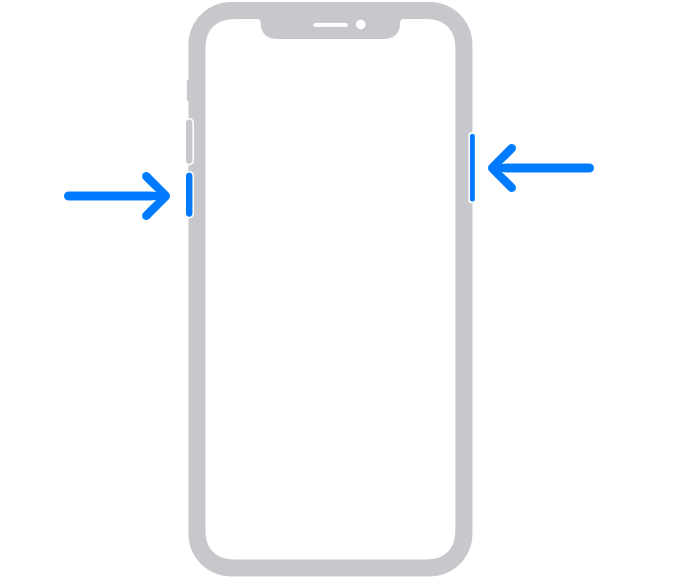
How to restart your iPhone X, 11, 12, or 13
1. Press and hold either volume button and the side button until the power-off slider appears.
2. Drag the slider, then wait 30 seconds for your device to turn off. If your device is frozen or unresponsive, force restart your device.
3. To turn your device back on, press and hold the side button (on the right side of your iPhone) until you see the Apple logo.
Disconnect the iPhone from the Mac.
On your Mac, go to the Apple menu > Restart. Then take these steps and attempt to sync again: Sync your iPhone, iPad, or iPod using your computer - Apple Support
If the issue continues to occur, which macOS version are you using? You can locate this in the Apple menu > About this Mac. You mentioned this was new, have you successfully synced this iPhone in the past or is this the first time?
Hoping this helps out, cheers.
Welcome Demgor02,
Have you tried to restart both the iPhone and Mac? If not, we'd try that next: Restart your iPhone - Apple Support
How to restart your iPhone X, 11, 12, or 13
1. Press and hold either volume button and the side button until the power-off slider appears.
2. Drag the slider, then wait 30 seconds for your device to turn off. If your device is frozen or unresponsive, force restart your device.
3. To turn your device back on, press and hold the side button (on the right side of your iPhone) until you see the Apple logo.
Disconnect the iPhone from the Mac.
On your Mac, go to the Apple menu > Restart. Then take these steps and attempt to sync again: Sync your iPhone, iPad, or iPod using your computer - Apple Support
If the issue continues to occur, which macOS version are you using? You can locate this in the Apple menu > About this Mac. You mentioned this was new, have you successfully synced this iPhone in the past or is this the first time?
Hoping this helps out, cheers.
There are lots of reasons this can happen. I will list most frequent from my experience.
Good luck.
demgor02,
What type of data are you attempting to sync to your iPhone from your computer?
If it's more than one type of data, can you take it down to one type at a time and see if the issue can be narrowed to a data type?
If it's just one type of data, can we cut the amount in half and test? For example, if it's all music, can you try syncing just a few albums or playlists instead of everything, then add more, etc? The hope is this isolates to the data causing an issue. Other things you can look for are if there is security software, you might need to update, change, or uninstall software in case it is interfering with your computer's connection.
Thanks.
I found one more...
7. When using USB, Windows likes to use your iPhone as an Internet router even while connected via ethernet. Turn off your iPhone's Personal Hotspot and try again. I just had this problem and the sync started working as soon as I turned Personal Hotspot off. As a side benefit, Windows stops using your cell phone data to download gigs of updates.
Yes this has been done and still gets thru steps 1 and 2 fine via WIFI or wired and step 3 just hangs at preparing to sync.
iPhone 13 - Stuck Preparing to sync