Fingerprint access on App Store keeps disabling

Why is the fingerprint access on my iPad 12.9 2nd Gen, 15.5, keep disabling itself. Whenever this happens, I have to do a workaround. Go to TouchID and Pass setting, turn off Touch ID for iTunes and App Store. Reboot my iPad, then go back into settings to turn on Touch ID for iTunes and App Store. Cool. Works again. But at some point, the App Store app will start asking me to manually enter my passcode. Then I have to do the workaround again. This has been going on for a long time now.


  1. Why does this happen?
  2. How to fix permanently?


I really hope that someone here has a more permanent solution. Or at the very least, an explanation of why this is happening in the first place. Note as well, when this happens, the only apps that are affected is within Apple. Ie. iTunes and App Store. Fingerprint verification continues to work for everything else not Apple.


I’ve read online, others have been having this issue for a very long time. It kills me that Apple doesn’t address these issues on their devices. There are issues that have existed for years, that haven’t been fixed. And they are annoying. Like this fingerprint issue. There’s one I’ve read that they are finally getting done in iOS 16. Cross fingers. I feel like I’m using a knock off tablet. Definitely doesn’t feel like the Apple that “Just Works”. Apple hasn’t felt like that since Jobs passed.

iPad Pro 12.9-inch, 2nd Gen, Wi-Fi

Posted on Jun 21, 2022 11:08 AM

Reply

Similar questions

2 replies

Jun 22, 2022 10:51 AM in response to Eric Shawn2

Hello Eric Shawn2,


The first thing that we recommend is to make sure that your iPad is using the latest iPadOS. Tap on Settings > General > Software update and check to see if there are any updates available. If there are, be sure to back up the iPad as instructed here: How to back up your iPhone, iPad, and iPod touch - Apple Support


If that does not resolve the issue, you may want to try a fresh install of the latest iPadOS. Here is how that can be done. Again, be sure you have a back up before performing these steps:


Put your iPad in recovery mode and set it up again
1. Make sure that your Mac is up to date. If you're using iTunes, make sure you have the latest version of iTunes
2. On a Mac with macOS Catalina, open Finder. On a Mac with macOS Mojave or earlier, or on a PC, open iTunes. If iTunes is already open, close it, then open it again. Find out which macOS your Mac is using.
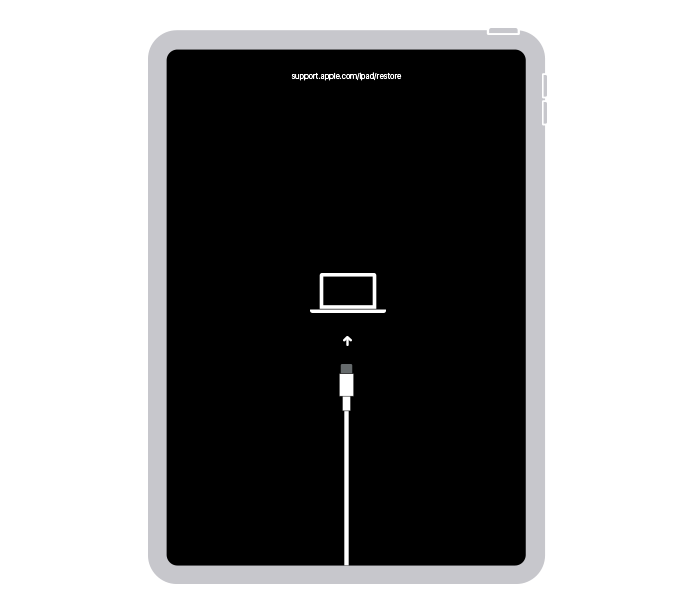
3. Keep your iPad connected and wait until the recovery mode screen appears:
• For an iPad without a Home button: Press and quickly release the volume button closest to the top button. Press and quickly release the volume button farthest from the top button. Press and hold the top button.
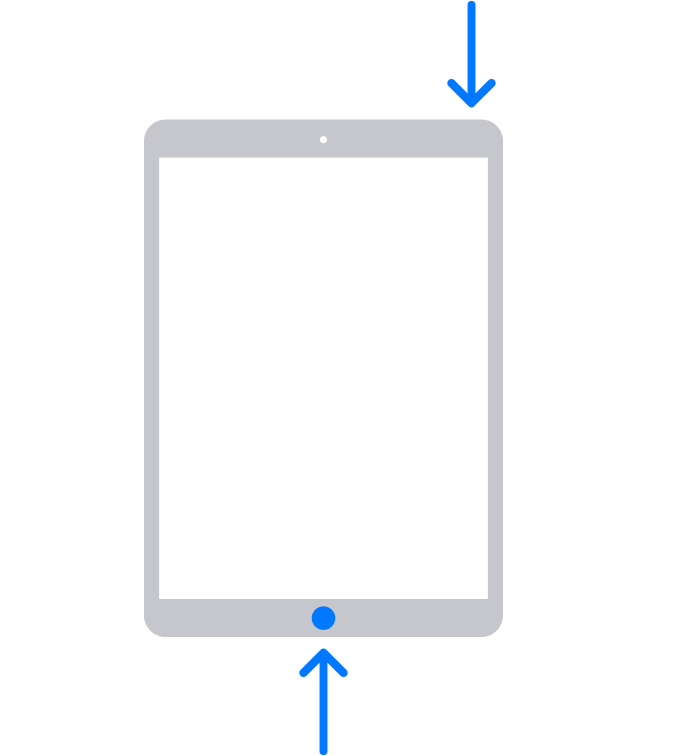
• For an iPad with a Home button: Press and hold both the Home and the top (or side) buttons at the same time. 
4. Keep holding the button (or buttons) until you see the recovery mode screen:
5. Locate your iPad on your computer. When you see the option to Restore or Update, choose Update. Your computer will try to reinstall the software without erasing your data. Wait while your computer downloads the software for your iPad. If the download takes more than 15 minutes and your iPad exits the recovery mode screen, let the download finish, then repeat step 3.
6. After the Update or Restore completes, set up your iPad.


These steps can be found here: If you can't update or restore your iPad - Apple Support


Have a good day.

Jul 14, 2022 11:15 AM in response to srbwanderer

I’ve done all those steps. And fingerprint access on App Store still randomly stops working. No idea why or how it continues to happen. And I have to keep doing my workaround. That was such a pain in the arse though. I had to reinstall all my apps. My take on this “fix”. Is that they don’t work. At least for me. Wiping, and reinstalling everything from scratch has NEVER worked for me in any of my issues that I’ve come across in at least the last 10 years I’ve been using Apple devices. Never. But they are a pain to do. This is the last time I will ever be doing that.


In trying to find a solution to this. I realized this issue has been ongoing for several years now. Even happened on my old 9” iPad Pro. It’s an iPadOS issue for sure. But Apple seems to feel, this is not a priority issue. Even though it’s been an issue for many for years. My take. It’s like when Apple was slowing down people’s devices, and not telling them (I knew of this back in 2014, long before Apple finally admitted it). It seems, perhaps, this is Apple’s way of getting everyone to upgrade all their fingerprint devices to newer face rec devices. That makes the most sense. Much more than it being an issue that a clean install “will fix”.

This thread has been closed by the system or the community team. You may vote for any posts you find helpful, or search the Community for additional answers.

Fingerprint access on App Store keeps disabling

Welcome to Apple Support Community
A forum where Apple customers help each other with their products. Get started with your Apple Account.