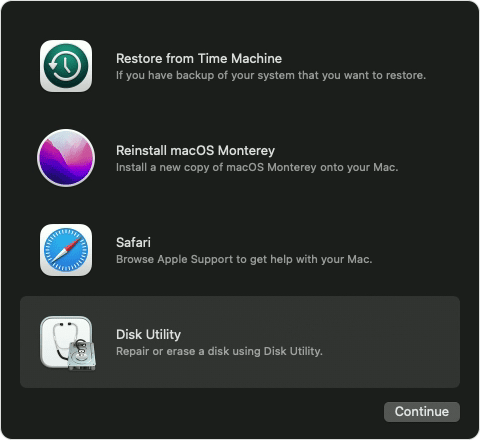
After restore from time machine, my comuter boots into recovery mode

I replaced my internal hard drive on my Mac. It is an iMac 2013. When I tried to restore from TM backup it errored. I read a post about installing a clean version and restoring later. I installed OS X Mavericks (I had to back date the system to work with the certificates). That worked. Then I entered recovery mode and reinstalled from TM backup. This ran for 90 min and appeared to work. When finished the computer rebooted. This is where it got weird. It rebooted back into recovery mode. There were three disks shown.


  1. My normal disk.. new internal hard drive
  2. my external TM drive.
  3. a new 1.2GB drive call Mac OS X Boot Drive.


I tried restarting again, and it ended up in recovery mode. Any ideas?

Posted on Jun 27, 2022 6:20 PM

Reply

Similar questions

1 reply

Jun 28, 2022 12:57 PM in response to fernin8r

Hi fernin8r,


Have you tried the steps outlined in the guide here: Time Machine troubleshooting on Mac - Apple Support


Also, test repairing the disk as recommend here: If you can't back up or restore your Mac using Time Machine - Apple Support


How to repair a Mac disk with Disk Utility - Apple Support


"Open Disk Utility

In general, you can just open Disk Utility from the Utilities folder of your Applications folder. However, if your Mac doesn't start up all the way, or you want to repair the disk your Mac starts up from, open Disk Utility from macOS Recovery:

  1. Determine whether you're using a Mac with Apple silicon, then follow the appropriate steps:
    • Apple silicon: Turn on your Mac and continue to press and hold the power button until you see the startup options window. Click the gear icon labeled Options, then click Continue.
    • Intel processor: Turn on your Mac, then immediately press and hold these two keys until you see an Apple logo or other image: Command (⌘) and R.
  1. You may be asked to select a user you know the password for. Select the user, then click Next and enter their administrator password.
  2. From the utilities window in macOS Recovery, select Disk Utility and click Continue.
  3. macOS Recovery options with Disk Utility selected"


Let us know if the repair helps.


Best.


This thread has been closed by the system or the community team. You may vote for any posts you find helpful, or search the Community for additional answers.

After restore from time machine, my comuter boots into recovery mode

Welcome to Apple Support Community
A forum where Apple customers help each other with their products. Get started with your Apple Account.