Apple ID cannot connect to server

Hy I am using IPHONE 11 PRO and facing issues APPLE ID SUGGESTION : when i go to this option there is error appearing problem connecting to server" 2) When i go to I CLOUD storage error is "unable to load storage My phone is not making any backup


[Edited by Moderator]

Posted on Jul 18, 2022 8:32 AM

Reply
Question marked as Top-ranking reply

Posted on Jul 19, 2022 10:08 AM

Hey there aslam73,


It looks like this might be related to your network connection. Are you having issues when using Safari or other applications that require an internet connection?


Also, if you haven't already, we recommend connecting to another reliable network then test to see if you can load Apple ID/iCloud information again. Use the steps below to help:


1. Make sure that your router is on and you're within range
If you're too far from your Wi-Fi router, you can't get a signal, so make sure that you're within range. 
 
2. Make sure that Wi-Fi is on and you can see your network
Go to Settings > Wi-Fi and make sure that Wi-Fi is on. Tap the name of your Wi-Fi network to join. A blue checkmark beside a network name means that you're connected.
If you see Auto Join Disabled under your Wi-Fi network name, tap it turn on Auto-Join.
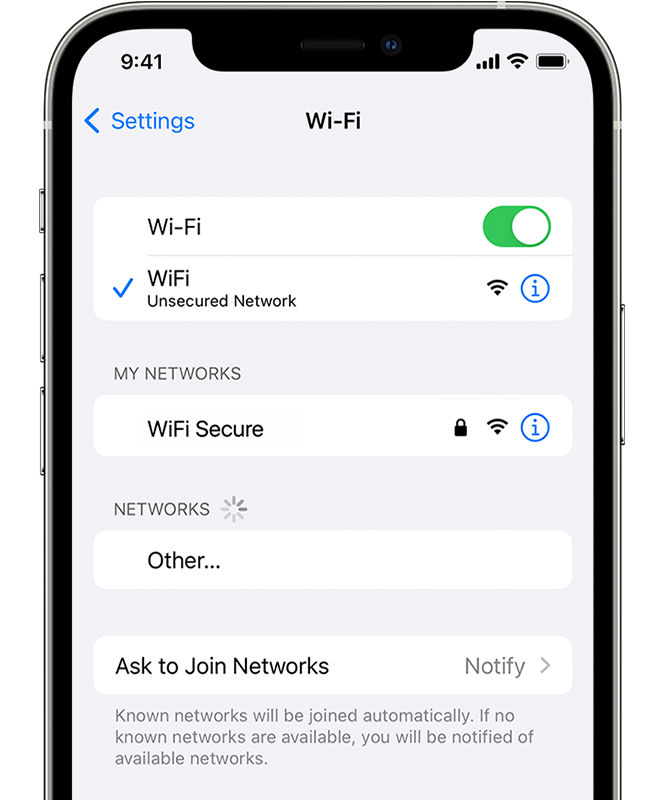
An iPhone on the Settings > Wi-Fi screen. There's a blue a checkmark next to the Wi-Fi network's name.
3. If asked, enter your Wi-Fi password
If asked, enter the password for your Wi-Fi network. Get help if you don't know your password.
Even if you enter the correct password, you might see an "unable to join the network" message or an "incorrect password" message. Restart all of your devices, then try to enter your password again.


If your iPhone, iPad, or iPod touch won't connect to a Wi-Fi network - Apple Support


If you can't connect to the App Store, iTunes Store, or other Apple services - Apple Support -- If you’re not having problems with your Wi-Fi network, see if these Apple-provided steps help you reach the server.


Take care!


1 reply
Question marked as Top-ranking reply

Jul 19, 2022 10:08 AM in response to aslam73

Hey there aslam73,


It looks like this might be related to your network connection. Are you having issues when using Safari or other applications that require an internet connection?


Also, if you haven't already, we recommend connecting to another reliable network then test to see if you can load Apple ID/iCloud information again. Use the steps below to help:


1. Make sure that your router is on and you're within range
If you're too far from your Wi-Fi router, you can't get a signal, so make sure that you're within range. 
 
2. Make sure that Wi-Fi is on and you can see your network
Go to Settings > Wi-Fi and make sure that Wi-Fi is on. Tap the name of your Wi-Fi network to join. A blue checkmark beside a network name means that you're connected.
If you see Auto Join Disabled under your Wi-Fi network name, tap it turn on Auto-Join.
An iPhone on the Settings > Wi-Fi screen. There's a blue a checkmark next to the Wi-Fi network's name.
3. If asked, enter your Wi-Fi password
If asked, enter the password for your Wi-Fi network. Get help if you don't know your password.
Even if you enter the correct password, you might see an "unable to join the network" message or an "incorrect password" message. Restart all of your devices, then try to enter your password again.


If your iPhone, iPad, or iPod touch won't connect to a Wi-Fi network - Apple Support


If you can't connect to the App Store, iTunes Store, or other Apple services - Apple Support -- If you’re not having problems with your Wi-Fi network, see if these Apple-provided steps help you reach the server.


Take care!


This thread has been closed by the system or the community team. You may vote for any posts you find helpful, or search the Community for additional answers.

Apple ID cannot connect to server

Welcome to Apple Support Community
A forum where Apple customers help each other with their products. Get started with your Apple Account.