Texts only go through iCloud account
Why are my texts only sending through my iCloud account?
iPhone 13 Pro Max, iOS 15
Why are my texts only sending through my iCloud account?
iPhone 13 Pro Max, iOS 15
Hi Whawley3,
It sounds like your messages are being sent from your Apple ID and would like them to be sent from your phone number. If that's the case, make sure the correct number is added, and selected in Settings > Messages > Send & Receive.
If you need to set up your phone number there use these steps:
On your iPhone:
• Go to Settings > Messages and make sure that iMessage is on. You might need to wait a moment for it to activate.
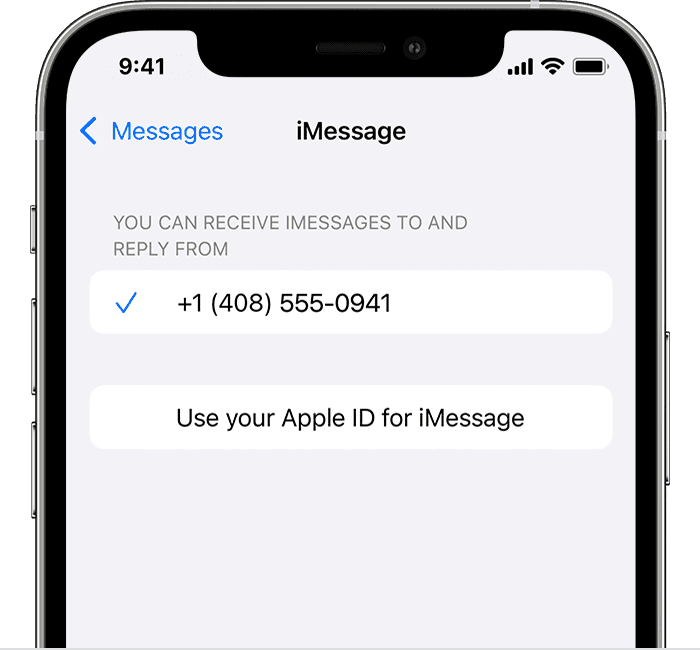
• Tap Send & Receive. If you see “Use your Apple ID for iMessage,” tap it and sign in with the same Apple ID that you use on your Mac, iPad, and iPod touch.
• In the "You can receive iMessages to and Reply From" section, make sure that your phone number and Apple ID are selected.
• Go to Settings > FaceTime and make sure that your phone number and Apple ID are selected in the "You can be reached by FaceTime at" section.
See more about that here: Add or remove your phone number in Messages or FaceTime
Thanks
Hi Whawley3,
It sounds like your messages are being sent from your Apple ID and would like them to be sent from your phone number. If that's the case, make sure the correct number is added, and selected in Settings > Messages > Send & Receive.
If you need to set up your phone number there use these steps:
On your iPhone:
• Go to Settings > Messages and make sure that iMessage is on. You might need to wait a moment for it to activate.
• Tap Send & Receive. If you see “Use your Apple ID for iMessage,” tap it and sign in with the same Apple ID that you use on your Mac, iPad, and iPod touch.
• In the "You can receive iMessages to and Reply From" section, make sure that your phone number and Apple ID are selected.
• Go to Settings > FaceTime and make sure that your phone number and Apple ID are selected in the "You can be reached by FaceTime at" section.
See more about that here: Add or remove your phone number in Messages or FaceTime
Thanks
Texts only go through iCloud account