How do I reset my Beats Solo Pro headphones?
How do I reset my Beats Solo Pro Headphones?
How do I reset my Beats Solo Pro Headphones?
Hello AppleQuery17,
You can reset your Beats Solo Pro using the steps below
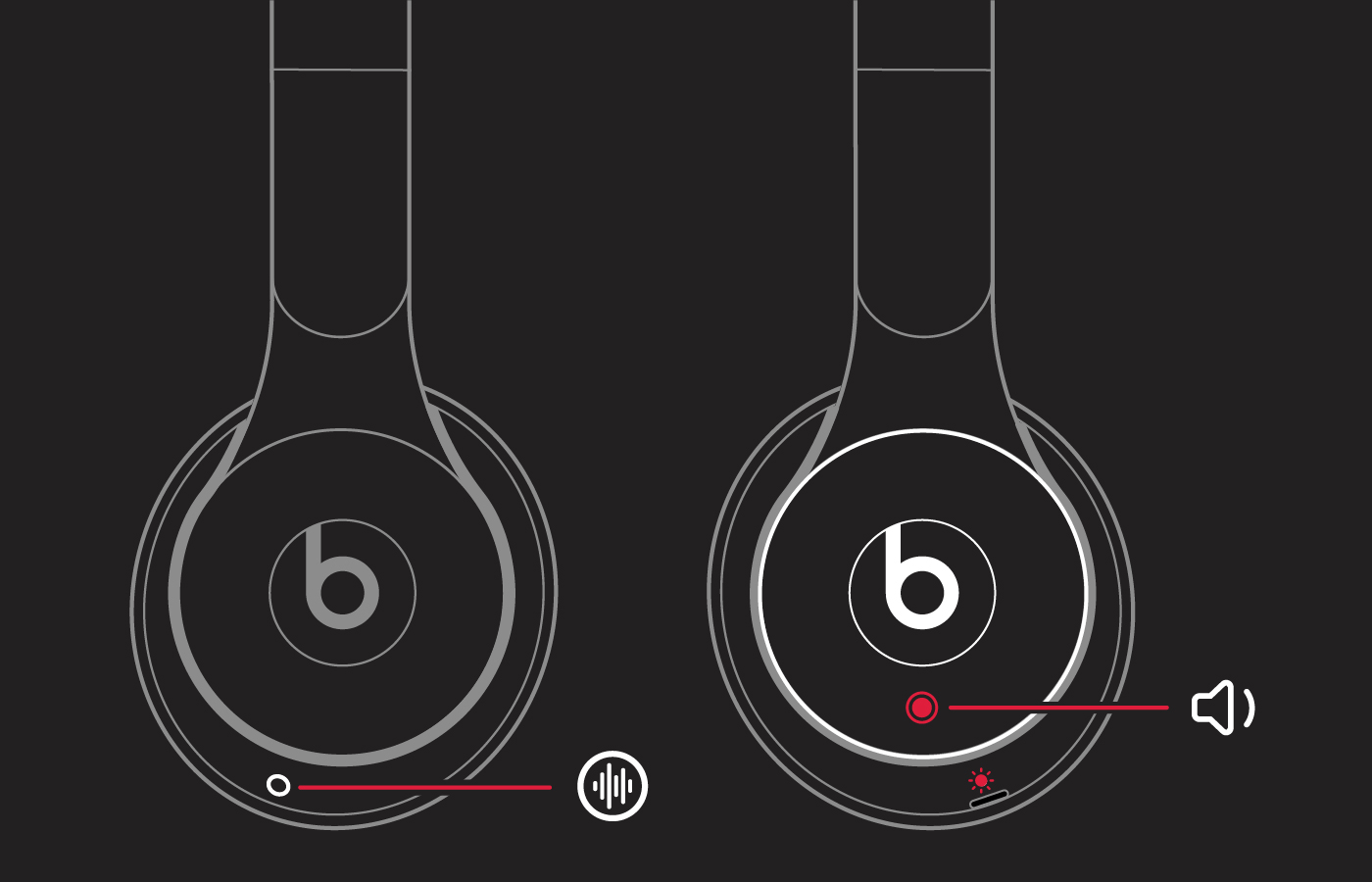
1. Hold down the mode button and volume down button for 10 seconds.
2. When the LED flashes red, release the buttons.
Your headphones are now reset and ready to be set up with your devices again.
You can also find those steps in this resource: Reset your Beats on-ear or over-ear headphones - Apple Support
If you are facing difficulties with your Beats that persist after a reset, can you let us know more details? That will help us to provide the best guidance possible.
Take care.
Hello AppleQuery17,
You can reset your Beats Solo Pro using the steps below
1. Hold down the mode button and volume down button for 10 seconds.
2. When the LED flashes red, release the buttons.
Your headphones are now reset and ready to be set up with your devices again.
You can also find those steps in this resource: Reset your Beats on-ear or over-ear headphones - Apple Support
If you are facing difficulties with your Beats that persist after a reset, can you let us know more details? That will help us to provide the best guidance possible.
Take care.
How do I reset my Beats Solo Pro headphones?