Unable to Authenticate MacBook Air M2 for iTunes

I have iTunes purchases and uploads I established many years ago. My new MacBook laptop tells me I have to authenticate it to access my files on iTunes. There is no iTunes for new MacBooks, it has been replaced with Music which is a paid service. So, I am being extorted. To get my files, I must pay. Unless, someone out there knows a way around this situation without paying Apple money.


MacBook Air, macOS 12.5

Posted on Aug 6, 2022 9:16 AM

Reply
Question marked as Top-ranking reply

Posted on Aug 6, 2022 11:38 AM

You can use the Music app to listen to listen to your iTunes music.

Sorry, I forgot the following link to authorization instructions in my previous post: Authorize or deauthorize your computer for iTunes Store purchases - Apple Support

If you get an add about subscribing to Apple Music, there should be an x in upper right corner of it or some other way to bypass or decline.


How to authorize or deauthorize your Mac

  1. Open the Apple Music app or Apple TV app. In the menu bar, choose Account and make sure that you're signed in with your Apple ID.
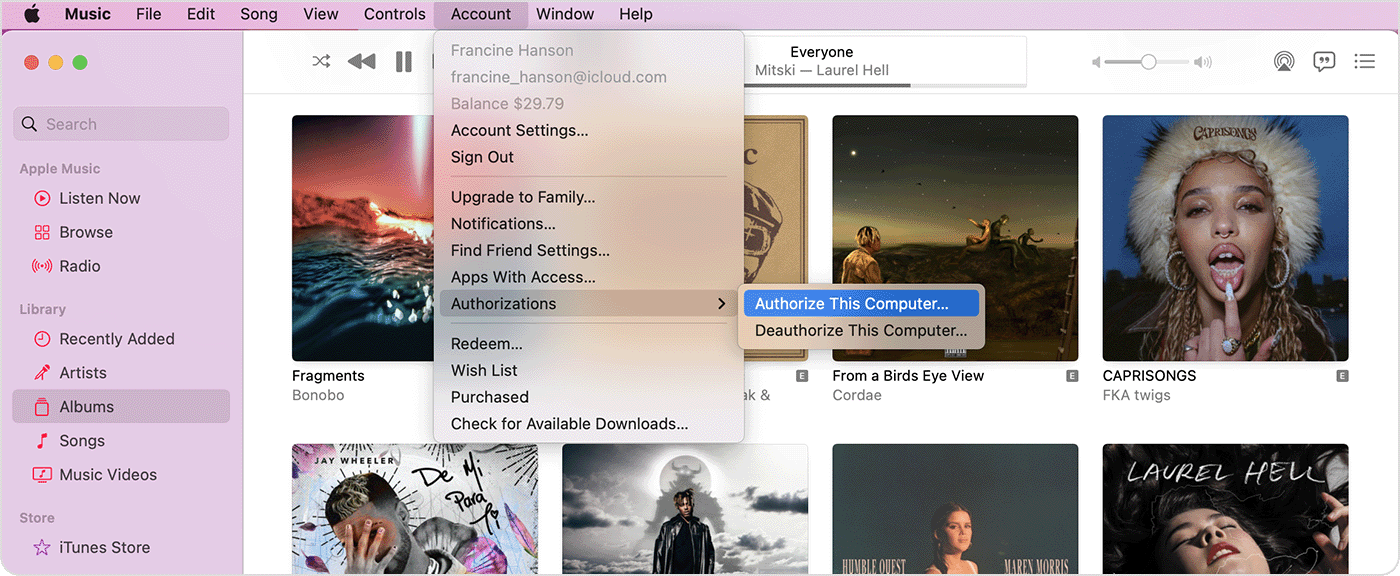
  2. Choose Account > Authorizations, then choose Authorize This Computer or Deauthorize This Computer.

  3. Sign in with your Apple ID and password. Forgot your Apple ID?
  4. Click Authorize or Deauthorize.


Similar questions

5 replies
Question marked as Top-ranking reply

Aug 6, 2022 11:38 AM in response to ejbpesca

You can use the Music app to listen to listen to your iTunes music.

Sorry, I forgot the following link to authorization instructions in my previous post: Authorize or deauthorize your computer for iTunes Store purchases - Apple Support

If you get an add about subscribing to Apple Music, there should be an x in upper right corner of it or some other way to bypass or decline.


How to authorize or deauthorize your Mac

  1. Open the Apple Music app or Apple TV app. In the menu bar, choose Account and make sure that you're signed in with your Apple ID.
  2. Choose Account > Authorizations, then choose Authorize This Computer or Deauthorize This Computer.

  3. Sign in with your Apple ID and password. Forgot your Apple ID?
  4. Click Authorize or Deauthorize.


Aug 6, 2022 11:41 AM in response to FoxFifth

I think I found it. I was going in the wrong direction. I just authenticated the MacBook and I have a file playing I think came from iTunes. I used another way to transfer it (moved it from a copy on a PC laptop) and that allowed me to authenticate with ID and password. When I tried that with my transferred iPad I got the message to use Music app to do it. I launched Music app, tried to play/authenticate and it sent me to a screen to pay for a subscription.

Aug 6, 2022 11:32 AM in response to FoxFifth

Thank you for the reply. I attempted to use Music to authenticate my new MacBook. I was taken right to a screen sign up for paid subscription. Maybe this is new for the latest Macs, or am I doing something wrong? Far as I can tell, if I want to play my own (not iTunes purchased) music files, I will use the free included QuickTime on the new MacBook. Music (the app) on my machine is a paid listen to, or purchase music app that has replaced iTunes. I still can get to iTunes and play purchases on my old iPad, but from what have I experienced, there is no way to authenticate my new Mac to play my transfers from that old iPad unless I pay for a Music (app) subscription, unless I am missing something here. If you know the procedure to authenticate a Mac for iTunes via Music app without paying for a Music subscription, please post. My goal is authentication to get to my old purchases. Itunes is no more for my MacBook and instructions say that Musci app is the way. Thank you.

This thread has been closed by the system or the community team. You may vote for any posts you find helpful, or search the Community for additional answers.

Unable to Authenticate MacBook Air M2 for iTunes

Welcome to Apple Support Community
A forum where Apple customers help each other with their products. Get started with your Apple Account.