Why can't I see the estimated life / usefulness in the batter like I can on my iPhone?

I want to see the remaining life of my MacBook battery but it just says it manages the health of battery, nothing with the actual life left. Am I missing something or is this just a huge oversight? (purposely done or not)

MacBook Pro 13″, macOS 11.3

Posted on Aug 9, 2022 4:36 PM

Reply
Question marked as Top-ranking reply

Posted on Aug 9, 2022 6:54 PM

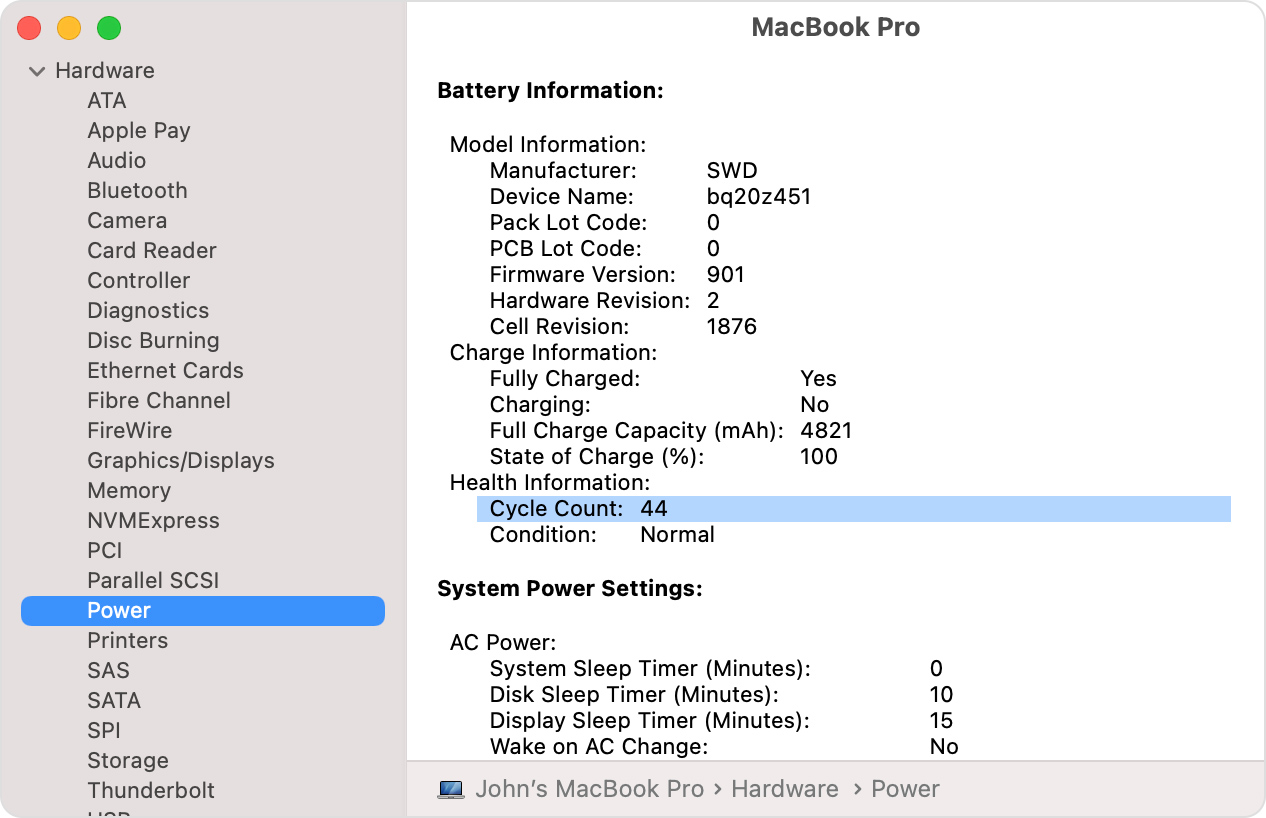
You can see that battery health in System Report under Hardware > Power.


Older versions of MacOS used to only display the maximum capacity in mAh, but the current version only outputs a value in full percentage points. I have a fairly new Mac and this is what I see:


 Health Information:
  Cycle Count: 9
  Condition: Normal
  Maximum Capacity: 100%


And coconutBattery was mentioned. That produces far more information including iPhone/iPad battery data on connected devices. I have that installed on all my Macs.


https://www.coconut-flavour.com/coconutbattery/

6 replies
Question marked as Top-ranking reply

Aug 9, 2022 6:54 PM in response to JimmieLynch

You can see that battery health in System Report under Hardware > Power.


Older versions of MacOS used to only display the maximum capacity in mAh, but the current version only outputs a value in full percentage points. I have a fairly new Mac and this is what I see:


 Health Information:
  Cycle Count: 9
  Condition: Normal
  Maximum Capacity: 100%


And coconutBattery was mentioned. That produces far more information including iPhone/iPad battery data on connected devices. I have that installed on all my Macs.


https://www.coconut-flavour.com/coconutbattery/

Aug 10, 2022 12:07 AM in response to JimmieLynch

JimmieLynch wrote:

I’m not downloading another app. This is an Apple forum so I’m not putting a 3rd party app to read system states. It’s clearly a flaw if it’s not readily accessible like in an iPhone. That or purposely left out.

With this MacBook Pro barely able to stay off the power cord that’s unacceptable. I’d like to know the remaining battery health, but so far no one has been able to say that’s possible. I was hoping it was an oversight on my part but nothing useful in settings has been mentioned yet.


Did you read what I wrote? It is possible and it was not left out. A Mac's battery capacity is readable within the operating system in System Report. This has been the case since OS X first came out and possibly even before that. Did you give a try?


Depending on the version of MacOS and/or the particular Mac model it might be in terms of mAh capacity (Full Charge Capacity) or percentage of expected new capacity (Maximum Capacity). If it's the former it will require looking up what new capacity is in order to calculate a percentage. Or it could be easy by using coconutBattery, which has a database of new battery capacities.


Determine battery cycle count for Mac notebooks - Apple Support

Aug 9, 2022 5:26 PM in response to JimmieLynch

There is also a freeware app called Coconut Battery that can give you all sorts of data, including cycle counts, for a macOS device battery. It is a very old and trusted app and has been in distribution for over a decade. There is a freeware version and a paid version (with of course some extra features if you wish them).


Works with the current macOS 12.5 on intel and M1 and M2 Macs.

Aug 9, 2022 10:13 PM in response to JimmieLynch

I’m not downloading another app. This is an Apple forum so I’m not putting a 3rd party app to read system states. It’s clearly a flaw if it’s not readily accessible like in an iPhone. That or purposely left out.


With this MacBook Pro barely able to stay off the power cord that’s unacceptable. I’d like to know the remaining battery health, but so far no one has been able to say that’s possible. I was hoping it was an oversight on my part but nothing useful in settings has been mentioned yet.

This thread has been closed by the system or the community team. You may vote for any posts you find helpful, or search the Community for additional answers.

Why can't I see the estimated life / usefulness in the batter like I can on my iPhone?

Welcome to Apple Support Community
A forum where Apple customers help each other with their products. Get started with your Apple Account.


