How to check magic mouse 1 is original?
iPhone X, iOS 14
iPhone X, iOS 14
Hi AlexChin89,
Welcome to Apple Support Communities. We understand that you have questions about the authenticity of a Magic Mouse you purchased. We'd like to help.
Have you tried to locate the serial number of this device and check that serial number for coverage. It may allow you to identify which exact model you have and if it's authentic. Check out how to get that done here:
Find the serial number of your Magic Keyboard, Magic Mouse, or Magic Trackpad - Apple Support
Earlier wireless mice
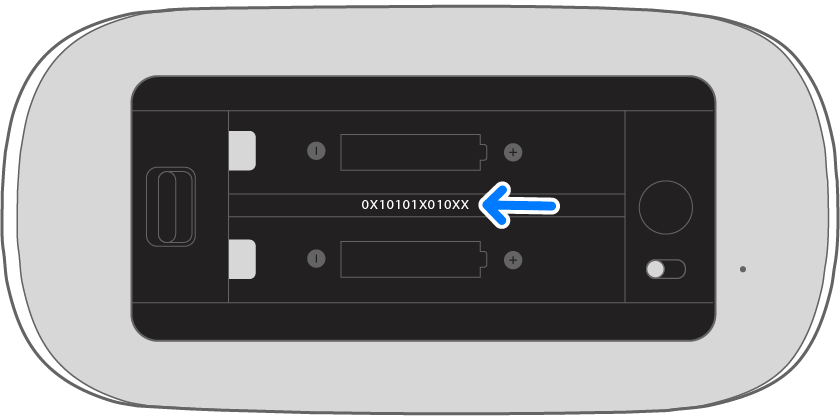
You can find the serial number of earlier Apple wireless mouse models inside the device's battery bay:
Check Your Service and Support Coverage - Apple Support
Let us know if you have any other questions after that.
Cheers!
Hi AlexChin89,
Welcome to Apple Support Communities. We understand that you have questions about the authenticity of a Magic Mouse you purchased. We'd like to help.
Have you tried to locate the serial number of this device and check that serial number for coverage. It may allow you to identify which exact model you have and if it's authentic. Check out how to get that done here:
Find the serial number of your Magic Keyboard, Magic Mouse, or Magic Trackpad - Apple Support
Earlier wireless mice
You can find the serial number of earlier Apple wireless mouse models inside the device's battery bay:
Check Your Service and Support Coverage - Apple Support
Let us know if you have any other questions after that.
Cheers!
How to check magic mouse 1 is original?