Beats Studio Buds turn off when changing from noise cancelling to transparency

Hello, i want to ask about my beats studio buds, my problem is when i want to change mode in noise cancelling to transparency in volume (beats studio logo) it will back to off mode and if i want to change to transprency mode i will back again to off


[Edited by Moderator]

Posted on Aug 13, 2022 8:29 AM

Reply
Question marked as Top-ranking reply

Posted on Aug 14, 2022 1:23 PM

Hello fadhlirivandi,


Thanks for posting in the Apple Support Communities!


Turning off your Beats Studio Buds would be an option to switch to using the Beats logo, and you may be able to customize this in Settings. Check out the information below, and you can find more details here: Beats Studio Buds and Beats Fit Pro Active Noise Cancellation and Transparency mode - Apple Support


Switch between listening modes

You can switch between listening modes right from your Beats Studio Buds or Beats Fit Pro, or you can use your iOS or iPadOS device, your Apple Watch, or your Mac. When you switch between modes, you hear a chime.

When you use iOS, iPadOS, watchOS, or macOS to switch between listening modes, you’ll see Active Noise Cancellation available as Noise Cancellation.

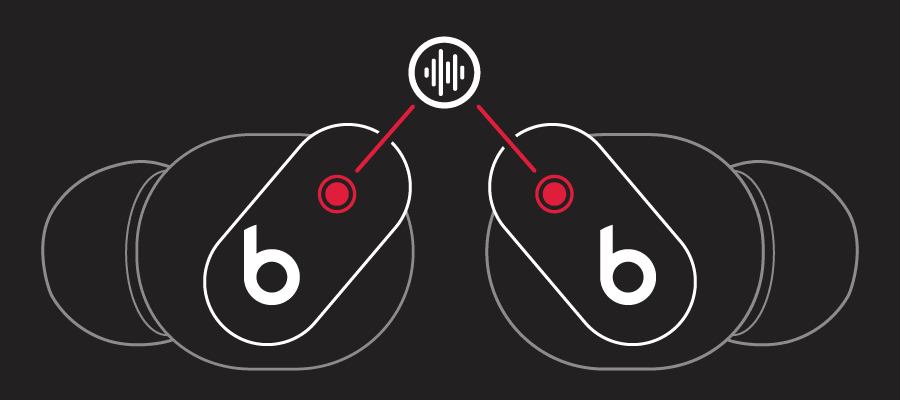
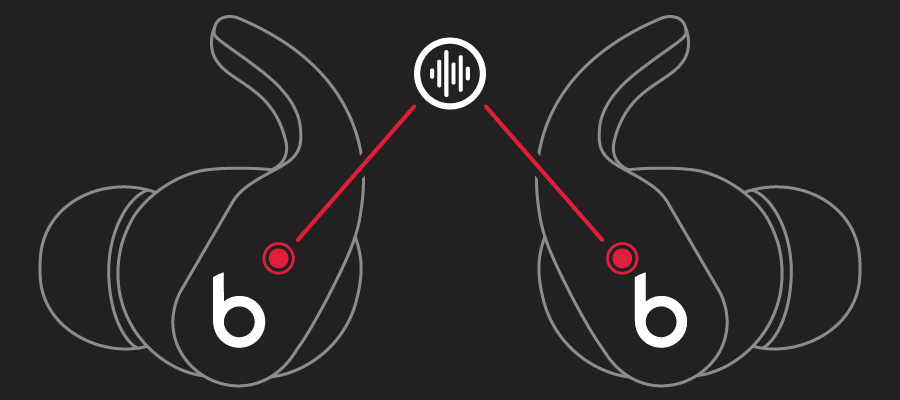
Press and hold the Beats logo button on either earbud until you hear a chime.

illustration of earbud showing side buttonillustration of earbud showing side button

When you're wearing both Beats Studio Buds or Beats Fit Pro, press and hold the Beats logo button on either earbud to switch between Active Noise Cancellation and Transparency mode. You can customize which modes to switch between (Active Noise Cancellation, Transparency mode, and Off) in Settings.


We hope that's able to help.


Have a great day!

1 reply
Question marked as Top-ranking reply

Aug 14, 2022 1:23 PM in response to fadhlirivandi

Hello fadhlirivandi,


Thanks for posting in the Apple Support Communities!


Turning off your Beats Studio Buds would be an option to switch to using the Beats logo, and you may be able to customize this in Settings. Check out the information below, and you can find more details here: Beats Studio Buds and Beats Fit Pro Active Noise Cancellation and Transparency mode - Apple Support


Switch between listening modes

You can switch between listening modes right from your Beats Studio Buds or Beats Fit Pro, or you can use your iOS or iPadOS device, your Apple Watch, or your Mac. When you switch between modes, you hear a chime.

When you use iOS, iPadOS, watchOS, or macOS to switch between listening modes, you’ll see Active Noise Cancellation available as Noise Cancellation.

Press and hold the Beats logo button on either earbud until you hear a chime.

illustration of earbud showing side buttonillustration of earbud showing side button

When you're wearing both Beats Studio Buds or Beats Fit Pro, press and hold the Beats logo button on either earbud to switch between Active Noise Cancellation and Transparency mode. You can customize which modes to switch between (Active Noise Cancellation, Transparency mode, and Off) in Settings.


We hope that's able to help.


Have a great day!

This thread has been closed by the system or the community team. You may vote for any posts you find helpful, or search the Community for additional answers.

Beats Studio Buds turn off when changing from noise cancelling to transparency

Welcome to Apple Support Community
A forum where Apple customers help each other with their products. Get started with your Apple Account.