Anyone else have a significant slow down since the update to Monterey 12.5?

It is not 100% of the time, but easily 75%. Some apps take minutes, not seconds, to open. Using iMac 2019, 3.6 GHz, 8 core i9, 32gb ram - should not be slow. Activity monitor doesn't show heavy CPU use - system max 4.5%, user max 3.6%, idle average 93%. Doesn't make sense to me. But I am relatively new to the Mac ecosystem - used to work only on PCs.....

iMac Line (2012 and Later)

Posted on Aug 15, 2022 11:28 AM

Reply
Question marked as Top-ranking reply

Posted on Aug 18, 2022 12:38 PM


Similar questions

27 replies

Aug 15, 2022 3:36 PM in response to bensrose

Have you installed and run any "cleaning", "optimizing", "speed-up", anti-virus or VPN apps on your Mac?


Download and run Etrecheck.  Copy and paste the results into your reply. Etrecheck is a diagnostic tool that was developed by one of the most respected users here in the ASC and recommended by Apple Support  to provide a snapshot of the system and help identify the more obvious culprits that can adversely affect a Mac's performance.


Copy the report


and use the Additional Text button to paste the report in your reply.


Then we can evaluate the report and try to ascertain what's causing your problems.


Aug 18, 2022 7:51 PM in response to geekk777

geekk777 wrote:

after update to macOS 12.5 my iMac very slow

You posted a different Etrecheck report with possibly a different problem than the other posters. It is best to start a new thread with your question separately.


Looking at your Etrecheck, you have a fusion drive from 2017. It is moderately old and is mostly a mechanical drive (it has a small SSD also) and mechanical drives are very slow under Monterey and the APFS disk format. You also have Adguard, and multiple utilities meant to manage fans and temperatures. You might consider uninstalling those tools to see what the impact is. I also see something called Appcleaner but don't know what that does, but in general "cleaning" apps are sometimes noted to be problem causers. A program called TelegramShare has been crashing. Is it compatible with Monterey?


The biggest problem could be the fusion drive performs poorly under Monterey and APFS. But you could remove (uninstall completely) the above software to see if it helps.

Sep 4, 2022 1:24 PM in response to bensrose

I had a similar problem. Traced the root cause to be a USB-connected hard drive that was failing. Apparently, the indexing service in Finder was using a lot of system resources trying to index this drive and not succeeding very well. Disconnected the failing drive and all good again. Just coincidence that the problem started about the time of the 12.5.1 update.

Aug 17, 2022 10:20 AM in response to bensrose

First, never add your personal information, i.e. full name, email address or phone no in any post. That's a sure way to get on many spam lists. I've asked the Hosts to edit out that info.


I don't use any of the usual suspects that would be causing the beach balling. I noticed that you have DropBox installed. There have been several posts with Monterey that uninstalling DropBox cleared up the problem. You might do that. There is another similar provider, Box, that has more space for the free version and less of a system resource hog. If Dropbox is the culprit give Box a try. I do't use either so can't comment from experience.


Aug 18, 2022 3:19 PM in response to geekk777

Unless you're using a true VPN tunnel, such as between you and your employer, school or bank's servers, they are useless from a privacy standpoint.  Read these two articles: Public VPN's are anything but private and Former Malware Distributor Kape Technologies Now Owns ExpressVPN, CyberGhost, Private Internet Access, Zenmate, and a Collection of VPN “Review” Websites


That being said uninstall WireGuard according to the developer's instructions and see if that helps the performance.


Also where did you get the additional RAM. Kernel panics can be hardware related and RAM that is incompatible with a system can cause the panics. The only RAM that many of us here use is from either Crucial.com or OWC (MacSales.com).


There is no reason to ever install or run any 3rd party "cleaning", "optimizing", "speed-up", anti-virus, VPN or security apps on your Mac.  This user tip describes what you need to know and do in order to protect your Mac: Effective defenses against malware and other threats - Apple Community.  


There are no known viruses, i.e. self propagating, for Macs.  There are, however, adware and malware which require the user to install although unwittingly most of the time thru sneaky links, etc.   


Anti Virus developers try to group all types as viruses into their ad campaigns of fear.  They do a poor job of the detecting and isolating the adware and malware.  Since there are no viruses these apps use up a lot of system resources searching for what is non-existent and adversely affect system and app performance.


There is one app, Malwarebytes, which was developed by a long time contributor to these forums and a highly respected member of the computer security community, that is designed solely to seek out adware and known malware and remove it.  The free version is more than adequate for most users.  


Just some food for thought.


Sep 4, 2022 2:56 PM in response to geekk777

Uninstall AdGuard. It's got several files running all the time in the background. If you need a ad removal feature for your browser try Ghostery or AdGuard. They are much less intrusive.


Unless you're using a true VPN tunnel, such as between you and your employer, school or bank's servers, they are useless from a privacy standpoint.  Read these two articles: Public VPN's are anything but private and Former Malware Distributor Kape Technologies Now Owns ExpressVPN, CyberGhost, Private Internet Access, Zenmate, and a Collection of VPN “Review” Websites


Uninstall the vpn according to the developer's instructions.


RAM modules should be adding in match pairs. The following is from this Apple document: Install memory in an iMac - Apple Support (CA)


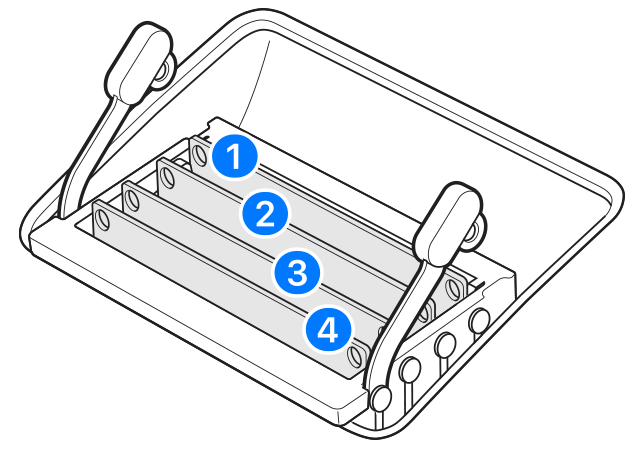
iMac (Retina 5K, 27-inch, 2020) DIMMs have a notch on the bottom, slightly left of the middle. If your DIMMs are mixed in capacity, minimize the capacity difference between Channel A (slots 1 and 2) and Channel B (slots 3 and 4) when possible.


From the report it appears that you r have a 4 GB and a 16 GB in Channel A (slots 1 & 2) and just a 4 GB module in slot #3.


Remove the 16 GB, put the two 4 GB modules in #1 & #2 and run for a while. Then you can purchase another 16 GB module and add the two to #3 & #4. Only get the RAM from Crucial.com or MacSales.com. Macs, especially with the later systems, are extremely finicky over RAM quality and the two vendors guarantee their modules will work in the model intended.


Aug 15, 2022 1:46 PM in response to bensrose

No.


  • I don't have any antivirus or cleanup apps installed
  • I don't leave too many apps open at one time
  • I don't have lots of apps loading at startup
  • I only install apps I really need
  • I shut down my Mac at least once a day
  • I didn't migrate a lot of old stuff over from my 12 year old Mac Pro Desktop
  • I don't use Microsoft Office
  • I only use standalone Adobe Lightroom 5, no other Adobe products
  • I don't use Chrome because it is known to be memory hungry
  • I don't use screensavers


M1 24" iMac Monterey 12.5

This thread has been closed by the system or the community team. You may vote for any posts you find helpful, or search the Community for additional answers.

Anyone else have a significant slow down since the update to Monterey 12.5?

Welcome to Apple Support Community
A forum where Apple customers help each other with their products. Get started with your Apple Account.