Hello the_bart123,
Thank you for reaching out in Apple Support Communities. We understand you'd like to organize the conversation threads in the Messages app on your iPhone. We'll be happy to help.
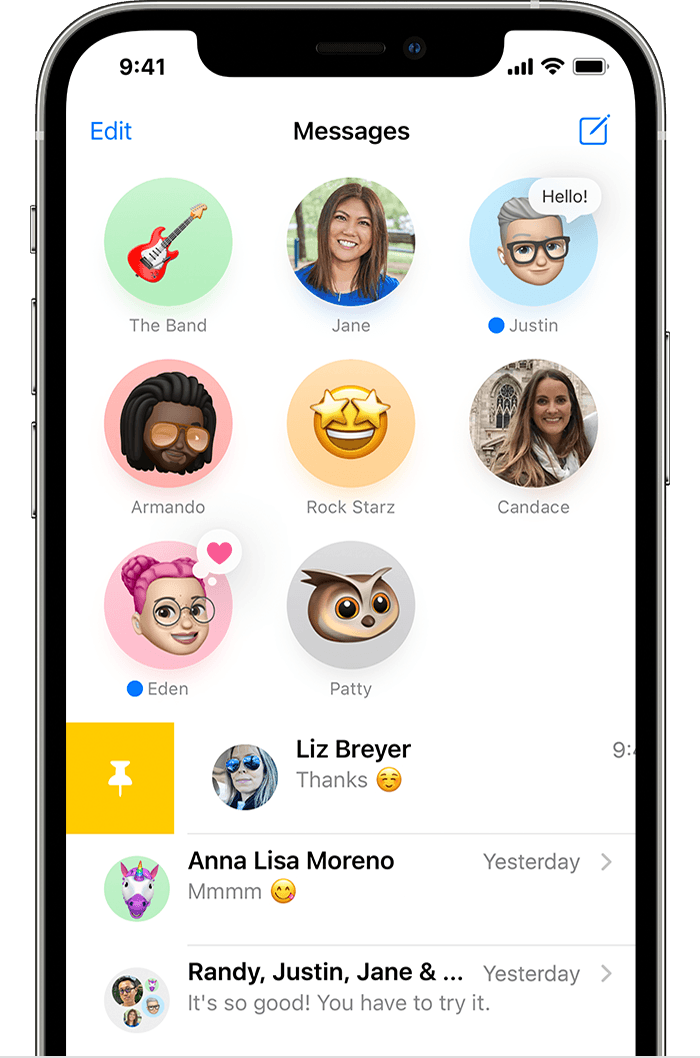
You can pin up to nine conversations in the Messages app. This will allow you to visually see them at the top within the app. Here's how to do that:
Pin important conversations
With Messages in iOS 14 and iPadOS 14 and later, you can pin up to nine conversations. When you pin a conversation it shows up at the top of the Messages app, so it's easy to get to.
To pin a conversation, open Messages, then swipe right over the conversation. Or follow these steps:
- Open Messages, then tap Edit or the More button
 .
. - Tap Edit Pins
 , then tap the Pin button
  .
. - Tap Done.
Best regards.


