Can I have my personal computer and phone sync some things on icloud, and my work computer sync other things?

I want all my contacts synched across all devices, but I only want my photos synched on my personal computer and phone. Is this possible?

MacBook Air 13″, macOS 10.15

Posted on Aug 19, 2022 11:33 AM

Reply
Question marked as Top-ranking reply

Posted on Aug 21, 2022 12:27 PM

Hi CaptainCrouton89,


The things you do not want to sync to your work computer would have to be turned off in System Preferences > Apple ID > iCloud. This would prevent it from being on your work computer. The same goes for the things you want on your Mac. You would have to turn those options on in System Preferences > Apple ID > iCloud on your work Mac.


You can setup iCloud contacts by completing the steps below that are also listed here: Set up and use iCloud Contacts - Apple Support


On your Mac
1. From the menu bar at the top of your computer screen, choose Apple menu  > System Preferences, then click Apple ID. If you’re using macOS Mojave or earlier, you don’t need to click Apple ID. 
2. Click iCloud.
3. Select Contacts.

You can setup Messages in iCloud by completing the steps below that are also listed here: Use Messages in iCloud - Apple Support


On your Mac
1. Open Messages.
2. In the menu bar, choose Messages > Preferences.
3. Click iMessage.
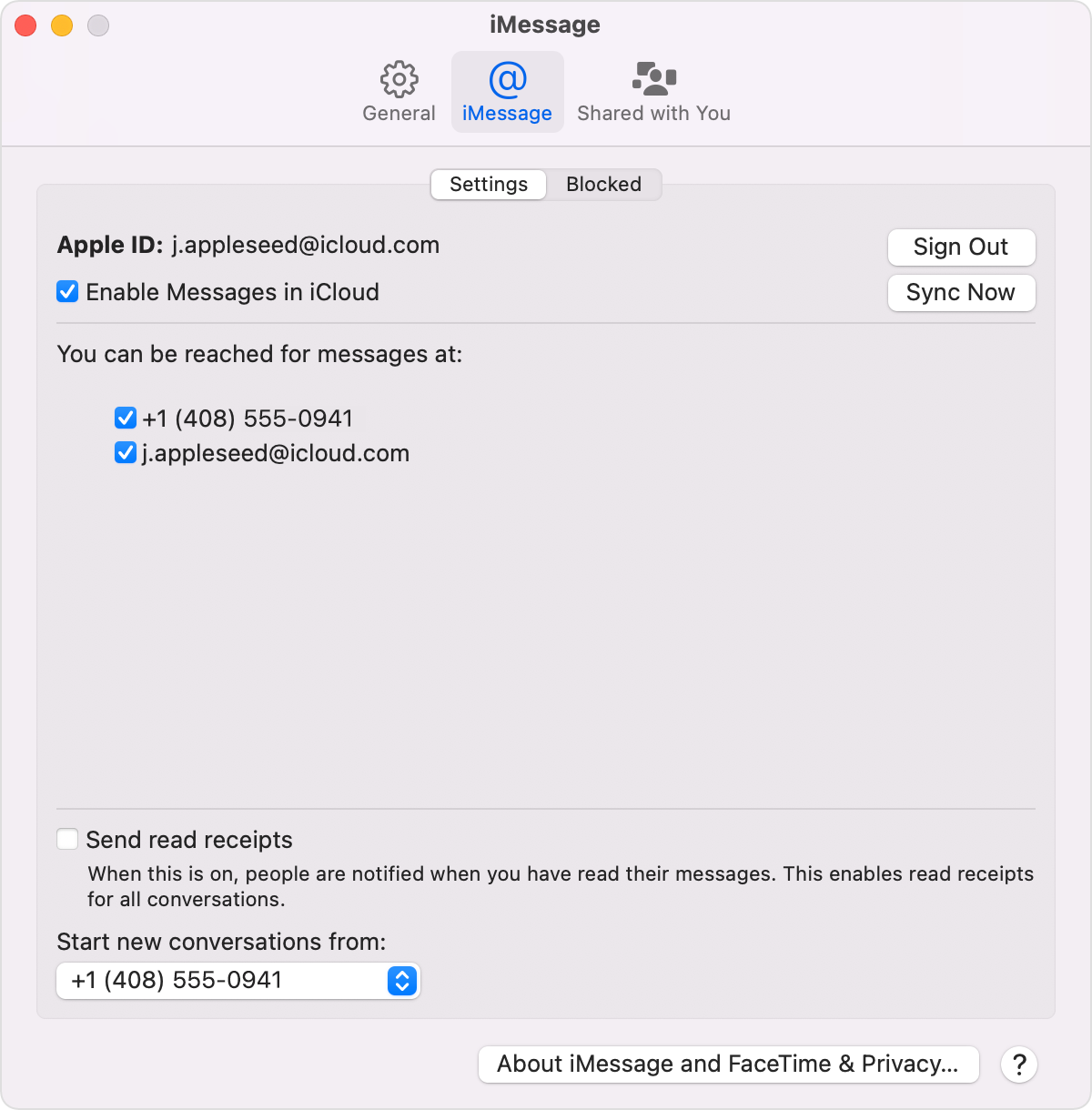
4. Select the checkbox next to Enable Messages in iCloud.
Mac iMessage settings screen with Enable Messages in iCloud selected

Cheers!

3 replies
Question marked as Top-ranking reply

Aug 21, 2022 12:27 PM in response to CaptainCrouton89

Hi CaptainCrouton89,


The things you do not want to sync to your work computer would have to be turned off in System Preferences > Apple ID > iCloud. This would prevent it from being on your work computer. The same goes for the things you want on your Mac. You would have to turn those options on in System Preferences > Apple ID > iCloud on your work Mac.


You can setup iCloud contacts by completing the steps below that are also listed here: Set up and use iCloud Contacts - Apple Support


On your Mac
1. From the menu bar at the top of your computer screen, choose Apple menu  > System Preferences, then click Apple ID. If you’re using macOS Mojave or earlier, you don’t need to click Apple ID. 
2. Click iCloud.
3. Select Contacts.

You can setup Messages in iCloud by completing the steps below that are also listed here: Use Messages in iCloud - Apple Support


On your Mac
1. Open Messages.
2. In the menu bar, choose Messages > Preferences.
3. Click iMessage.
4. Select the checkbox next to Enable Messages in iCloud.
Mac iMessage settings screen with Enable Messages in iCloud selected

Cheers!

Aug 21, 2022 9:14 AM in response to CaptainCrouton89

Hi CaptainCrouton89, We appreciate you reaching out to us. We understand that you are looking to manage the data that are synced to your devices.


We’d like to gather additional details that may help us be in a better position to assist you.

Are you using managed devices?


If no, you have the option to manage which data are synced to your devices.

For iOS and iPadOS devices, you can manage the data synced to iCloud through Settings > tap your name.

For macOS devices, you can go to System Preferences > Apple ID > iCloud.


Take care!

Aug 21, 2022 9:30 AM in response to kamote0628

I am using managed devices‚ and I know how to turn on and off synchronization. I'm just wondering if those settings are global. For example, I want all of my safari favorited tabs uploaded to the cloud. However, I only want my personal laptop and my iPhone pulling from the cloud—my work computer should have its own, isolated set of favorited tabs. On the other hand, I want all of my iMessages and contacts synchronized across all of my devices.


Does that make sense?

This thread has been closed by the system or the community team. You may vote for any posts you find helpful, or search the Community for additional answers.

Can I have my personal computer and phone sync some things on icloud, and my work computer sync other things?

Welcome to Apple Support Community
A forum where Apple customers help each other with their products. Get started with your Apple Account.