Alarm clock should go off on the iPhone instead of the Apple Watch

When the alarm goes off with my sleep schedule in the morning, I can easily turn it off with my Apple Watch by putting the palm of my hand on it, respectively turning the alarm off completely. I do this while half asleep and it doesn't really wake me up. Now I would like to set it up so that I can put on the Apple Watch while still asleep for sleep analysis, but the alarm comes from the iPhone in the morning so I have to get out of my bed.

I hope it's clear what my goal is :)

And I know that I can turn off the push notifications from the app "clock" However, I would already like to get the notification of my timer end or so.

iPhone 12 Pro Max, iOS 16

Posted on Aug 21, 2022 3:25 PM

Reply
1 reply

Aug 22, 2022 2:16 PM in response to MasterSpam

Hey there MasterSpam,


It sounds like you're wanting to use the Sleep app but also have your alarm go off in the morning.


With the Sleep app, you're able to create schedules and also set up an alarm to wake you up. This will allow you to still use the app while also maintaining the alarm to get you up in the morning.


Use the steps below to set up Sleep on your Apple Watch and to also set up the wake-up alarm:


Set up Sleep on Apple Watch
1. Open the Sleep app  on your Apple Watch.
2. Follow the onscreen instructions.

You can also open the Health app on iPhone, tap Browse, tap Sleep, then tap Get Started (under Set Up Sleep).

Change or turn off your next wake-up alarm
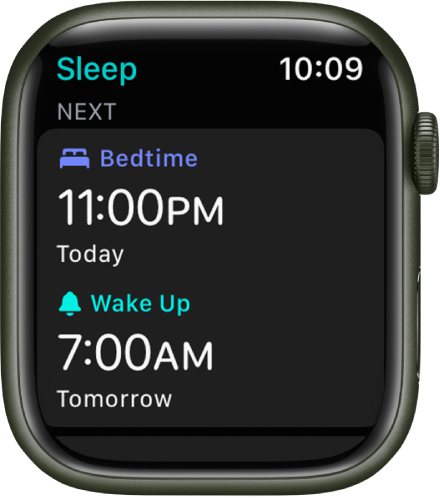
The Sleep app on Apple Watch showing the evening’s sleep schedule. Bedtime appears at the top, and Wake Up time is below it.
1. Open the Sleep app  on your Apple Watch.
2. Tap your current bedtime.
3. To set a new wake-up time, tap the wake-up time, turn the Digital Crown to set a new time, then tap the Check button.

If you don’t want your Apple Watch to wake you in the morning, turn off Alarm.

You can also open the Health app on your iPhone, tap Browse, tap Sleep, then tap Edit below Your Schedule to change your schedule.

The changes apply only to your next wake-up alarm, after which your normal schedule resumes.
Note: You can also turn off the next wake-up alarm in the Alarms app . Just tap the alarm that appears under Sleep | Wake up, then tap Skip for Tonight.

For more details: Track your sleep with Apple Watch - Apple Support


We hope this helps!


Take care.


This thread has been closed by the system or the community team. You may vote for any posts you find helpful, or search the Community for additional answers.

Alarm clock should go off on the iPhone instead of the Apple Watch

Welcome to Apple Support Community
A forum where Apple customers help each other with their products. Get started with your Apple Account.