I cant add the phone number to iMessage/facetime

Hi,


I cant add the phone number to iMessage/facetime. because of error activation failed, bit the commission from my carrier happened after each attempt to add the phone number.


Please help to understand if i missing sth. i have a latest update, apple id can be added easily


iPhone XS

Posted on Aug 28, 2022 8:08 AM

Reply
1 reply

Aug 29, 2022 9:42 AM in response to Kusalap007

Hello Kusalap007,


For assistance with this issue, follow the steps from this article:

Add or remove your phone number in Messages or FaceTime - Apple Support


If you can't see or select your number in Messages or FaceTime
1. Make sure that you're using the latest software for your Mac or iOS device
2. Make sure that you correctly followed the iPhone steps to set up your phone number. You should be using the same Apple ID on all of your devices.
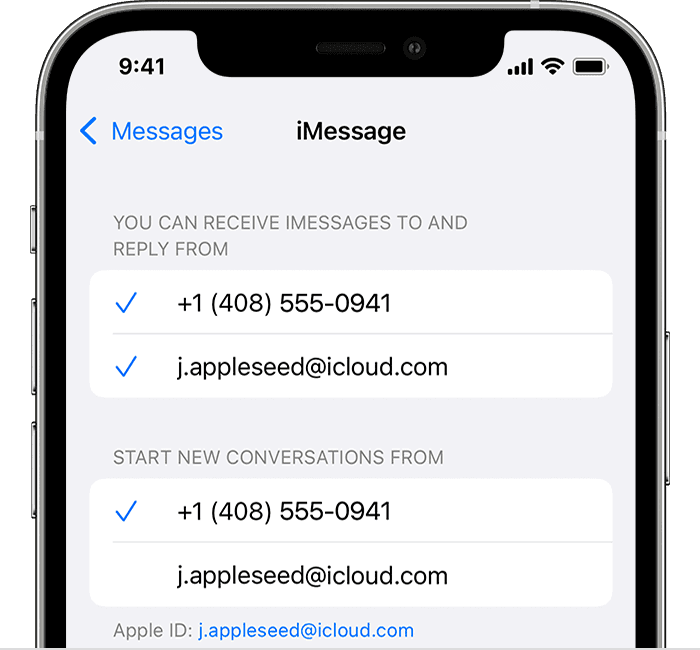
3. In the “You can be reached” section of Messages and FaceTime settings, make sure that there are checkmarks beside your phone number and Apple ID:
iPhone showing how to choose where you can be reached
If your phone number is unchecked and you can't select it, or you have some other issue, follow these steps:
On your iPhone, iPad, and iPod touch:
Go to Settings > Messages > Send & Receive. Tap your Apple ID, then tap Sign Out.
Go to Settings > FaceTime. Tap your Apple ID, then tap Sign Out.
On your iPhone:
Go back to Settings > Messages and make sure that iMessage is turned on.
Tap Send & Receive, then choose “Use your Apple ID for iMessage” and sign in with your Apple ID.
Using the same Apple ID, sign back in to Messages and FaceTime on your other devices. 
If you still need help, change your Apple ID password and repeat the setup steps. If that doesn't work, contact Apple Support.


Best Regards.


This thread has been closed by the system or the community team. You may vote for any posts you find helpful, or search the Community for additional answers.

I cant add the phone number to iMessage/facetime

Welcome to Apple Support Community
A forum where Apple customers help each other with their products. Get started with your Apple Account.