Has anybody ever connected Hubspace to apple home

Has anybody ever connected Hubspace to apple home

Posted on Aug 29, 2022 1:41 AM

Reply
1 reply

Aug 30, 2022 8:45 AM in response to Hubspace

Hi Hubspace,


For help with adding accessories to use with HomeKit, test the steps below found in the article here: Add a HomeKit accessory to the Home app - Apple Support


"To add an accessory to the Home app, use your iPhone, iPad, or iPod touch. You can't add accessories to the Home app on Mac. Before you set up your accessory, check these things:


  • Make sure that the accessory is powered on and nearby.
  • Check the accessory's manual to see if it needs additional hardware to work with HomeKit.

Then follow these steps:

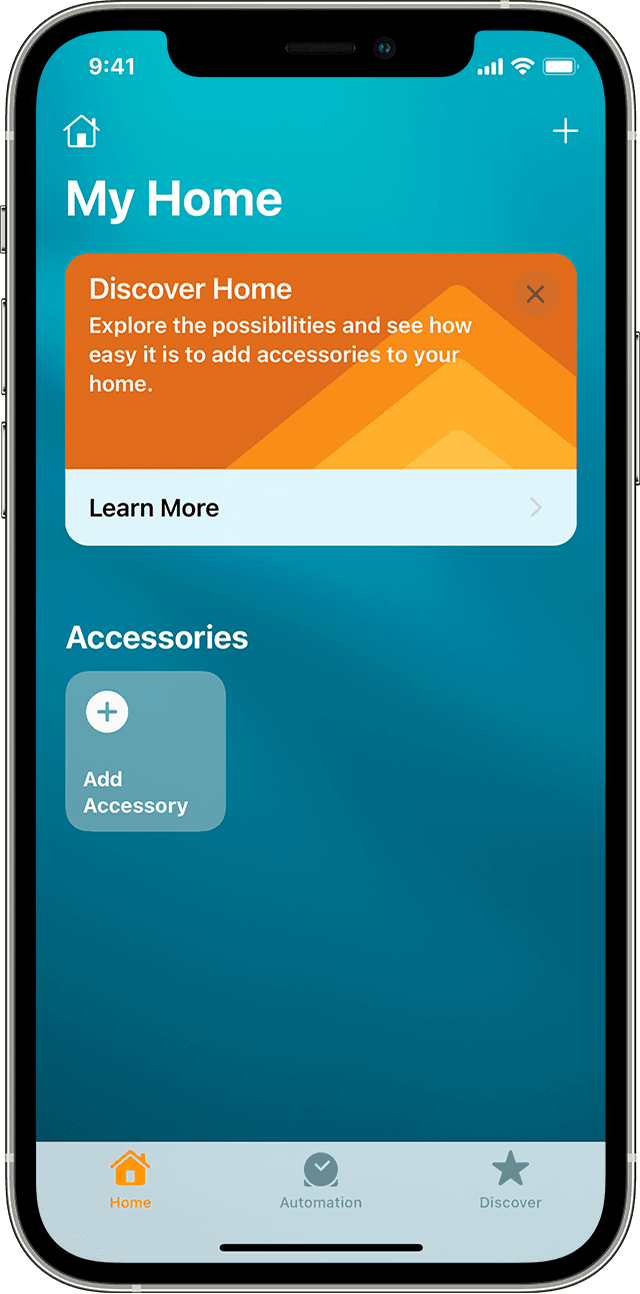
The Home app screen on iOS showing the Add Accessory tile 

  1. Open the Home app and tap Add Accessory  or Add  .
  2. Tap Add Accessory .
  3. Use the camera on your iPhone, iPad, or iPod touch to scan the eight-digit HomeKit code, or QR code on the accessory or accessory documentation. If you have an iPhone 7 or later and see NFC-compatibility symbol on your accessory, hold your iPhone near the accessory to add it.
  4. When your accessory appears, tap it. If asked to Add Accessory to Network, tap Allow.
  5. Name your accessory and assign it to a room to help you identify it in the Home app and control it with Siri.
  6. Tap Next, then tap Done.

Learn how to set up your HomePod mini, HomePod, Apple TV, or iPad as a home hub so that you can control your accessories while you're away from your home."


You can also view a list of supported accessories here: iOS - Home Accessories - Apple


Best.

This thread has been closed by the system or the community team. You may vote for any posts you find helpful, or search the Community for additional answers.

Has anybody ever connected Hubspace to apple home

Welcome to Apple Support Community
A forum where Apple customers help each other with their products. Get started with your Apple Account.