Recovery contact

Recovery contact

Posted on Aug 31, 2022 3:37 PM

Reply
Question marked as Top-ranking reply

Posted on Sep 1, 2022 2:45 PM

Hello adejoke129,


Thank you for reaching out to Apple Support Communities, and we'll be happy to help in any way we can. We understand you have questions about recovery contacts. To start, if you'd like to set one up, follow the steps listed here: Set up an account recovery contact - Apple Support


"Requirements for setting up a recovery contact


  • All of your devices must be running iOS 15, iPadOS 15, watchOS 8, or macOS Monterey or later. You might be prompted to update any devices not running the latest OS, or remove any devices that you aren't using.
  • You must be over the age of 13.
  • You need two-factor authentication turned on for your Apple ID.


How to set up an account recovery contact


Learn how to set up an account recovery contact on your iPhone, iPad, or iPod touch with iOS 15 or iPadOS 15 or later, or on your Mac with macOS Monterey or later. 


On your iPhone, iPad, or iPod touch with iOS 15 or iPadOS 15 or later
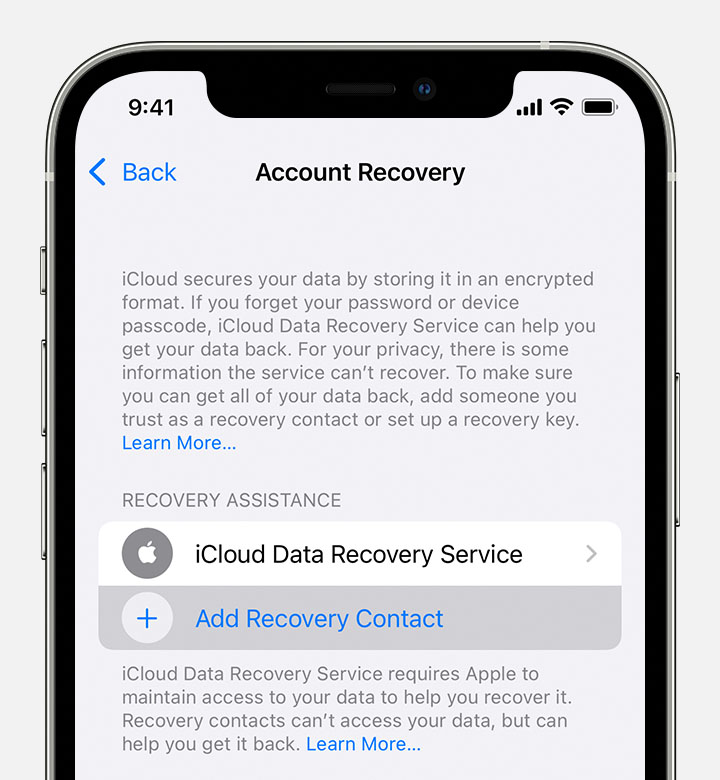
  1. Go to Settings, then tap your name.
  2. Tap Password & Security, then tap Account Recovery.
  3. Under Recovery Assistance, tap Add Recovery Contact, then authenticate with Face ID or Touch ID. 
  4. Add Recovery Contact is listed underneath iCloud Data Recovery Service.
  5. If you're in a Family Sharing group, the members of the group are recommended. Or you can choose one of your contacts.
  6. Suggested contacts show up below the "To:" field.
  7. If you select a family member, they're added automatically. If you select a contact, they need to accept the request. 
  8. After they accept your request, you see a message that they have been added as your account recovery contact. 


If your friend or family member declines or removes themselves as your recovery contact, you see a notification and need to select a new account recovery contact. 


On your Mac with macOS Monterey or later


  1. Choose Apple menu  > System Preferences, then click Apple ID.
  2. Under your name, click Password & Security.
  3. Next to Account Recovery, click Manage. 
  4. Click the Add button  and click Add Recovery Contact, then authenticate with Touch ID or your Mac password.
  5. Under Recovery Assistance, click the Add button to add a recovery contact.
  6. If you're in a Family Sharing group, the members of the group are recommended. Or you can choose one of your contacts. Click Choose Someone Else to choose one of your contacts, then click Continue. 
  7. If you select a family member, they're added automatically. If you select a contact, they need to accept the request. 
  8. After they accept your request, you see a message that they have been added as your account recovery contact. 

If your friend or family member declines or removes themself as your recovery contact, you see a notification and need to select a new account recovery contact. 


How to get a recovery code from your recovery contact


If you forget your Apple ID password or get locked out of your account, just follow the steps on your device to share the onscreen instructions with your recovery contact in-person or on the phone. Your recovery contact then shares a six-digit code that you enter on your device. After your identity is confirmed, you can reset your Apple ID password."


We hope this helps.


Cheers!


1 reply
Question marked as Top-ranking reply

Sep 1, 2022 2:45 PM in response to adejoke129

Hello adejoke129,


Thank you for reaching out to Apple Support Communities, and we'll be happy to help in any way we can. We understand you have questions about recovery contacts. To start, if you'd like to set one up, follow the steps listed here: Set up an account recovery contact - Apple Support


"Requirements for setting up a recovery contact


  • All of your devices must be running iOS 15, iPadOS 15, watchOS 8, or macOS Monterey or later. You might be prompted to update any devices not running the latest OS, or remove any devices that you aren't using.
  • You must be over the age of 13.
  • You need two-factor authentication turned on for your Apple ID.


How to set up an account recovery contact


Learn how to set up an account recovery contact on your iPhone, iPad, or iPod touch with iOS 15 or iPadOS 15 or later, or on your Mac with macOS Monterey or later. 


On your iPhone, iPad, or iPod touch with iOS 15 or iPadOS 15 or later
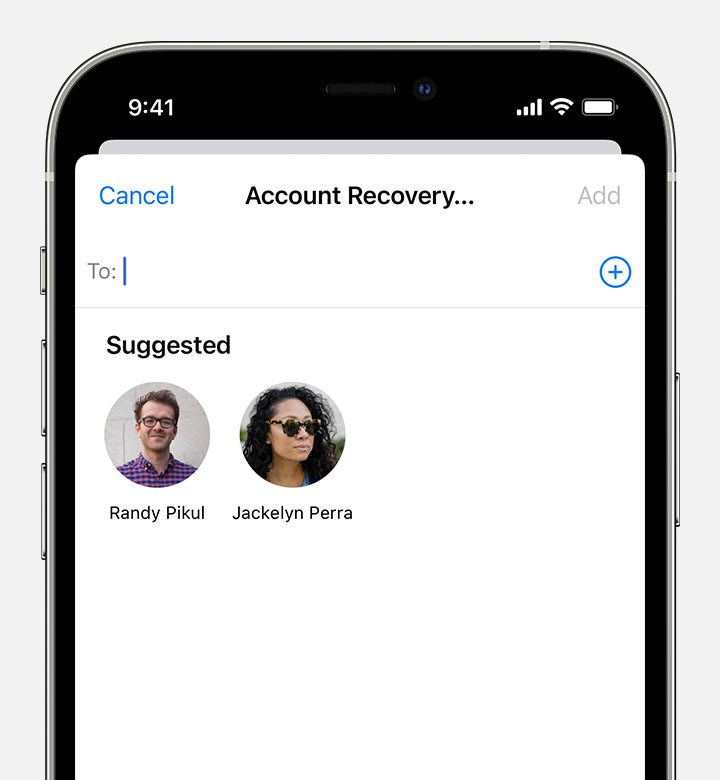
  1. Go to Settings, then tap your name.
  2. Tap Password & Security, then tap Account Recovery.
  3. Under Recovery Assistance, tap Add Recovery Contact, then authenticate with Face ID or Touch ID. 
  4. Add Recovery Contact is listed underneath iCloud Data Recovery Service.
  5. If you're in a Family Sharing group, the members of the group are recommended. Or you can choose one of your contacts.
  6. Suggested contacts show up below the "To:" field.
  7. If you select a family member, they're added automatically. If you select a contact, they need to accept the request. 
  8. After they accept your request, you see a message that they have been added as your account recovery contact. 


If your friend or family member declines or removes themselves as your recovery contact, you see a notification and need to select a new account recovery contact. 


On your Mac with macOS Monterey or later


  1. Choose Apple menu  > System Preferences, then click Apple ID.
  2. Under your name, click Password & Security.
  3. Next to Account Recovery, click Manage. 
  4. Click the Add button  and click Add Recovery Contact, then authenticate with Touch ID or your Mac password.
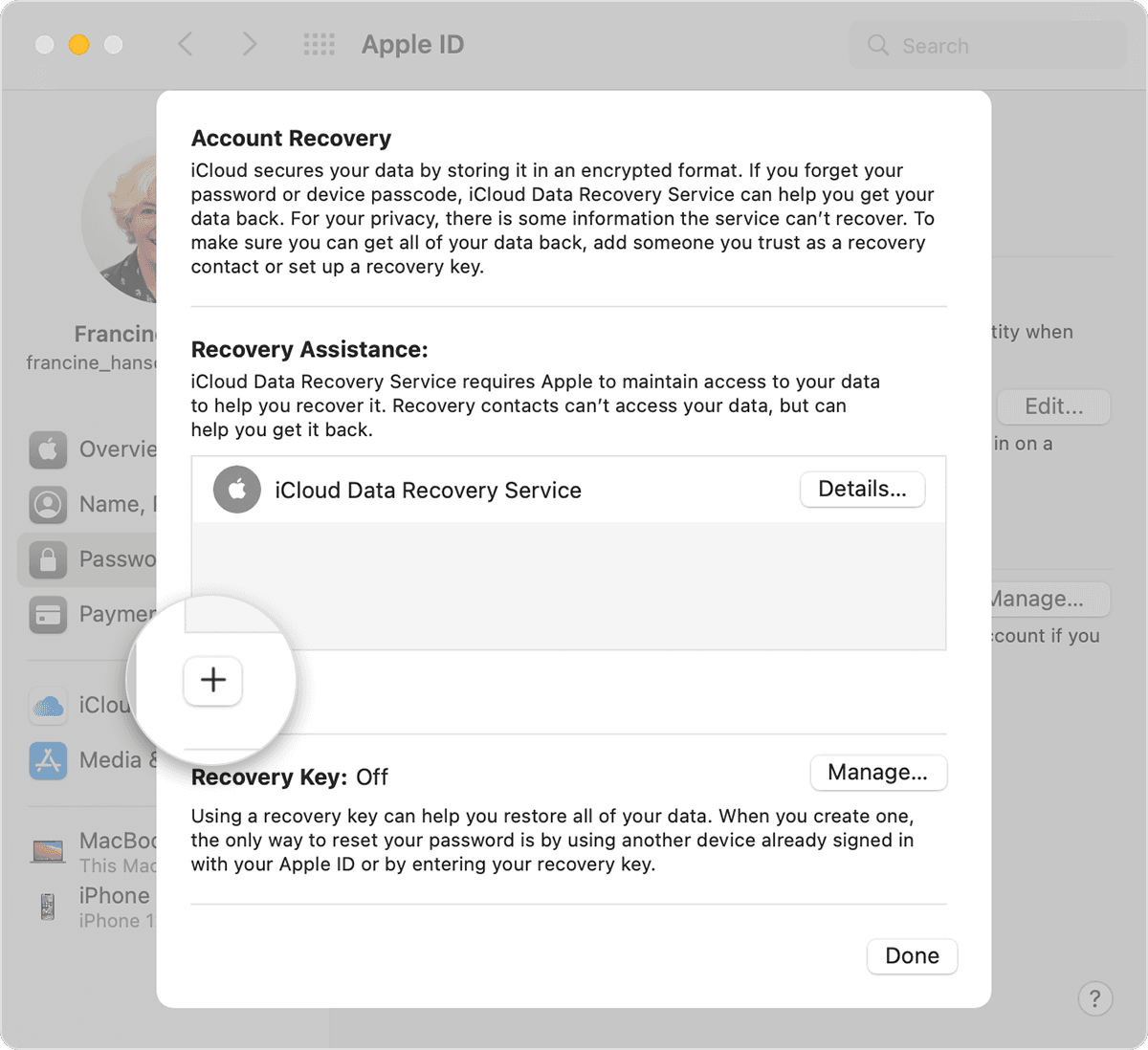
  5. Under Recovery Assistance, click the Add button to add a recovery contact.
  6. If you're in a Family Sharing group, the members of the group are recommended. Or you can choose one of your contacts. Click Choose Someone Else to choose one of your contacts, then click Continue. 
  7. If you select a family member, they're added automatically. If you select a contact, they need to accept the request. 
  8. After they accept your request, you see a message that they have been added as your account recovery contact. 

If your friend or family member declines or removes themself as your recovery contact, you see a notification and need to select a new account recovery contact. 


How to get a recovery code from your recovery contact


If you forget your Apple ID password or get locked out of your account, just follow the steps on your device to share the onscreen instructions with your recovery contact in-person or on the phone. Your recovery contact then shares a six-digit code that you enter on your device. After your identity is confirmed, you can reset your Apple ID password."


We hope this helps.


Cheers!


This thread has been closed by the system or the community team. You may vote for any posts you find helpful, or search the Community for additional answers.

Recovery contact

Welcome to Apple Support Community
A forum where Apple customers help each other with their products. Get started with your Apple Account.