
unable to active touch id in this ipad ( since last update :(
does anybody knows how to fix this new bug?
iPad Pro 10.5-inch, Wi-Fi, Cellular
does anybody knows how to fix this new bug?
iPad Pro 10.5-inch, Wi-Fi, Cellular
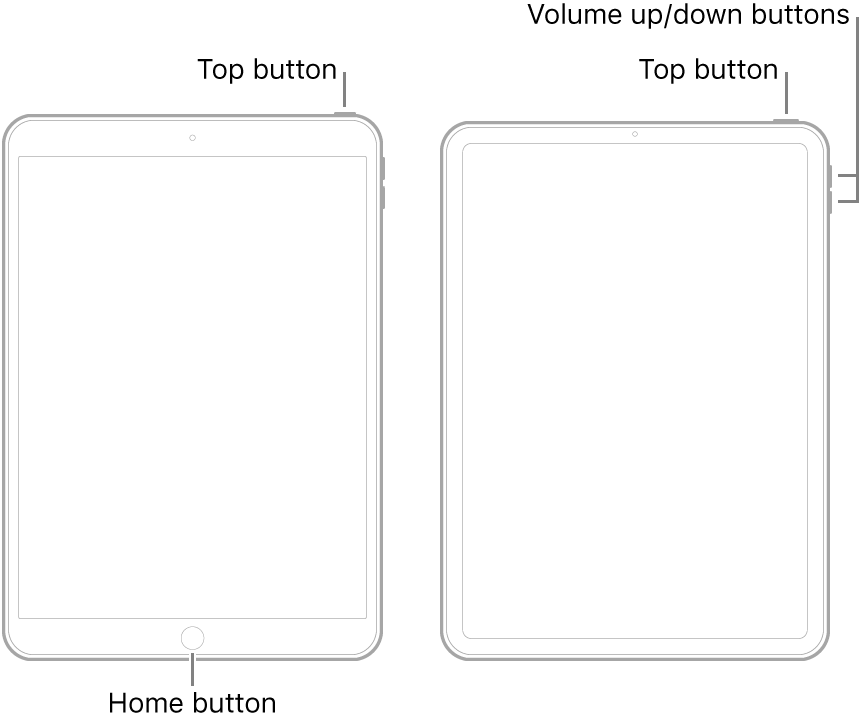
Begin with a forced-restart of your iPad - as this will often resolve an isolated software issue:
If the problem remains unresolved, try setting-up TouchID with new fingerprints:
Use Touch ID on iPhone and iPad - Apple Support
If Touch ID isn't working on your iPhone or iPad - Apple Support
Begin with a forced-restart of your iPad - as this will often resolve an isolated software issue:
If the problem remains unresolved, try setting-up TouchID with new fingerprints:
Use Touch ID on iPhone and iPad - Apple Support
If Touch ID isn't working on your iPhone or iPad - Apple Support
If you continue to experience difficulties, you might be best advised to seek assistance directly from from Apple Support - and request a remote diagnostic test. You can contact the Support Team using the Get Support link at top-right of this page. Alternatively, you can initiate and manage your support cases using the excellent Apple Support App. If not already installed on your iPad, the App can be downloaded from the App Store:
https://apps.apple.com/gb/app/apple-support/id1130498044
You might also visit the Genius Bar at your local Apple Store or Apple Authorised Service Provider (AASP) - where the technicians will be able to test and assess your iPad. If your iPad requires repair, you’ll be in the best possible place to explore your available options:
Thanks but not need. I downgrade my ipad and now it works. Apple won't let me downgrade, they make it as difficult as possible since iOS 13, but there are ways to do it. Now it works with 15.5
I even reset my ipad. It doesn't work. Going back one notch :(. I should always keep myself 2 updates behind. I learned that with Ios 13.
unable to active touch id in this ipad ( since last update :(
