Comma missing from iphone13 keyboard

Iphone13 mini ios15.6.1

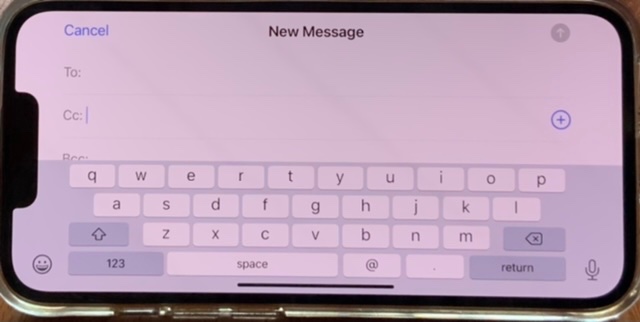
comma is missing from keyboard

tried turning to landscape no difference

also the globe key is missing


without comma cannot enter multiple recipients in email

any help appreciated

iPhone 13 Mini

Posted on Sep 9, 2022 4:47 AM

Reply
6 replies

Sep 9, 2022 7:49 AM in response to Boss47

Very interesting. I never noticed that before on my iPhone13 Pro. Both are indeed missing so it’s not a bug. When entering multiple recipients in the To, CC or BCC fields, you can use the space bar to separate recipients.


Not sure if these tips will help but just in case:

  • To insert a special version of a letter I
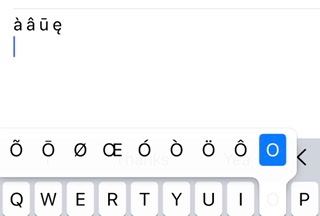
hold the letter and slide to the version you want.

  • To change keyboards, long press the smiley face at the bottom to see the following options:
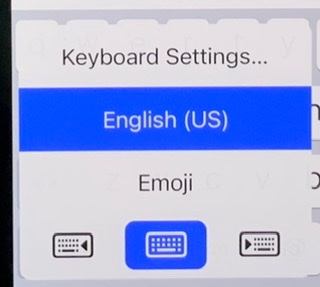

Note: I tested this in Email and Messages. Works in both.
Sep 9, 2022 6:54 AM in response to kb1951

Thanks for the reply and yes there is a comma key next to the m key but this on my MacBook Air laptop.


No sign of a comma key on my iPhone 13 mini I’m using the keyboard setting of English UK running IOS 15.6.1


ive tried turning the iPhone to landscape but this makes no difference

ive tried a long press on some keys to see if an alternative character appears but no luck finding a comma

This thread has been closed by the system or the community team. You may vote for any posts you find helpful, or search the Community for additional answers.

Comma missing from iphone13 keyboard

Welcome to Apple Support Community
A forum where Apple customers help each other with their products. Get started with your Apple Account.



