Bluetooth not working in car after iOS 16 update

I have a 2013 honda accord. I updated my iphone 13 pro max to ios 16 last night and this morning the bluetooth connection in my car no longer works. I have hard booted the phone, turned off and on bluetooth, re-paired the device. I can connect the phone with a lightning cable and it works fine. I'd rather just use the bluetooth option though. Anyone else having this issue and have any advice on how to correct it?


[Re-Titled by Moderator]


iPhone 13 Pro Max

Posted on Sep 14, 2022 10:07 AM

Reply
Question marked as Top-ranking reply

Posted on Dec 29, 2022 5:53 PM

Hello all. I have been doing tech support for 30 years, fyi. I called Apple Support and through a discussion with a great support person, we churned out why we think this is happening. 1st, the older you car radio is, the more likelihood you will have Bluetooth issues. Bluetooth is on version 5.x. 5.0 came out in 2016, so anything older and you will possibly be out of luck. That said, the Bluetooth version is not the only issue - there are "profiles" that come into play and they are "a standard that defines the specifications of the devices to be connected, and the communication protocols used between them". So even though your car may be Bluetooth 5.0, its profile support for audio video playback may be aging and no longer working with all features or you experience instability. Most cars use an AVRCP or "audio video remote control profile". And there are versions of this profile as well. Version 1.5 was adopted in 2012. 1.6.2 was just adopted in 2019. So this means a new phone may not give you the optimum experience with any car radio/dashboard that has no updates from the maker. For example, my 2016 Honda CR-Z no longer shows album art. So if your car radio manufacturer does not support it, the only thing you can do is to use a USB input connection like in the old iPod days.


The first thing to try, is to delete the car connection in your iPhone Bluetooth. And then reconnect it.

The next thing is more of a hassle, but may be necessary, is to factory reset your car radio. (you will have to set the time/date and any radio stations again, as well as possibly redo any contact customizations...like "Home" and "Work" that they car may know.


But there might be one more thing.


I have been experiencing drop outs of music and podcasts...a few seconds to tens of seconds. This week, after the iOS 16.2 update I even had the audio drop out completely and did not come back. The car radio still showed the music playing, as did my iPhone, and and the radio display even changed the track playing information as the tracks changed. But to get things working. I had to pull over, end task/close the music app, and reopen the music app on my iPhone and play my playlist again and the audio came back. I did not restart the car, so the Bluetooth connection was OK, it was the delivery of the content that was not working properly. It is almost daily that I have issues with the audio drop out issue.


Now that all said. I discovered today, with the Apple support person, that each Bluetooth connection in Settings> Bluetooth> has an "i" in a circle next to the description. If you tap on that "i", usually there is only info. But my Honda "HandsFreeLink" connection has a "Device Type" option THAT WAS NOT SET. I set it to "Car Stereo" and I am hoping this will help.
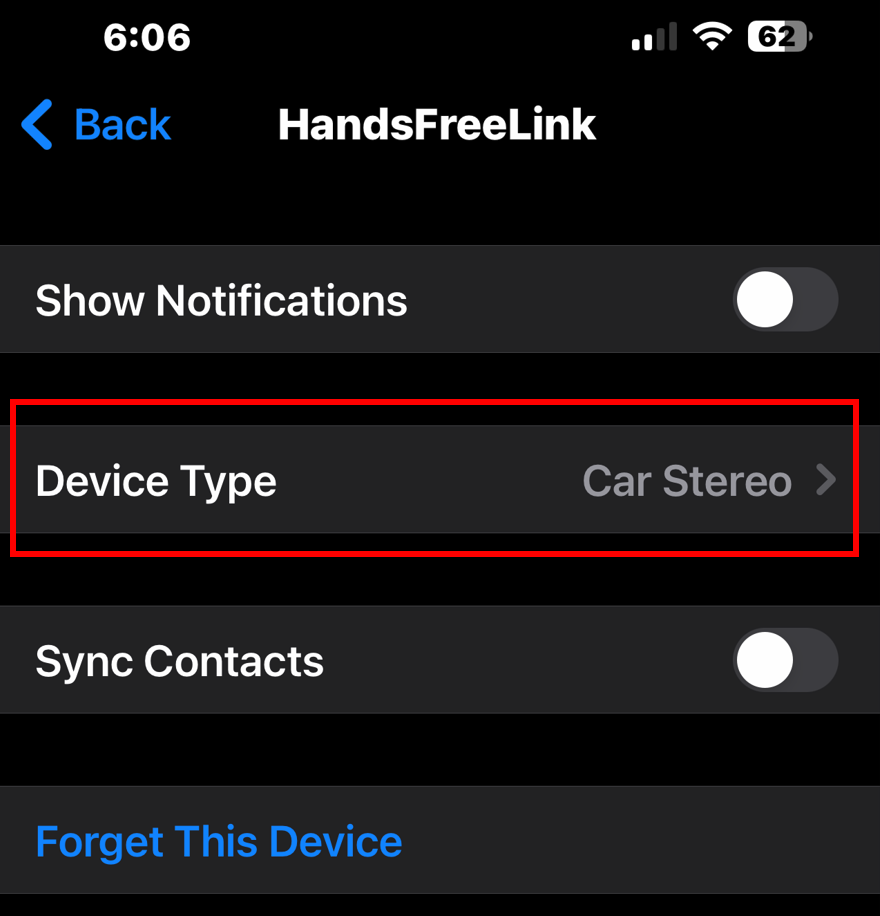


I just wanted to share this info. Bluetooth connections are computer connections. If you are using an old computer to talk to a new computer (iPhone), then they may no longer speak the correct language, or not speak it well. The only solution is to fall back to a USB cable input and play and use audio functions, but your older stereo may not provide hands free phone calling anymore.


Fact of technology. Fascinating to have learned about AVRCP.

You can't put a spark plug into a Tesla.

I hope this helps.

Similar questions

117 replies
Question marked as Top-ranking reply

Dec 29, 2022 5:53 PM in response to cardinaux

Hello all. I have been doing tech support for 30 years, fyi. I called Apple Support and through a discussion with a great support person, we churned out why we think this is happening. 1st, the older you car radio is, the more likelihood you will have Bluetooth issues. Bluetooth is on version 5.x. 5.0 came out in 2016, so anything older and you will possibly be out of luck. That said, the Bluetooth version is not the only issue - there are "profiles" that come into play and they are "a standard that defines the specifications of the devices to be connected, and the communication protocols used between them". So even though your car may be Bluetooth 5.0, its profile support for audio video playback may be aging and no longer working with all features or you experience instability. Most cars use an AVRCP or "audio video remote control profile". And there are versions of this profile as well. Version 1.5 was adopted in 2012. 1.6.2 was just adopted in 2019. So this means a new phone may not give you the optimum experience with any car radio/dashboard that has no updates from the maker. For example, my 2016 Honda CR-Z no longer shows album art. So if your car radio manufacturer does not support it, the only thing you can do is to use a USB input connection like in the old iPod days.


The first thing to try, is to delete the car connection in your iPhone Bluetooth. And then reconnect it.

The next thing is more of a hassle, but may be necessary, is to factory reset your car radio. (you will have to set the time/date and any radio stations again, as well as possibly redo any contact customizations...like "Home" and "Work" that they car may know.


But there might be one more thing.


I have been experiencing drop outs of music and podcasts...a few seconds to tens of seconds. This week, after the iOS 16.2 update I even had the audio drop out completely and did not come back. The car radio still showed the music playing, as did my iPhone, and and the radio display even changed the track playing information as the tracks changed. But to get things working. I had to pull over, end task/close the music app, and reopen the music app on my iPhone and play my playlist again and the audio came back. I did not restart the car, so the Bluetooth connection was OK, it was the delivery of the content that was not working properly. It is almost daily that I have issues with the audio drop out issue.


Now that all said. I discovered today, with the Apple support person, that each Bluetooth connection in Settings> Bluetooth> has an "i" in a circle next to the description. If you tap on that "i", usually there is only info. But my Honda "HandsFreeLink" connection has a "Device Type" option THAT WAS NOT SET. I set it to "Car Stereo" and I am hoping this will help.


I just wanted to share this info. Bluetooth connections are computer connections. If you are using an old computer to talk to a new computer (iPhone), then they may no longer speak the correct language, or not speak it well. The only solution is to fall back to a USB cable input and play and use audio functions, but your older stereo may not provide hands free phone calling anymore.


Fact of technology. Fascinating to have learned about AVRCP.

You can't put a spark plug into a Tesla.

I hope this helps.

Apr 5, 2023 12:08 PM in response to cardinaux

I had trouble pairing my iPhone 14 with iOS 16.4 with a 2013 Mini Cooper S.


Turned out the problem was my phone’s name had emoji in it. Once I removed those characters from the name, it paired right up.


That said it does want to use a phone call to play music for some reason which makes music sound tinny, but I don’t make calls in the car so I just disabled it in my car and it switched over to Bluetooth audio. I also set the device type in iOS to car stereo though i’m unsure what they does.


Maybe this will help someone.

Feb 11, 2023 7:32 AM in response to cardinaux

I have a 2017 Honda civic. Bluetooth worked on my iPhone 7 but stopped November 2021 when I upgraded to iPhone 13. Bluetooth continued to work with iPhone XR and iPhone 11. All were on the same iOS but 13 would not show text messages unless plugged into Apple CarPlay. I spent hours on the phone with Apple and eventually gave up. With an update to iOS 16.3 Bluetooth would stop playing music every time a text was received but still no notification was displayed on the screen. I finally tried a factory reset of the head unit. After a year a half of not having texts, my iPhone 13 and my stereo are finally working again.  

Apr 6, 2023 2:14 AM in response to maloisius

THANK YOU FOR THE GREAT TIP! Being a computer support person, you are correct in that special characters were not commonly usable and this is a great thing to try. Make sure your phone name is simple, without spaces or special characters! Change "Bobby's iPhone" to "BobbysiPhone" and perhaps a free people will be successful to get their phone to connect in their car.


And another note: Bluetooth audio will ALWAYS be of lesser quality and degrades your experience due to bandwidth limitations and re-encoding to get the music from your phone to the car stereo. Each copy of a copy on a Xerox gets worse and worse. Analog audio is recorded and converted to mp3, and you lose some of the highs and lows and details in the music/call. Then you re-encode the mp3 with the Bluetooth wireless transmission and cause further degradation to the audio quality. This is over simplified, but try connecting that USB cable and play your music and a wire always sounds better.


Again... thank's for posting the special character/spaces warning! Kudos to you!

Sep 16, 2022 7:58 PM in response to Slick_Vick

Slick_Vick Said:

"Fixed it. I reset the connection with the car then rebooted the phone. Works as normal once again."

-------


Report this Fix to Apple:

Let Apple know what cured, and what the fix is. They should be made aware of this, ASAP, being this iOS version has just been released. October is when the iOS16.1 update will released.

  1. Go Here: Feedback - iPhone - Apple
  2. Select: "Bug Report" for the "Feedback Type"
  3. Comment: that this all began after installing an update. Inform haw to recreate the fix. Include the URL of this thread
  4. Proceed from there as necessary

Dec 20, 2022 1:43 AM in response to marindad2022

So here’s an update about week ago I called apple tech spoke with a supervisor who said apple is very aware of many

IOS 16 issues including bluetooth phone call issues for phone users. They’ve had so many complaints about car bluetooth connectivity issues they stopped taking complaint tickets 12/2 and they’re working on it .. timeline could be a week or later such as late december or early january.. supervisor didn’t know ..

Sep 14, 2022 9:52 PM in response to cardinaux

cardinaux aid:

"IOS 16 and car bluetooth: I have a 2013 honda accord. I updated my iphone 13 pro max to ios 16 last night and this morning the bluetooth connection in my car no longer works. [...]Anyone else having this issue and have any advice on how to correct it?"

-------


Troubleshooting iOS16 and Car Bluetooth

Honda probably has yet to do their part in making this compatible. Contact them for assistance with this.


Give Apple Feedback:

Do your Part: Provide Apple with feedback on this, letting them know about this issue.  Apple may not get back to you directly, but the more feedback they receive on this, the more they will know what is occurring, and what bug fixes to include in updates to come.

  1. Go Here: Feedback - iPhone - Apple
  2. Select: "Bug Report" for the "Feedback Type"
  3. Comment: that this all began after installing an update. Include the URL of this post
  4. Proceed from there as necessary

Apr 10, 2023 8:41 AM in response to tazer176

2014.5 Camry XLE with same issue. All was working fine, until one day bluetooth stopped working with my Iphone 13. I've done it all and have reset everything possible on both phone and car, but the menu still shows "Bluetooth Not connected". (Note, my system requires the SETUP button to reach the Diagnostic Menu. Not the power button.) I did INIT there and follow advice from other forums but no resolution. The system is the Entune system, but nothing seems to be fixing it.


Did a re- paring

Did a reset on phone and car, deleting all personal data on car and from Iphone 13 bluetooth menu.

Did an INIT from the Diagnostic menu

Did bluetooth off/on on phone for Bluetooth, Toyota app and Entune app (which no longer works or is used it seems)

Disconnected battery and did same above, still no luck.


Seems when 3 G towers were disabled we lost bluetooth on our models..my research so far only results in replacing the system.

Nothing works to fix this!!!! 


Took to Toyota Queens NY Service Center 4/10/2023, after they advised yes could fix issue, they checked car and found, no they cannot! Only solution is replacement at a cost of $1090.00 plus tax.

Dec 2, 2022 6:00 PM in response to cardinaux

I have a menu that I am unable to access normally since the update. In my 2013 Lexus, I cannot access destination, setup, radio or satellite, phone or anything else on the menu. Then I ask Siri to make a call and only then does the call connect through my car’s Bluetooth and that action only allows me to access menu in the car. So I do this every day because it is not permanent. I know my husband gets tired of these quick calls every day( a hello and bye)

Jan 27, 2023 3:01 PM in response to cardinaux

I just got off the phone with Apple Support. A Senior Tech Advisor named Joshua.

I did NOT have any Bluetooth issues with my iPhone XS Max with iOS 15.x.

I traded in my XS Max for an iPhone 13 Pro Max in March 2022, with iOS 15.x.

And the Bluetooth issues began.

Apple replaced my iPhone 13 Pro Max in August of 2022, due to camera picture quality issues. No change in the photo issues.

My iPhone 13 Pro Max replacement phone was built from scratch, not restored from backup to ensure no settings were causing the camera issues.

The Bluetooth issues persist, even with the new iPhone replacement.

iOS is upgrade to 16 and the Bluetooth issues persist.

I have even factory reset my car and the Bluetooth issues persist.

I bought a Pixel 6A and was able to connect to the car and even display the album art and play music. (But I am stuck in my credits for my XS Max trade-in for 14 more months, so I sold the Pixel 6A.)

Apple support ran diagnostics and said all passed. Not a phone issue. "It is a 3rd party issue. Have you checked with the manufacturer of your car?"

He could not respond as to why I had no issues with the iPhone XS Max with Bluetooth.

He could not respond as to why I had no issues with the Pixel 6A phone with Bluetooth.

He only responded that I could go to "apple.com/feedback" to complain.

He would not give me any way to take my complaints about my experiences further.

Apple does not care about the end user any longer.

So very disheartened.


Do not hold your breath that Apple will fix anything. Time is moving forward and iOS 17 is on the way - with all it's new bugs and old issues never fixed.


Good luck to everyone with this issue.


This thread has been closed by the system or the community team. You may vote for any posts you find helpful, or search the Community for additional answers.

Bluetooth not working in car after iOS 16 update

Welcome to Apple Support Community
A forum where Apple customers help each other with their products. Get started with your Apple Account.
