Bluetooth not working in car after iOS 16 update

I have a 2013 honda accord. I updated my iphone 13 pro max to ios 16 last night and this morning the bluetooth connection in my car no longer works. I have hard booted the phone, turned off and on bluetooth, re-paired the device. I can connect the phone with a lightning cable and it works fine. I'd rather just use the bluetooth option though. Anyone else having this issue and have any advice on how to correct it?


[Re-Titled by Moderator]


iPhone 13 Pro Max

Posted on Sep 14, 2022 10:07 AM

Reply
Question marked as Top-ranking reply

Posted on Dec 29, 2022 5:53 PM

Hello all. I have been doing tech support for 30 years, fyi. I called Apple Support and through a discussion with a great support person, we churned out why we think this is happening. 1st, the older you car radio is, the more likelihood you will have Bluetooth issues. Bluetooth is on version 5.x. 5.0 came out in 2016, so anything older and you will possibly be out of luck. That said, the Bluetooth version is not the only issue - there are "profiles" that come into play and they are "a standard that defines the specifications of the devices to be connected, and the communication protocols used between them". So even though your car may be Bluetooth 5.0, its profile support for audio video playback may be aging and no longer working with all features or you experience instability. Most cars use an AVRCP or "audio video remote control profile". And there are versions of this profile as well. Version 1.5 was adopted in 2012. 1.6.2 was just adopted in 2019. So this means a new phone may not give you the optimum experience with any car radio/dashboard that has no updates from the maker. For example, my 2016 Honda CR-Z no longer shows album art. So if your car radio manufacturer does not support it, the only thing you can do is to use a USB input connection like in the old iPod days.


The first thing to try, is to delete the car connection in your iPhone Bluetooth. And then reconnect it.

The next thing is more of a hassle, but may be necessary, is to factory reset your car radio. (you will have to set the time/date and any radio stations again, as well as possibly redo any contact customizations...like "Home" and "Work" that they car may know.


But there might be one more thing.


I have been experiencing drop outs of music and podcasts...a few seconds to tens of seconds. This week, after the iOS 16.2 update I even had the audio drop out completely and did not come back. The car radio still showed the music playing, as did my iPhone, and and the radio display even changed the track playing information as the tracks changed. But to get things working. I had to pull over, end task/close the music app, and reopen the music app on my iPhone and play my playlist again and the audio came back. I did not restart the car, so the Bluetooth connection was OK, it was the delivery of the content that was not working properly. It is almost daily that I have issues with the audio drop out issue.


Now that all said. I discovered today, with the Apple support person, that each Bluetooth connection in Settings> Bluetooth> has an "i" in a circle next to the description. If you tap on that "i", usually there is only info. But my Honda "HandsFreeLink" connection has a "Device Type" option THAT WAS NOT SET. I set it to "Car Stereo" and I am hoping this will help.
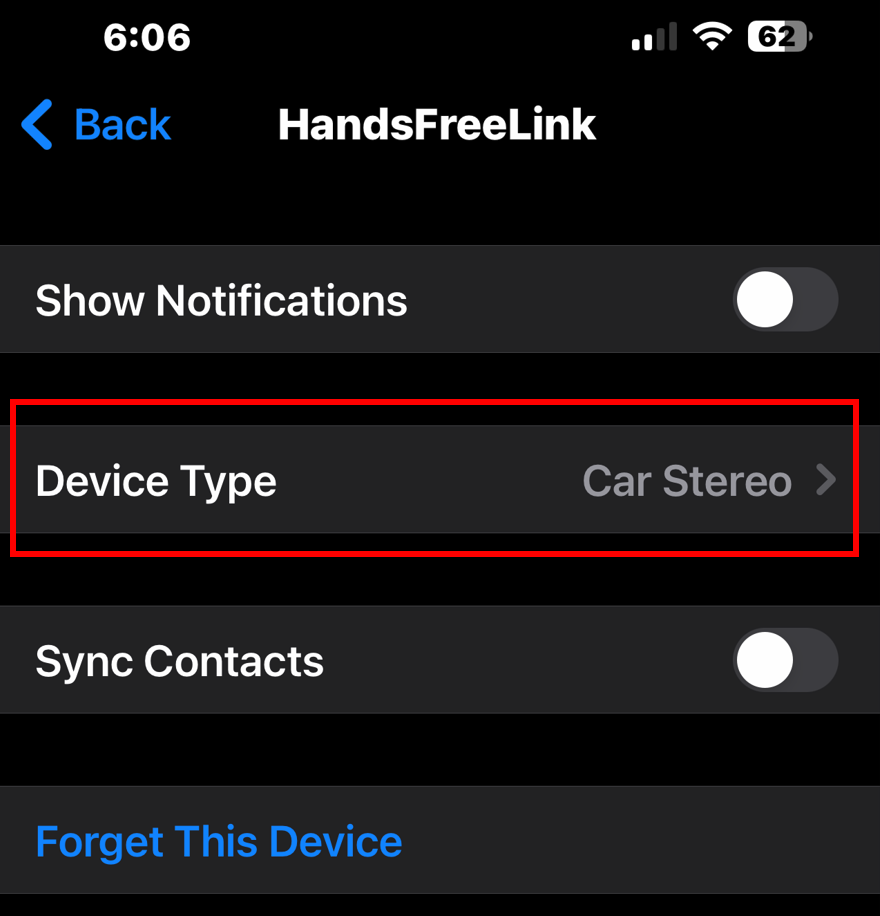


I just wanted to share this info. Bluetooth connections are computer connections. If you are using an old computer to talk to a new computer (iPhone), then they may no longer speak the correct language, or not speak it well. The only solution is to fall back to a USB cable input and play and use audio functions, but your older stereo may not provide hands free phone calling anymore.


Fact of technology. Fascinating to have learned about AVRCP.

You can't put a spark plug into a Tesla.

I hope this helps.

117 replies

Dec 19, 2022 12:55 PM in response to FatherTonk

I have a similar issue on my 2021 palisade.


When I ask Siri to call someone , the sound system plays Siri’s response and dials the number on my phone, but the call does not go through the sound system sporadically; Even though the phone says it’s connected to the Palisade’s Bluetooth. And the Palisade says hands free calling.


This seemed to have happened

after I installed the October 2022 update on my 2021 calligraphy maps and/or iOS 16.1.2 on my iPhone. iOS 16.2 didn’t fix it.


But, from this post, sounds like an iOS issue.


Mar 2, 2023 10:44 PM in response to cardinaux

I'm relieved (kind of!) to hear I'm not the only one. I have a late 2014 Mazda2. Similar issues. I never had problems with my iPhone X but since upgrading to iPhone 13 Pro last year the bluetooth has been bad and seems even worse since iOS 16 (I can't remember what it was like on iOS 15 but I think not as bad). Music streaming is fine (Music app, Spotify, media apps) but phone calls are really choppy (although highly variable). Nothing to do with phone reception as it happens with full signal and Siri's voice is just as choppy. I'll pay attention if it's better with incoming calls and report back. I have done several Apple support calls and diagnostics including in the Apple Store and when connected to car Bluetooth. "All fine". I did the Reset Network Settings as instructed but no difference. I'm not interested in doing a full Factory reset on the phone as it's a pain in the neck and I suspect it won't help. I just had the car in at the Mazda dealer today and they checked Bluetooth (all up to date), did factory reset and said it's fine. There was apparently no issue with their phones but I think they were all Android. I re-paired my from phone from scratch after the car bluetooth reset and it's as bad as ever. My wife's iPhone 12 (iOS 16.3 as well now) is bad as well. SO FRUSTRATING!! I can't update my car's stereo (too integrated and no after-market options available). I REALLY hope Apple sorts this out as I am often on call for work and have to take calls in the car. I've tried setting Bluetooth to "car stereo" and will see if it helps. I might have to revert to the old USB option too...

Mar 2, 2023 11:02 PM in response to fuggles_01

I'm relieved (kind of!) to hear I'm not the only one. I have a late 2014 Mazda2. Similar issues. I never had problems with my iPhone X but since upgrading to iPhone 13 Pro last year the bluetooth has been bad and seems even worse since iOS 16 (I can't remember what it was like on iOS 15 but I think not as bad). Music streaming is fine (Music app, Spotify, media apps) but phone calls are really choppy (although highly variable). Nothing to do with phone reception as it happens with full signal and Siri's voice is just as choppy. I'll pay attention if it's better with incoming calls and report back. I have done several Apple support calls and diagnostics including in the Apple Store and when connected to car Bluetooth. "All fine". I did the Reset Network Settings as instructed but no difference. I'm not interested in doing a full Factory reset on the phone as it's a pain in the neck and I suspect it won't help. I just had the car in at the Mazda dealer today and they checked Bluetooth (all up to date), did factory reset and said it's fine. There was apparently no issue with their phones but I think they were all Android. I re-paired my from phone from scratch after the car bluetooth reset and it's as bad as ever. My wife's iPhone 12 (iOS 16.3 as well now) is bad as well. SO FRUSTRATING!! I can't update my car's stereo (too integrated and no after-market options available). I REALLY hope Apple sorts this out as I am often on call for work and have to take calls in the car. I've tried setting Bluetooth to "car stereo" and will see if it helps. I might have to revert to the old USB option too... (sorry I just tried that and can only stream music via cable as "iPod", phone still goes through Bluetooth)

May 3, 2023 7:50 AM in response to ErikAviance

Final Results: Queen Toyota Service Center added another part (box behind the head unit) that was an additional $600. plus 2 hrs labor. Advised was required since my "2014.5 Camry XLE is special edition with different parts". Result is a new head unit, same as OEM really, but with new junction box that has fixed the bluetooth issue. Hence, overall, $1900 for the entire replacement of unit and additional box, and labor from Queens Toyota Service Center. local stores/companies would have cost the same, I went with dealership service in case I can recover some funds through an class actions taking place. Do take note thought, with the ending of the Entune app, the Bing search, Traffic, Iheart, and other Internet functions no longer work since app is no longer around. The new Toyota app doesn't resolve it. I didn't care, my bluetooth, phone calls, music, rear camera and navigations are working again which is what I wanted.


If anyone has leads on the class action lawyers or litigations taking place, please let me know so I can contact them to try for fund recovery.

Sep 23, 2023 9:49 PM in response to cardinaux

I had bluetooth connection issues between my 2020 infotainment system and iphone when I updated to 16.5.1. Symptoms were similar to what’s been described here, with calls not coming through my car’s speakers, and my iphone music playlists no longer playing through my car speakers.


I tried many of the suggestions here, like unpairing and pairing again, restarting the car, rebooting the iphone. Like others, only a direct connection via USB cable fixed the issue.


THIS WORKED FOR ME:

The only fix that has allowed my phone to once again connect with my infotainment system through Bluetooth was to uninstal the new, IOS rapid security (probably not ideal).


It’s now been a couple of months that 16.7 has been out, but I have not yet updated to 16.7 because I’d heard that disabling or uninstalling the “rapid security” feature may not be an option in future ios updates.


Hope this helps someone.

Dec 30, 2022 2:50 PM in response to videogayme

I have a 2021 Hyundai palisade; so it is pretty new. I changed the “Device Type” to “Car Stereo“ to no avail. Not sure if the problem started after iOS update or Hyundai navigation update in October.

I’ve done many of what “videogayme” suggested to no avail. Sometimes the call uses the car stereo and sometimes it doesn’t. It’s mostly when I bask Siri to call.

Incoming calls seem not as much of an issue. And not sure if when I’m using the car’s navigation that the issue occurs.


very frustrating.

Dec 30, 2022 4:32 PM in response to BigDominic

Yeah... The setting it to "car stereo" didn't change my audio drop outs. First trip to the grocery store and it dropped out several times for 1-3 seconds.


I have gone back to a USB unit cable. and now my album art shows, too. And the SOUND IS SO MUCH BETTER THAN USING BLUETOOTH.


Apple has too much money and doesn't care about the end user anymore. This if not a new problem and I had the issue back on iOS 15.x. They haven't fixed it in a more than a year. I'm not holding my breath.


I'm so done with Apple. This will likely be my last iPhone, since my iPhone 3! Tim Cook should be proud he's allowing long term customers to walk away. I've already sold my MacBook Pro (Intel) and my Apple TV. The purple box "ultra" model streams from my phone just fine.


Good luck.


My next car have the basic factory radio so so can replace it as it gets outdated. My 2016 CR-Z radio is far too integrated into the car and any replacement would lose all kinds of functionality, especially for the buttons on the steering wheel and the maintenance trackers in the car.

This thread has been closed by the system or the community team. You may vote for any posts you find helpful, or search the Community for additional answers.

Bluetooth not working in car after iOS 16 update

Welcome to Apple Support Community
A forum where Apple customers help each other with their products. Get started with your Apple Account.
