Interval run

Apple Watch

Os9 how to set interval for running

Apple Watch Series 6, watchOS 9

Posted on Sep 14, 2022 10:58 PM

Reply
Question marked as Top-ranking reply

Posted on Sep 19, 2022 7:24 AM

Hi nicodemalux,


Thanks for posting in Apple Support Communities! To add structured intervals for a workout, follow these steps:


  1. "On your Apple Watch, open the Workout app.
  2. Tap the More button the ... icon next to the workout that you want to do.
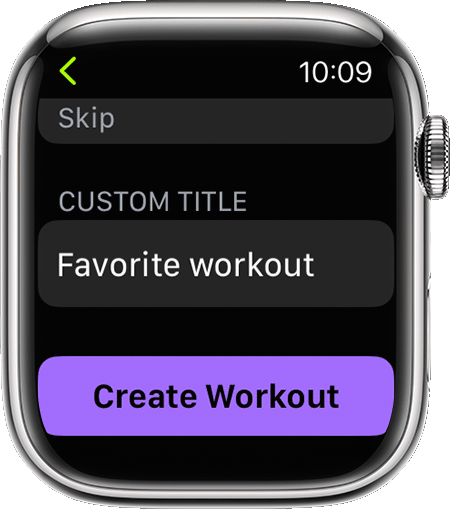
  3. Scroll down and tap Create Workout, then tap Custom.
  4. Tap Warmup to set a Goal Type or Skip.
  5. Tap Add, then tap Work or Recovery and select a Goal Type.
  6. Tap Cooldown to set a Goal Type or Skip.
  7. Enter the Custom Title of your workout.

8. Tap Create Workout."


These steps and more options for using the Workout app can be found here: Use the Workout app on your Apple Watch


Cheers!


1 reply
Question marked as Top-ranking reply

Sep 19, 2022 7:24 AM in response to nicodemalux

Hi nicodemalux,


Thanks for posting in Apple Support Communities! To add structured intervals for a workout, follow these steps:


  1. "On your Apple Watch, open the Workout app.
  2. Tap the More button the ... icon next to the workout that you want to do.
  3. Scroll down and tap Create Workout, then tap Custom.
  4. Tap Warmup to set a Goal Type or Skip.
  5. Tap Add, then tap Work or Recovery and select a Goal Type.
  6. Tap Cooldown to set a Goal Type or Skip.
  7. Enter the Custom Title of your workout.

8. Tap Create Workout."


These steps and more options for using the Workout app can be found here: Use the Workout app on your Apple Watch


Cheers!


This thread has been closed by the system or the community team. You may vote for any posts you find helpful, or search the Community for additional answers.

Interval run

Welcome to Apple Support Community
A forum where Apple customers help each other with their products. Get started with your Apple Account.