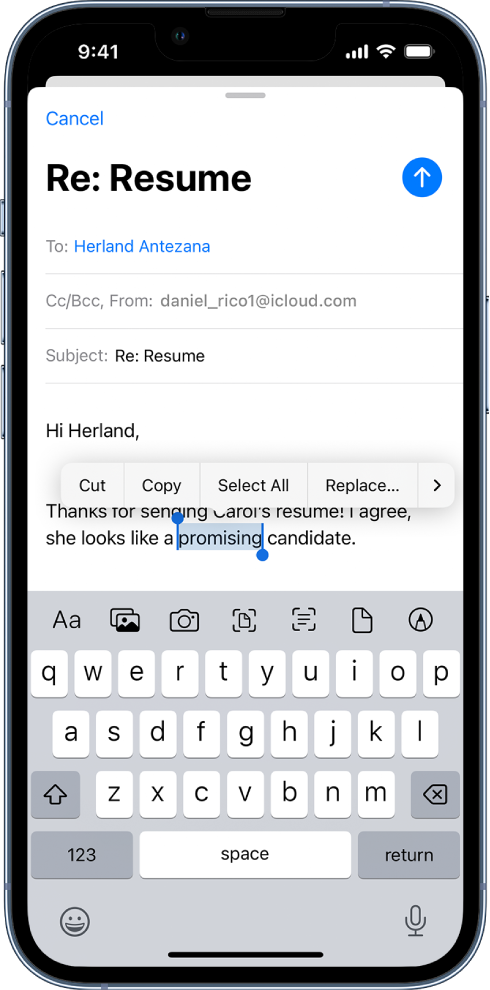
copy part of text message in ios
Is it not possible to copy a few words out of a text or imessage I have received? I only see an option to copy the entire message.
Is it not possible to copy a few words out of a text or imessage I have received? I only see an option to copy the entire message.
Hello JCJBW,
You can copy and paste words by completing the steps below which also shows the info listed here: Select, cut, copy, and paste text on iPhone - Apple Support
Select and edit text
1. To select text, do any of the following:
• Select a word: Double-tap with one finger.
• Select a paragraph: Triple-tap with one finger.
• Select a block of text: Double-tap and hold the first word in the block, then drag to the last word.
2. After selecting the text you want to revise, you can type, or tap the selection to see editing options:
• Cut: Tap Cut or pinch closed with three fingers two times.
• Copy: Tap Copy or pinch closed with three fingers.
• Paste: Tap Paste or pinch open with three fingers.
• Select All: Select all the text in the document.
• Replace: View suggested replacement text, or have Siri suggest alternative text.
• Format: Format the selected text.
•: View more options.
Best regards
Hello JCJBW,
You can copy and paste words by completing the steps below which also shows the info listed here: Select, cut, copy, and paste text on iPhone - Apple Support
Select and edit text
1. To select text, do any of the following:
• Select a word: Double-tap with one finger.
• Select a paragraph: Triple-tap with one finger.
• Select a block of text: Double-tap and hold the first word in the block, then drag to the last word.
2. After selecting the text you want to revise, you can type, or tap the selection to see editing options:
• Cut: Tap Cut or pinch closed with three fingers two times.
• Copy: Tap Copy or pinch closed with three fingers.
• Paste: Tap Paste or pinch open with three fingers.
• Select All: Select all the text in the document.
• Replace: View suggested replacement text, or have Siri suggest alternative text.
• Format: Format the selected text.
•
Best regards
JCJBW wrote:
Is it not possible to copy a few words out of a text or imessage I have received? I only see an option to copy the entire message.
No, it's not possible.
copy part of text message in ios