
Workout running metrics
Well. Erased all metrics points on the first metrics page in workout app. And now it appears blank. Is there any way to have the little pen back so I can add some back?
Apple Watch Series 6
Well. Erased all metrics points on the first metrics page in workout app. And now it appears blank. Is there any way to have the little pen back so I can add some back?
Apple Watch Series 6
Hello androidvim,
Thank you for reaching out to Apple Support Communities, and we'll be happy to help in any way we can. We understand you're having issues with missing metrics on your watch after erasing them. To add them again, follow the steps listed here: Use the Workout app on your Apple Watch - Apple Support
"Change the metrics for each workout
 next to the workout that you want to do.
 .
.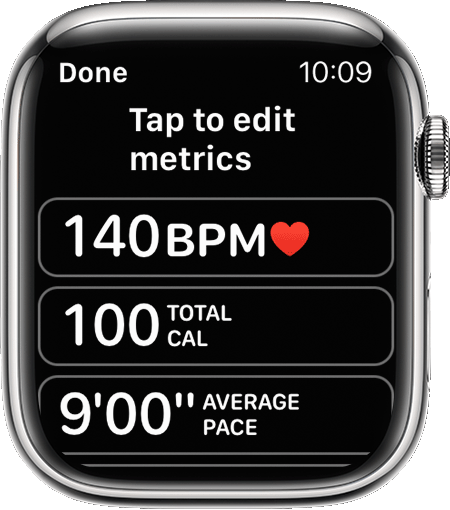
Depending on the type of workout, you can include metrics such as:
You can also tap Reorder, then touch and hold the Change Order button  to change the order."
For more help, reach out to Apple directly here: Get Support
We hope this helps.
Cheers!
Hello androidvim,
Thank you for reaching out to Apple Support Communities, and we'll be happy to help in any way we can. We understand you're having issues with missing metrics on your watch after erasing them. To add them again, follow the steps listed here: Use the Workout app on your Apple Watch - Apple Support
"Change the metrics for each workout
next to the workout that you want to do..Depending on the type of workout, you can include metrics such as:
You can also tap Reorder, then touch and hold the Change Order button to change the order."
For more help, reach out to Apple directly here: Get Support
We hope this helps.
Cheers!
Thank you for providing that clarification.
Does anything happen if you tap on the Metrics field, even though the edit button is not visible?
If not, we would recommend trying to restart your Apple Watch and its paired iPhone next. These steps may seem simple, but often resolve a variety of issues:
Should you still be unable to edit the Metrics field after restarting, we would suggest making sure both your iPhone and the Apple Watch are running the latest software version. This will ensure that the app has all of the information it needs, including any fixes that may have been put in place.
Since your watch pulls update availability from its paired iPhone, update the iPhone first: Update your iPhone or iPad - Apple Support, then update your watch: Update your Apple Watch - Apple Support
Should the issue continue after that, please get in touch with Apple Support directly. They will have access to additional tools and resource to further assist. You can reach them here: Get Support
Best!
Hi. Update on the little bug. Sorted with watch OS9.1. Beautiful
We understand, androidvim. However, since watchOS just recently became available, we’re unsure of when the next update will become available. Also, the next one may or may not address your issue. We still encourage you to contact Apple Support to look into this further with you: Get Support
All the best.
Thank you for getting back to me. The steps you have showed me (thank you for spending time to go through them) work for the metrics 2 page. The metrics 1 has no more pen beside sense not being able to add them. On metrics 2 page the pen is still there. Unfortunately on the metrics page it has gone...
Yep tried all that. Will wait for an update may be a slight overlook. I shouldn’t have wanted to do a clean slate.
Workout running metrics


