Hello stevenfromkensington,
Thank you for reaching out to Apple Support Communities, and we'll be happy to help in any way we can. We understand you're having issues with the sound on your Mac when connecting an external monitor. Try the steps listed here to see if they resolve the issue: If you can’t hear sound from your Mac speakers - Apple Support
"If you can’t hear sound from your Mac speakers
First, make sure any volume controls in the app you’re using aren’t turned all the way down. Also, try playing a different audio file, CD, or DVD, or try playing the file or disc on another computer or media player to isolate the problem. Then, try the following solutions.
If you’re trying to listen through your computer’s built-in speakers
- Unplug any headphones or external speakers.
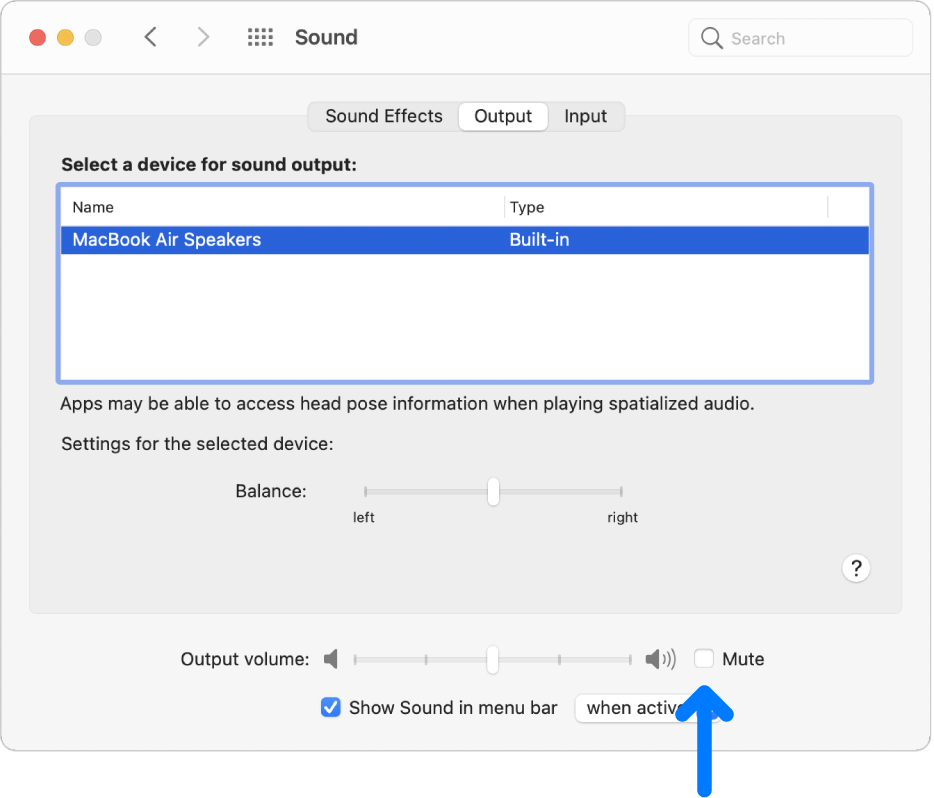
- On your Mac, choose Apple menu
 > System Preferences, click Sound
  , then click Output. Make sure “Internal Speakers” is selected, the “Output volume” slider is not all the way to the left, and the Mute checkbox is not selected.
  "
"
If those steps don't help, have you tried another port?
We hope this helps.
Cheers!


