Auto response to iMessages when driving focus is on

For years this message “I’m not receiving notifications. If this is urgent, reply “urgent” to send a notification through with your original message.”


has been in my phone when I have “Driving” turned on. I have been unable to delete it, why something as simple as that not been dealt with? All answers I have read says it cannot be deleted.


has that changed, I hope so. How can I delete this and keep one that I have written myself?

iPhone 13 mini, iOS 15

Posted on Sep 25, 2022 12:47 PM

Reply
Question marked as Top-ranking reply

Posted on Sep 27, 2022 9:04 AM

Greetings judyfromgreenfield,


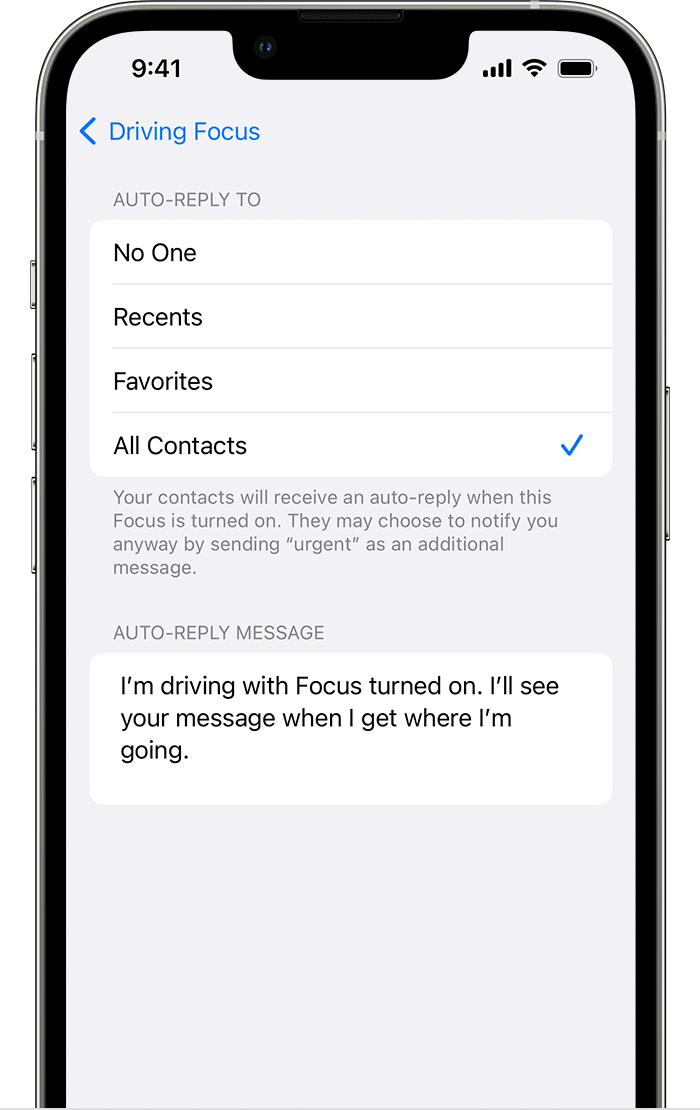
In order to change the auto-response that is sent while using the Driving Focus, follow the steps found here:


Use the Driving Focus on your iPhone to concentrate on the road - Apple Support


"Turn on Auto-Reply 

With Auto-Reply, favorites and those you allow notifications from will get an auto reply when you have the Driving Focus on. They can choose to notify you anyway by sending "urgent" as an additional message.

iPhone showing how to turn on Auto Reply 

  1. Go to Settings > Focus, then tap Driving.
  2. Tap Auto-Reply.
  3. Select an option, like No One, Recents, Favorites, or All Contacts.

From here, you can customize the auto-reply message that people get when they message you while a Driving Focus is on."


Take care.

1 reply
Question marked as Top-ranking reply

Sep 27, 2022 9:04 AM in response to judyfromgreenfield

Greetings judyfromgreenfield,


In order to change the auto-response that is sent while using the Driving Focus, follow the steps found here:


Use the Driving Focus on your iPhone to concentrate on the road - Apple Support


"Turn on Auto-Reply 

With Auto-Reply, favorites and those you allow notifications from will get an auto reply when you have the Driving Focus on. They can choose to notify you anyway by sending "urgent" as an additional message.

iPhone showing how to turn on Auto Reply 

  1. Go to Settings > Focus, then tap Driving.
  2. Tap Auto-Reply.
  3. Select an option, like No One, Recents, Favorites, or All Contacts.

From here, you can customize the auto-reply message that people get when they message you while a Driving Focus is on."


Take care.

This thread has been closed by the system or the community team. You may vote for any posts you find helpful, or search the Community for additional answers.

Auto response to iMessages when driving focus is on

Welcome to Apple Support Community
A forum where Apple customers help each other with their products. Get started with your Apple Account.