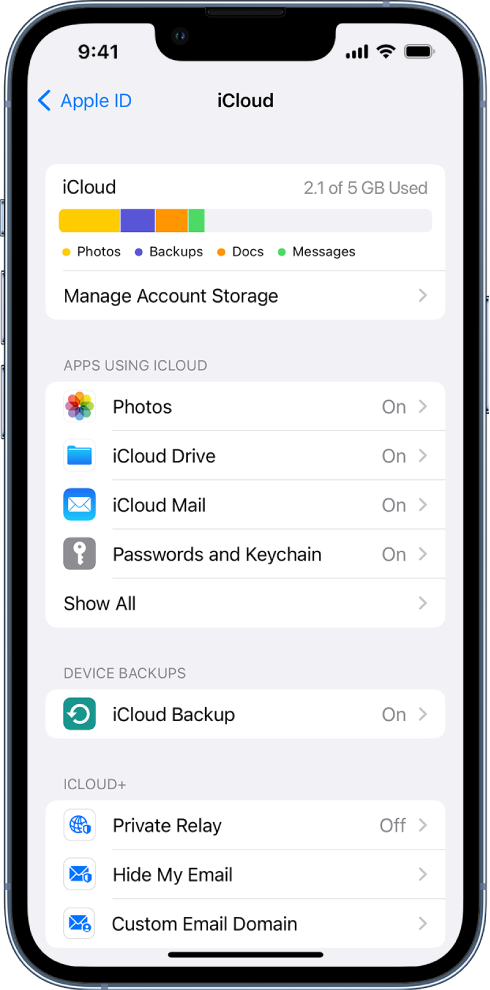
icloud settings
iCloud settings
iPhone 6, iOS 12
iCloud settings
iPhone 6, iOS 12
Hello Fiifi100,
Welcome to Apple Support Communities!
If we understand your post correctly, you have some questions about iCloud settings. We'd like to help!
iCloud securely stores your photos, videos, documents, backups, and more—and keeps them updated across all your devices—automatically. With iCloud, you can also share photos, calendars, notes, folders, and files with friends and family. iCloud provides you with an email account and 5 GB of free storage for your data. For more storage and additional features, you can subscribe to iCloud+.
Note: Some iCloud features have minimum system requirements. The availability of iCloud and its features varies by country or region.
Change your iCloud settings
Sign in with your Apple ID, then do the following:
Go to Settings> [your name] > iCloud.
Do any of the following:
See your iCloud storage status.
Turn on the features you want to use, such as Photos, iCloud Drive, and iCloud Backup.
For information on how to customize iCloud features on your other devices, see Set up iCloud and change settings on all your devices in the iCloud User Guide.
Ways to use iCloud on iPhone
iCloud can keep your iPhone backed up automatically. See Back up iPhone.
You can also keep the following information stored in iCloud and kept up to date across your iPhone and other Apple devices:
Photos and videos; see Use iCloud Photos on iPhone
Files and documents; see Set up iCloud Drive on iPhone
iCloud Mail
Contacts, Calendars, Notes, and Reminders
Data from compatible third-party apps and games
Messages threads; see Set up Messages on iPhone
Passwords and payment methods; see Make your passkeys and passwords available on all your devices with iPhone and iCloud Keychain
Safari bookmarks and open tabs; see Bookmark a website in Safari on iPhone and Organize your tabs with Tab Groups in Safari on iPhone
News, Stocks, and Weather settings
Home and Health data
Voice memos
Map favorites
You can also do the following:
Share your photos and videos. See Use iCloud Shared Albums with iPhone.
Share folders and documents with iCloud Drive. See Share files and folders in iCloud Drive on iPhone.
Use Find My to locate a missing device or share locations with friends and family. See Locate a device in Find My on iPhone and Locate a friend in Find My on iPhone.
For additional storage and access to iCloud Private Relay (beta), Hide My Email, and HomeKit Secure Video support, you can subscribe to iCloud+.
You can also access your iCloud data on iPad, Apple Watch, Mac, Apple TV, your Windows computer, and iCloud.com. To learn more about the available features and how they work across all your devices, see the iCloud User Guide.
If you have a specific question about iClouds settings let us know so we can point you in the right direction for resolution.
Thank you for using Apple Support Communities.
Take care!
Hello Fiifi100,
Welcome to Apple Support Communities!
If we understand your post correctly, you have some questions about iCloud settings. We'd like to help!
iCloud securely stores your photos, videos, documents, backups, and more—and keeps them updated across all your devices—automatically. With iCloud, you can also share photos, calendars, notes, folders, and files with friends and family. iCloud provides you with an email account and 5 GB of free storage for your data. For more storage and additional features, you can subscribe to iCloud+.
Note: Some iCloud features have minimum system requirements. The availability of iCloud and its features varies by country or region.
Change your iCloud settings
Sign in with your Apple ID, then do the following:
Go to Settings
Do any of the following:
See your iCloud storage status.
Turn on the features you want to use, such as Photos, iCloud Drive, and iCloud Backup.
For information on how to customize iCloud features on your other devices, see Set up iCloud and change settings on all your devices in the iCloud User Guide.
Ways to use iCloud on iPhone
iCloud can keep your iPhone backed up automatically. See Back up iPhone.
You can also keep the following information stored in iCloud and kept up to date across your iPhone and other Apple devices:
Photos and videos; see Use iCloud Photos on iPhone
Files and documents; see Set up iCloud Drive on iPhone
iCloud Mail
Contacts, Calendars, Notes, and Reminders
Data from compatible third-party apps and games
Messages threads; see Set up Messages on iPhone
Passwords and payment methods; see Make your passkeys and passwords available on all your devices with iPhone and iCloud Keychain
Safari bookmarks and open tabs; see Bookmark a website in Safari on iPhone and Organize your tabs with Tab Groups in Safari on iPhone
News, Stocks, and Weather settings
Home and Health data
Voice memos
Map favorites
You can also do the following:
Share your photos and videos. See Use iCloud Shared Albums with iPhone.
Share folders and documents with iCloud Drive. See Share files and folders in iCloud Drive on iPhone.
Use Find My to locate a missing device or share locations with friends and family. See Locate a device in Find My on iPhone and Locate a friend in Find My on iPhone.
For additional storage and access to iCloud Private Relay (beta), Hide My Email, and HomeKit Secure Video support, you can subscribe to iCloud+.
You can also access your iCloud data on iPad, Apple Watch, Mac, Apple TV, your Windows computer, and iCloud.com. To learn more about the available features and how they work across all your devices, see the iCloud User Guide.
If you have a specific question about iClouds settings let us know so we can point you in the right direction for resolution.
Thank you for using Apple Support Communities.
Take care!
icloud settings