how to transfer music from iphone 7 back to Mac

This is probably a silly question, but here goes.... I have bought an iPhone 13 Pro Max, which uses iOS 16 and Apple Music.... I have this older iPhone 7 Plus which has iTunes on it and uses iOS 15.6.... the iPhone 7 Plus has music on it from iTunes, but I can't seem to get the music off of my iPhone 7+and transfer it back to my Mac or eventually to my iPhone 13 Pro Max..... Airdrop doesn't seem to work for Music on this iPhone... at least not with the individual songs or groups of songs.... I have Apple Music on my Mac and Apple music on my iPhone 13 Pro Max..... but iTunes on my iPhone 7+


so, some help would be greatly appreciated....

thanks

John B

iPhone 7 Plus

Posted on Sep 27, 2022 7:31 AM

Reply
Question marked as Top-ranking reply

Posted on Sep 29, 2022 9:18 AM

If I'm understanding the question correctly, it seems that you have music on the old phone that (possibly) did not come from the iTunes Store, but was synced to it from a computer, but you no longer has access to those files, and you wish to transfer them back from the old phone to your computer... If that is the case DO NOT sync your phone with your computer, because your phone will only have music on it that is currently on your computer, and you will completely lose the songs on the phone that are not already on your computer.


Community user Turingtest2 has gone to the trouble of describing how to go about this in detail.

Recover your iTunes library from your iPo… - Apple Community


4 replies
Question marked as Top-ranking reply

Sep 29, 2022 9:18 AM in response to Johnb-one

If I'm understanding the question correctly, it seems that you have music on the old phone that (possibly) did not come from the iTunes Store, but was synced to it from a computer, but you no longer has access to those files, and you wish to transfer them back from the old phone to your computer... If that is the case DO NOT sync your phone with your computer, because your phone will only have music on it that is currently on your computer, and you will completely lose the songs on the phone that are not already on your computer.


Community user Turingtest2 has gone to the trouble of describing how to go about this in detail.

Recover your iTunes library from your iPo… - Apple Community


Sep 29, 2022 8:49 AM in response to Johnb-one

Hello Johnb-one,


Thank you for reaching out to Apple Support Communities.


You would need to sync your new iPhone with the same library you synced your iPhone 7+.


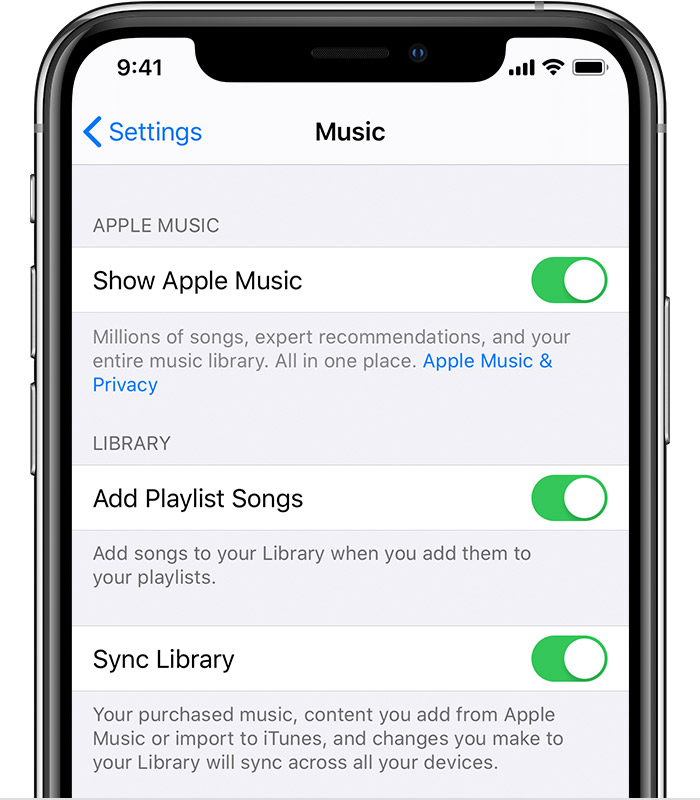
Another option would be to enable Apple Music on your iPhone 7+ and enable Sync library:


"Turn on Sync Library

With the latest version of iOS, iPadOS, and macOS, Sync Library is turned on by default. If you turned off Sync Library, you can turn it back on. Just follow the steps below for your device.

On your iPhone, iPad, or iPod touch

  1. Go to Settings > Music.
  2. Turn on Sync Library. If you don't subscribe to Apple Music or iTunes Match, you won’t see an option to turn on Sync Library."


More details can be found here: Turn on Sync Library with Apple Music


If you are not able to set up Apple Music on your iPhone 7+ can yo provide a few more details? What happens when you attempt to sign in and set up Apple Music?


Cheers!

This thread has been closed by the system or the community team. You may vote for any posts you find helpful, or search the Community for additional answers.

how to transfer music from iphone 7 back to Mac

Welcome to Apple Support Community
A forum where Apple customers help each other with their products. Get started with your Apple Account.