Reminders no longer working on Apple Watch

My Apple Watch no longer syncs Reminders with my phone. Lately, whenever I say to my watch, "Hey Siri, remind me to..." her response is "I didn't find a Reminders list, would you like me to create one?" All my reminders are there on my phone, and I've never had problems using my Apple Watch to set up Reminders via Siri. Oddly, when I go into the Watch app on my phone, the Reminders app is not even listed on my list of apps. I've tried restarting my watch, my phone, disabling and re-enabling Reminder notifications on my watch... nothing has worked.


I've searching online and haven't found the solution, though I found an old version of this exact question that was never resolved.


Apple Watch SE

Posted on Sep 28, 2022 2:23 PM

Reply
Question marked as Top-ranking reply

Posted on Oct 3, 2022 12:19 AM

The watch software was up-to-date. I had already updated to iOS 16, but when I checked again, the iPhone surprisingly had an update that hadn't gotten pushed out to me but was available, so I updated to 16.0.2. Nothing was fixed.


Finally, the unpairing and re-pairing the Apple Watch did it, the reminders are now synched up. Thanks!

Similar questions

5 replies
Question marked as Top-ranking reply

Oct 3, 2022 12:19 AM in response to Soosie_J215

The watch software was up-to-date. I had already updated to iOS 16, but when I checked again, the iPhone surprisingly had an update that hadn't gotten pushed out to me but was available, so I updated to 16.0.2. Nothing was fixed.


Finally, the unpairing and re-pairing the Apple Watch did it, the reminders are now synched up. Thanks!

Sep 30, 2022 4:42 PM in response to JTsvale

Thanks for the response JTsvale.


Just to confirm, do you also not see the Reminders app anywhere on your Home Screen?


We'd also suggest to make sure both your iPhone and Apple Watch don't have any software updates to install.


Update your iPhone or iPad - Apple Support


Update your Apple Watch - Apple Support


Finally, one other step that will usually resolve many software issues like this (missing app) is to unpair and erase your Apple Watch, then re-pair it. Your data will be saved to your iPhone until you re-pair your Apple Watch.


Unpair and erase your Apple Watch - Apple Support


Let us know how it goes.


Best regards.

Sep 30, 2022 11:24 AM in response to JTsvale

Greetings JTsvale,


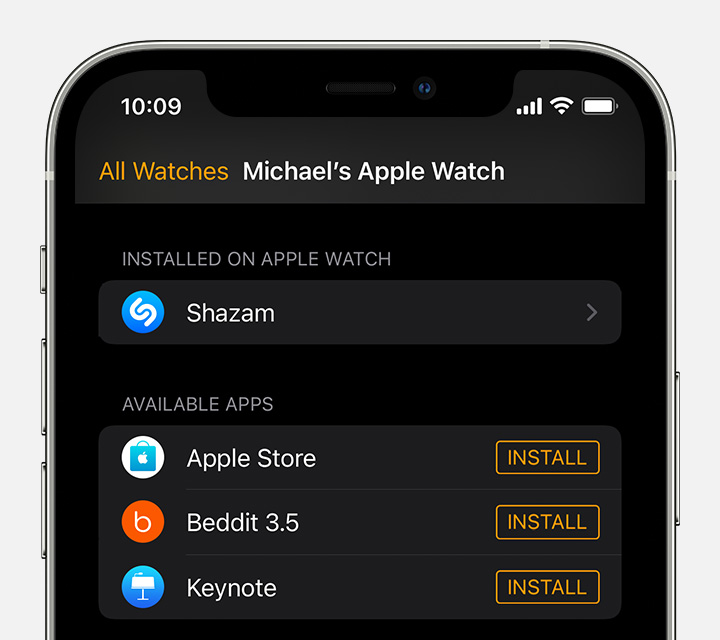
It sounds like you need to install the Reminders app pin your Apple Watch, and you can learn how to do so here:


Download apps on your Apple Watch - Apple Support


"Get apps with the iPhone that's paired with the Apple Watch

  1. On your iPhone, open the Watch app.
  2. Tap the My Watch tab.
  3. Scroll to the app that you want to add. Apps that you can install appear in the Available Apps section.
  4. iPhone screen showing Watch app

  5. To add an app to your watch, tap Install."


Take care.

This thread has been closed by the system or the community team. You may vote for any posts you find helpful, or search the Community for additional answers.

Reminders no longer working on Apple Watch

Welcome to Apple Support Community
A forum where Apple customers help each other with their products. Get started with your Apple Account.