how to recover screen time passcode
How do I recover screen time passcode?
iPhone 13
How do I recover screen time passcode?
iPhone 13
Hello melpen79,
Welcome to Apple Support Communities!
If we understand your post correctly, you want to know how to recover your Screen Time passcode. We're happy to help!
Use the steps below if you forgot your Screen Time passcode or the Screen Time passcode for a member of your Family Sharing group. If you forgot the passcode to unlock your iPhone, iPad, or iPod touch, or you get a message that says it's disabled, follow these steps instead.
How to reset the Screen Time passcode for your personal device
Use the steps below to change your Screen Time passcode on an iPhone, iPad, iPod touch, or Mac.
On an iPhone, iPad, or iPod touch
Make sure that your device is updated to iOS 13.4 or iPadOS 13.4 or later.
Go to Settings > Screen Time.
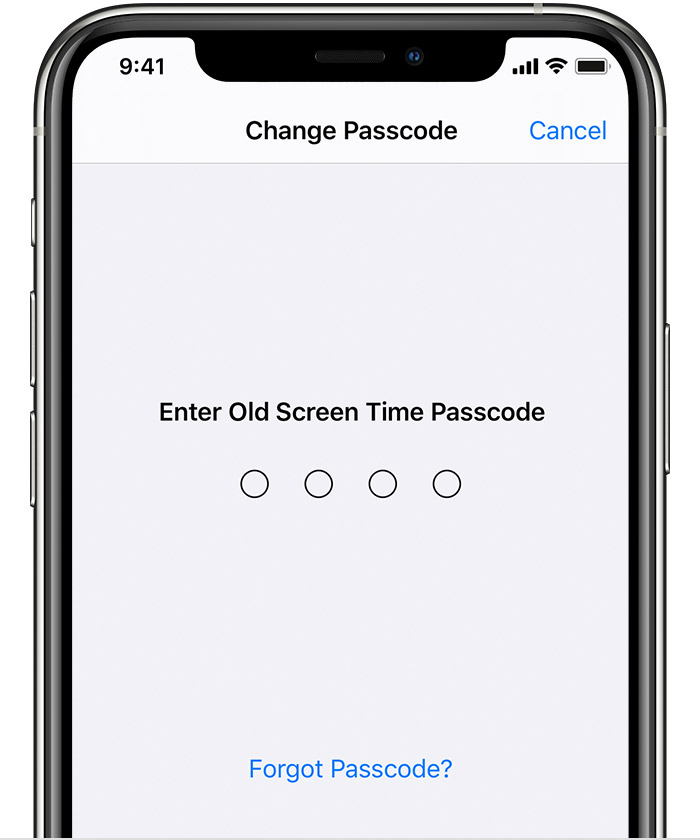
Tap Change Screen Time Passcode, then tap Change Screen Time Passcode again.
Tap Forgot Passcode?
Enter the Apple ID and password* that you used to set up the Screen Time passcode.
Enter a new Screen Time passcode, then enter it again to confirm.
On a Mac
Make sure that your Mac is updated to macOS Catalina 10.15.4 or later.
Choose Apple menu > System Preferences, then click Screen Time.
ClickOptions in the lower-left corner.
Click Change Passcode, then click Forgot Passcode.
Enter the Apple ID and password* that you used to set up the Screen Time passcode.
Enter a new Screen Time passcode, then enter it again to confirm.
If you have Share Across Devices turned on, your new Screen Time passcode will automatically update on those devices after you reset it.
If you still have issues resetting your Screen Time passcode, contact Apple Support.
How to reset the Screen Time passcode for your child's device
If you’re using Family Sharing to manage a child’s account, passcode reset options won’t be available on their device. Use the following steps on the family organizer's device to reset the Screen Time passcode for your child.
On an iPhone, iPad, or iPod touch
Make sure that the family organizer's device is updated to iOS 13.4 or iPadOS 13.4 or later.
On the family organizer's device, go to Settings > Screen Time.
Scroll down and choose a child’s name under Family.
Tap Change Screen Time Passcode, then tap Change Screen Time Passcode again. You might be asked to authenticate with Face ID, Touch ID, or your device passcode.
Enter a new Screen Time passcode, then enter it again to confirm.
On a Mac
Make sure that your Mac is updated to macOS Catalina 10.15.4 or later.
Choose Apple menu > System Preferences, then click Screen Time.
Select a child's name from the drop-down menu in the left sidebar.
Click
Click Change Passcode, then click Forgot Passcode.
Enter the Apple ID and password* that you used to set up the Screen Time passcode.
Enter a new Screen Time passcode, then enter it again to confirm.
If you have Share Across Devices turned on, your new Screen Time passcode will automatically update on those devices after you reset it.
If you still have issues resetting your Screen Time passcode, contact Apple Support.
*Learn what to do if you forgot your Apple ID or password.
Learn more
Use your iPhone, iPad, or iPod touch to set up Screen Time, view your usage, and set limits.
Use your Mac to set up Screen Time, view your usage, and set limits.
If you forgot your Screen Time passcode
Let us know if you have any questions.
Thank you for using Apple Support Communities.
Take care!
Hello melpen79,
Welcome to Apple Support Communities!
If we understand your post correctly, you want to know how to recover your Screen Time passcode. We're happy to help!
Use the steps below if you forgot your Screen Time passcode or the Screen Time passcode for a member of your Family Sharing group. If you forgot the passcode to unlock your iPhone, iPad, or iPod touch, or you get a message that says it's disabled, follow these steps instead.
How to reset the Screen Time passcode for your personal device
Use the steps below to change your Screen Time passcode on an iPhone, iPad, iPod touch, or Mac.
On an iPhone, iPad, or iPod touch
Make sure that your device is updated to iOS 13.4 or iPadOS 13.4 or later.
Go to Settings > Screen Time.
Tap Change Screen Time Passcode, then tap Change Screen Time Passcode again.
Tap Forgot Passcode?
Enter the Apple ID and password* that you used to set up the Screen Time passcode.
Enter a new Screen Time passcode, then enter it again to confirm.
On a Mac
Make sure that your Mac is updated to macOS Catalina 10.15.4 or later.
Choose Apple menu > System Preferences, then click Screen Time.
Click
Click Change Passcode, then click Forgot Passcode.
Enter the Apple ID and password* that you used to set up the Screen Time passcode.
Enter a new Screen Time passcode, then enter it again to confirm.
If you have Share Across Devices turned on, your new Screen Time passcode will automatically update on those devices after you reset it.
If you still have issues resetting your Screen Time passcode, contact Apple Support.
How to reset the Screen Time passcode for your child's device
If you’re using Family Sharing to manage a child’s account, passcode reset options won’t be available on their device. Use the following steps on the family organizer's device to reset the Screen Time passcode for your child.
On an iPhone, iPad, or iPod touch
Make sure that the family organizer's device is updated to iOS 13.4 or iPadOS 13.4 or later.
On the family organizer's device, go to Settings > Screen Time.
Scroll down and choose a child’s name under Family.
Tap Change Screen Time Passcode, then tap Change Screen Time Passcode again. You might be asked to authenticate with Face ID, Touch ID, or your device passcode.
Enter a new Screen Time passcode, then enter it again to confirm.
On a Mac
Make sure that your Mac is updated to macOS Catalina 10.15.4 or later.
Choose Apple menu > System Preferences, then click Screen Time.
Select a child's name from the drop-down menu in the left sidebar.
Click
Click Change Passcode, then click Forgot Passcode.
Enter the Apple ID and password* that you used to set up the Screen Time passcode.
Enter a new Screen Time passcode, then enter it again to confirm.
If you have Share Across Devices turned on, your new Screen Time passcode will automatically update on those devices after you reset it.
If you still have issues resetting your Screen Time passcode, contact Apple Support.
*Learn what to do if you forgot your Apple ID or password.
Learn more
Use your iPhone, iPad, or iPod touch to set up Screen Time, view your usage, and set limits.
Use your Mac to set up Screen Time, view your usage, and set limits.
If you forgot your Screen Time passcode
Let us know if you have any questions.
Thank you for using Apple Support Communities.
Take care!
how to recover screen time passcode