Hello Ramadar16,
Welcome to Apple Support Communities!
If we understand your post correctly, you're getting critical alerts that you want to shut off and your phone is frozen and won't power off. We're happy to help!
For the issue with your phone being frozen let's follow these steps:
If your screen is black or frozen
Follow the steps for your device.
On your iPhone 8 or later, including iPhone SE (2nd and 3rd generation)
Press and quickly release the volume up button.
Press and quickly release the volume down button.
Press and hold the side button until you see the Apple logo.

If your phone doesn't turn on, follow these steps to check your hardware and charge your phone. You might need to charge for up to an hour.
If your phone still doesn't turn on, contact Apple Support.
On your iPhone 7 or iPhone 7 Plus
Press and hold both the side button and the volume down button until you see the Apple logo.

If your phone doesn't turn on, follow these steps to check your hardware and charge your phone. You might need to charge for up to an hour.
If your phone still doesn't turn on, contact Apple Support.
On your iPhone 6s and earlier, including iPhone SE (1st generation)
Press and hold both the Home button and the side button or the top button until you see the Apple logo.
If your phone doesn't turn on, follow these steps to check your hardware and charge your phone. You might need to charge for up to an hour.
If your phone still doesn't turn on, contact Apple Support.

If your iPhone turns on but gets stuck during start up
If you see the Apple logo or a red or blue screen during startup, try these steps:
Connect your iPhone to a computer. On a Mac with macOS Catalina, open the Finder. On a Mac with macOS Mojave or earlier, or on a PC, open iTunes. Find out which macOS your Mac is using.
Select your iPhone on your computer.
While your iPhone is connected, follow these steps:
On your iPhone 8 or later, including iPhone SE (2nd and 3rd generation): Press and quickly release the volume up button. Press and quickly release the volume down button. Then press and hold the side button.
On your iPhone 7 or iPhone 7 Plus: Press and hold the side button and volume down button at the same time.
On your iPhone 6s or earlier, including iPhone SE (1st generation): Press and hold both the Home button and the side button or the top button at the same time.
Keep holding the buttons until you see the recovery mode screen.
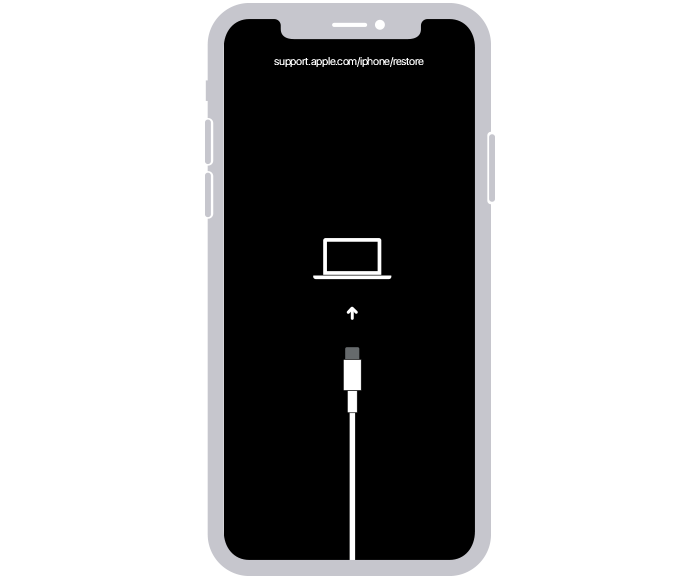
When you get the option to restore or update, choose Update.

Your computer will download the software for your device. If it takes more than 15 minutes, your device will exit recovery mode. Repeat steps 2-4.
If you need more help
Contact Apple Support to set up service.
If your iPhone won't turn on or is frozen
To turn off the critical Alerts follow these steps:
Launch the Settings app on your iPhone or iPad.
Tap Notifications.
Select the app from the list that you want to enable/disable Critical Alerts for. In your case look for the application Home in the list.
Toggle the Critical Alerts switch on/off.
Thank you for using Apple Support Communities.
Take care!




