AirPods (2nd generation) with Lightning Charging - Technical Specifications

Hello,


I have iPhone 7 (IOS 15.7) / AirPod Pro (2nd Generation). I paired them and able to use as an earphone with all functions on my iPhone 7 but I can not see them on Find My also can not see them on My devices.


AirPods Pro (2nd generation) - Technical Specifications in here it says it is compatible with iPhone 7.


I tried reset, forget device, restart iPhone procedures but nothing helped.

What might be the issue?


Thanks

iPhone 7

Posted on Oct 6, 2022 6:28 AM

Reply
Question marked as Top-ranking reply

Posted on Oct 8, 2022 10:55 AM


Just to clarify, since I can not update iPhone 7 to IOS 16 (latest allowed in iPhone 7 is IOS 15.7) I will not be able to use Find My app with AirPods Pro (2nd generation).


I think this should have been included in technical specifications here: AirPods Pro (2nd generation) - Technical Specifications

Specifications says iPhone7 is compatible but only Audio Sharing is not supported.


After all you saved me some time, going to an Apple Store to speak with a Genius...


Thanks


2 replies
Question marked as Top-ranking reply

Oct 8, 2022 10:55 AM in response to Grace2211


Just to clarify, since I can not update iPhone 7 to IOS 16 (latest allowed in iPhone 7 is IOS 15.7) I will not be able to use Find My app with AirPods Pro (2nd generation).


I think this should have been included in technical specifications here: AirPods Pro (2nd generation) - Technical Specifications

Specifications says iPhone7 is compatible but only Audio Sharing is not supported.


After all you saved me some time, going to an Apple Store to speak with a Genius...


Thanks


Oct 7, 2022 2:05 PM in response to bzl 44

Hello bzl 44,


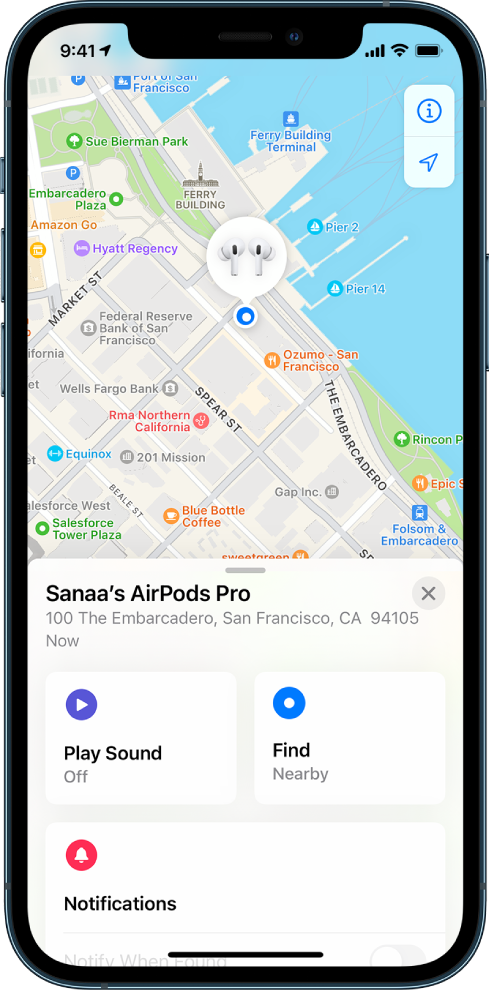
To clarify, are you using the Find My app? If so, please be mindful of the following details:


If your AirPods (all generations), AirPods Pro (1st generation), or AirPods Max are paired with your iPhone, iPad, iPod touch, Apple Watch, or Mac, you can use the Find My app to help you locate them if they’re lost.

To use the Find My app with AirPods Pro (2nd generation), you need an iPhone with iOS 16 or later.*

A screen from the Find My app on iPhone. The location of AirPods Pro is shown on a map of San Francisco, along with an address listed and the options Play Sound, Find, and Notifications.

More details here: AirPods User Guide - Locate AirPods in Find My


At this time, we suggest updating your iPhone 7 to the latest software version. Be sure to secure your data with a backup before proceeding: Update your iPhone or iPad


We hope this helps.

Take care!


This thread has been closed by the system or the community team. You may vote for any posts you find helpful, or search the Community for additional answers.

AirPods (2nd generation) with Lightning Charging - Technical Specifications

Welcome to Apple Support Community
A forum where Apple customers help each other with their products. Get started with your Apple Account.